Table of Contents
A LINQ query can look exactly the same after an EF Core upgrade while the SQL sent to the database changes underneath it. In EF Core 10, one important example is a query that uses Contains() with a collection of values.
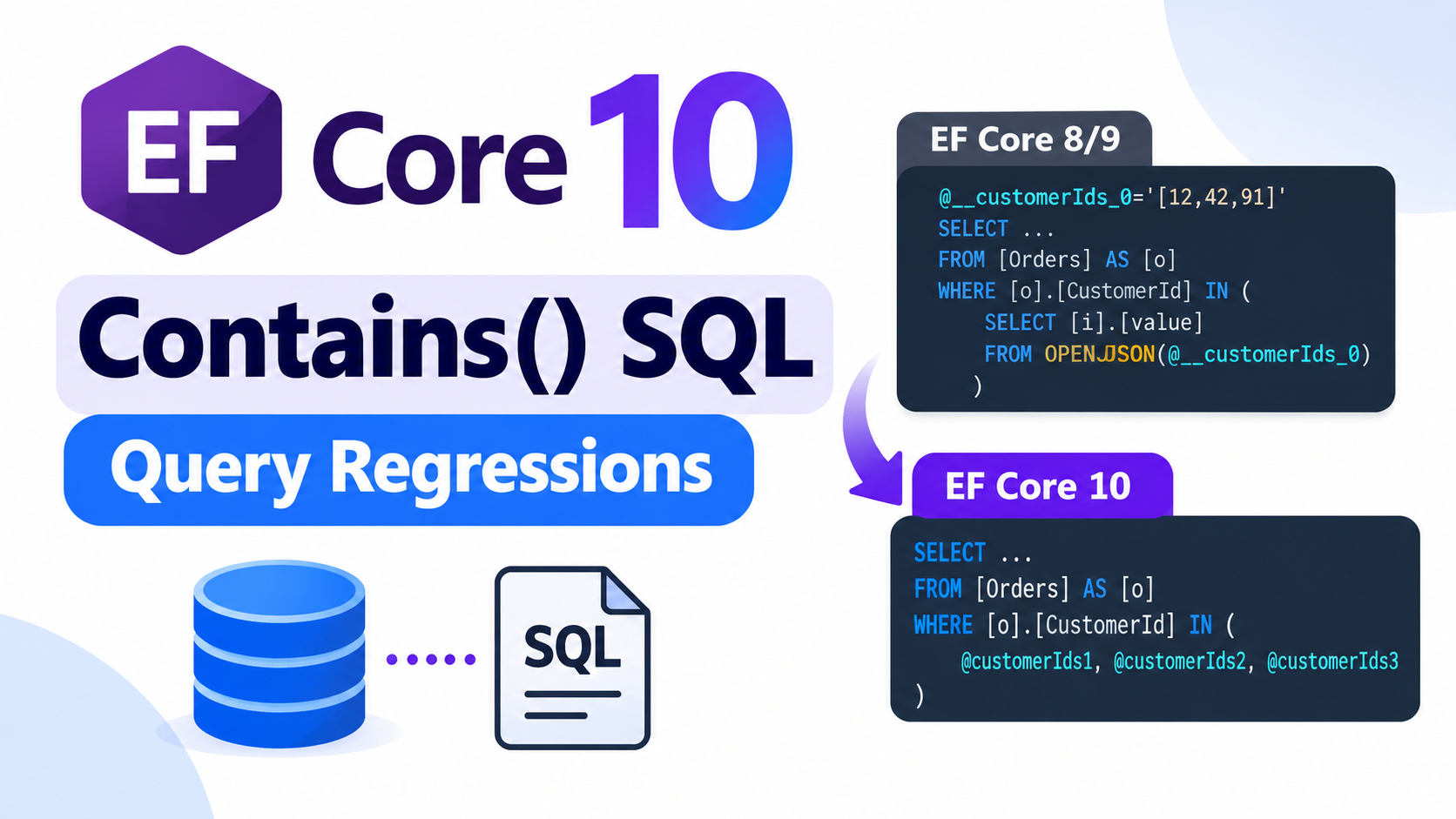
EF Core 8 and 9 usually sent that collection to SQL Server as a single JSON parameter and expanded it with OPENJSON. EF Core 10 changed the default. It now normally sends multiple scalar parameters instead.
For many applications, the new behavior is a good default. It gives the database more information about the size of the collection and can improve query planning. Microsoft also warns, however, that some workloads can see different performance after upgrading, especially when they previously benefited from the EF Core 8/9 translation.
That does not mean you should immediately change the EF Core 10 configuration. The useful question is narrower: did this SQL translation change make one of your real production queries worse?
This article shows how to answer that question and how to choose between the available translation modes without guessing.
The SQL examples use SQL Server. Other database providers can translate parameterized collections differently.
What Changed in EF Core 10?
Consider a common query:
int[] customerIds = [12, 42, 91];

var orders = await dbContext.Orders
    .Where(order => customerIds.Contains(order.CustomerId))
    .ToListAsync();
The LINQ itself is ordinary. The important part is that customerIds is a collection whose contents are only known when the query runs.
With EF Core 8 and 9, SQL Server commonly received one JSON parameter:
@__customerIds_0='[12,42,91]'

SELECT [o].[Id], [o].[CustomerId], [o].[Total]
FROM [Orders] AS [o]
WHERE [o].[CustomerId] IN (
    SELECT [i].[value]
    FROM OPENJSON(@__customerIds_0)
    WITH ([value] int '$') AS [i]
)
EF Core 10 now uses multiple scalar parameters by default:
SELECT [o].[Id], [o].[CustomerId], [o].[Total]
FROM [Orders] AS [o]
WHERE [o].[CustomerId] IN (
    @customerIds1,
    @customerIds2,
    @customerIds3
)
The change is deliberate. With separate parameters, the database can see how many values participate in the IN predicate. That cardinality information can help the optimizer choose a better execution plan.
EF Core also pads some parameter lists to reduce the number of different SQL shapes it generates. For example, a collection containing eight values may use ten parameters, with the final value repeated in the additional slots. This reduces unnecessary SQL variation while still exposing useful collection-size information to the database.
The new behavior is therefore not a regression by definition. It is a different trade-off, and Microsoft explicitly notes that different workloads can benefit from different translation strategies.
Why the Same LINQ Query Can Perform Differently
Your database does not execute LINQ. It executes the SQL that EF Core generates.
Changing this:
OPENJSON(@ids)into this:
IN (@ids1, @ids2, @ids3, ...)changes what the SQL optimizer sees.
The JSON approach gives SQL Server one stable parameterized SQL shape even when the number of IDs changes. That can be useful for plan reuse, but the optimizer has less direct information about the size of the collection.
The EF Core 10 approach makes the collection cardinality more visible while keeping the actual values parameterized. This can improve estimates and execution plans, but different SQL shapes can also behave differently depending on your indexes, data distribution, statistics and collection sizes.
This is why EF Core exposes multiple translation strategies rather than assuming that one approach is always best.
If an endpoint becomes slower after moving to EF Core 10, seeing Contains() in the LINQ is not enough evidence to blame this change. You still need to inspect the generated SQL and measure what the database is actually doing.
Find the Queries That Actually Matter
Do not begin by searching the entire repository for every use of Contains(). Start with queries that matter to the application.
A useful candidate is usually a database query that:
- runs frequently;
- sits behind an important endpoint or background job;
- filters using a collection supplied at runtime;
- receives collection sizes that vary significantly;
- or became slower after the EF Core 10 deployment.
You can inspect the SQL generated by EF Core with ToQueryString():
int[] customerIds = GetCustomerIds();

var query = dbContext.Orders
    .Where(order => customerIds.Contains(order.CustomerId));

var sql = query.ToQueryString();

Console.WriteLine(sql);

var orders = await query.ToListAsync();
ToQueryString() is useful for understanding the translation, but it is not a performance benchmark. It tells you what EF Core intends to send to the database; it does not tell you whether the resulting execution plan is good for your workload.
If possible, capture the generated SQL before and after the upgrade. If the application is already running EF Core 10, you can also force different translation modes for the same query and compare the generated SQL directly.
Use collection sizes taken from real application behavior. Testing three IDs tells you little if production requests usually contain hundreds. Testing only an artificial list with thousands of values can be equally misleading if that case rarely occurs.
A useful test set normally includes a small collection, a typical collection and a large but realistic collection.
Understand the Three Translation Modes
EF Core 10 provides three strategies through ParameterTranslationMode.
| Mode | Typical SQL shape | Main trade-off |
|---|---|---|
MultipleParameters | IN (@p1, @p2, @p3) | EF Core 10 default; exposes collection cardinality while keeping values parameterized |
Parameter | One collection parameter, such as JSON with OPENJSON on SQL Server | Similar to the EF Core 8/9 default; stable SQL shape with less direct cardinality information |
Constant | IN (12, 42, 91) | Gives the optimizer the actual values but produces different SQL as values change |
You can choose a strategy for an individual query.
Keep the EF Core 10 Default Explicitly
var orders = await dbContext.Orders
    .Where(order =>
        EF.MultipleParameters(customerIds)
            .Contains(order.CustomerId))
    .ToListAsync();
This is useful when you have changed the global default but want a particular query to continue using multiple scalar parameters.
Use the EF Core 8/9-Style Parameterized Collection
var orders = await dbContext.Orders
    .Where(order =>
        EF.Parameter(customerIds)
            .Contains(order.CustomerId))
    .ToListAsync();
On SQL Server, this can return to the single JSON parameter and OPENJSON style used by EF Core 8 and 9.
Inline the Collection Values
var orders = await dbContext.Orders
    .Where(order =>
        EF.Constant(customerIds)
            .Contains(order.CustomerId))
    .ToListAsync();
This can produce SQL similar to:
WHERE [o].[CustomerId] IN (12, 42, 91)Inlining constants gives the optimizer the actual values, but it also means different collections can produce different SQL text. That can increase query compilation and plan-cache activity.
For that reason, EF.Constant() should not become an automatic response to every slow Contains() query. It is another option to measure, not a universal performance fix.
Prefer a Per-Query Fix Before a Global Change
Suppose an application contains fifty parameterized-collection queries and only one becomes slower after the EF Core 10 upgrade.
Changing the translation strategy globally would also affect the other forty-nine queries, including queries that may already perform well with the new default.
A per-query override is usually safer:
var orders = await dbContext.Orders
    .Where(order =>
        EF.Parameter(customerIds)
            .Contains(order.CustomerId))
    .ToListAsync();
The intention is clear: this particular query should use a single collection parameter.
A global setting becomes more reasonable when measurements show that the application consistently benefits from another strategy. For example, you can configure SQL Server to use the EF Core 8/9-style parameter translation globally:
builder.Services.AddDbContext<AppDbContext>(options =>
{
    options.UseSqlServer(
        connectionString,
        sqlOptions =>
        {
            sqlOptions.UseParameterizedCollectionMode(
                ParameterTranslationMode.Parameter);
        });
});
You can also configure ParameterTranslationMode.MultipleParameters or ParameterTranslationMode.Constant.
The safest order is simple:
- Find the regression.
- Confirm which query changed.
- Compare the available translation strategies.
- Fix the smallest possible scope.
- Change the global behavior only when broader workload evidence supports it.
Restoring the old EF Core behavior everywhere just because one query became slower can easily replace one performance problem with another.
Measure the Database, Not Just the C# Code
Once you have identified a candidate query, compare it using production-like data.
For SQL Server, Query Store is especially useful because it keeps query text, execution plans and runtime statistics. This makes it much easier to investigate whether a query plan changed after an application or EF Core upgrade.
For each translation strategy, examine information such as:
- execution duration;
- CPU usage;
- logical reads;
- actual versus estimated row counts;
- selected indexes;
- join strategies;
- and whether the plan changes for different collection sizes.
Do not judge a strategy from one execution. The first run can include compilation work that later calls do not. Run enough representative requests to distinguish a temporary compilation cost from steady-state query performance.
Keep other variables stable as well. If you upgrade EF Core while changing indexes, database statistics, compatibility level and infrastructure at the same time, it becomes much harder to identify what caused the performance difference.
Actual execution plans are particularly useful when you suspect poor cardinality estimates. They let you compare the optimizer’s estimate with the number of rows that were really processed.
The question you are trying to answer is not which translation mode looks best in generated SQL. It is:
Which translation gives this query acceptable and predictable behavior with the collection sizes our application actually sends?
Do Not Confuse This With the EF Core 10 Plan-Cache Recompile Change
EF Core 10 also simplified generated SQL parameter names.
For example, older EF Core versions could generate a parameter such as:
@__city_0EF Core 10 can generate the simpler:
@cityThis is mostly a readability improvement, but parameter names are part of the SQL text. Microsoft notes that upgrading can therefore cause many existing cached query plans to be recompiled. Large systems may see a temporary compilation spike after deployment while those plans are rebuilt.
That is different from the parameterized-collection behavior discussed in this article.
A short performance spike immediately after deployment may be caused by query plans being rebuilt. A persistent slowdown on a specific Contains() query after the system has settled is a better candidate for investigating the collection translation strategy.
Keeping these two changes separate can save a lot of unnecessary debugging.
Roll Out the Change Carefully
When measurements show that another translation strategy performs better for a specific query, keep the change easy to understand and easy to reverse.
For example:
var orders = await dbContext.Orders
    // EF Core 10 MultipleParameters produced a worse plan for this
    // workload. Keep the single collection parameter until the query
    // is re-evaluated after future EF Core or database upgrades.
    .Where(order =>
        EF.Parameter(customerIds)
            .Contains(order.CustomerId))
    .ToListAsync();
Avoid comments that claim one translation mode is universally faster. The decision applies to the workload you measured.
After deployment, monitor the same query again through Query Store or your normal database monitoring. Confirm that the change solves the original problem without creating a new one for other collection sizes.
For particularly important queries, keep a regression test or performance check around the behavior. EF Core, database providers and SQL Server continue to evolve, so a useful workaround today should not become permanent architecture without being reviewed again later.
EF Core 10 Contains() Upgrade Checklist
When upgrading an application to EF Core 10, use this process for important parameterized-collection queries:
- Identify important database queries that use runtime collections with
Contains(). - Inspect the SQL generated before and after the upgrade.
- Prioritize high-frequency and latency-sensitive queries.
- Test realistic small, typical and large collection sizes.
- Measure actual database behavior rather than relying only on
ToQueryString(). - Keep
MultipleParameterswhen the EF Core 10 default performs well. - Try
EF.Parameter()when evidence shows that the previous single-parameter strategy works better for a particular query. - Use
EF.Constant()only when measurements justify the additional SQL and plan variability. - Prefer a per-query override before changing the whole
DbContext. - Recheck the query after deployment with Query Store or equivalent production monitoring.
If this query review is part of a wider framework upgrade, see our .NET 8/9 to .NET 10 production migration checklist for runtime, package, CI, container, deployment, and rollback checks.
The EF Core 10 change is a good example of why a framework upgrade should include SQL verification for important queries. Your LINQ can remain unchanged while the database receives materially different SQL.
The right response is not to restore the old behavior automatically. Keep the new default when it works, measure the queries that matter, and override the translation only when your database gives you evidence that another strategy is better.
References
Microsoft Learn — Breaking changes in EF Core 10
EF Core 10 breaking changes
Microsoft Learn — What’s New in EF Core 10: Improved translation for parameterized collections
What’s New in EF Core 10
Microsoft Learn — ParameterTranslationMode
ParameterTranslationMode API
Microsoft Learn — UseParameterizedCollectionMode
UseParameterizedCollectionMode API
Microsoft Learn — Monitor performance by using Query Store
SQL Server Query Store documentation
Microsoft Learn — Compare execution plans
Compare SQL Server execution plans
Enjoy This Blog?


Discover more from Dot Net Coder
Subscribe to get the latest posts sent to your email.