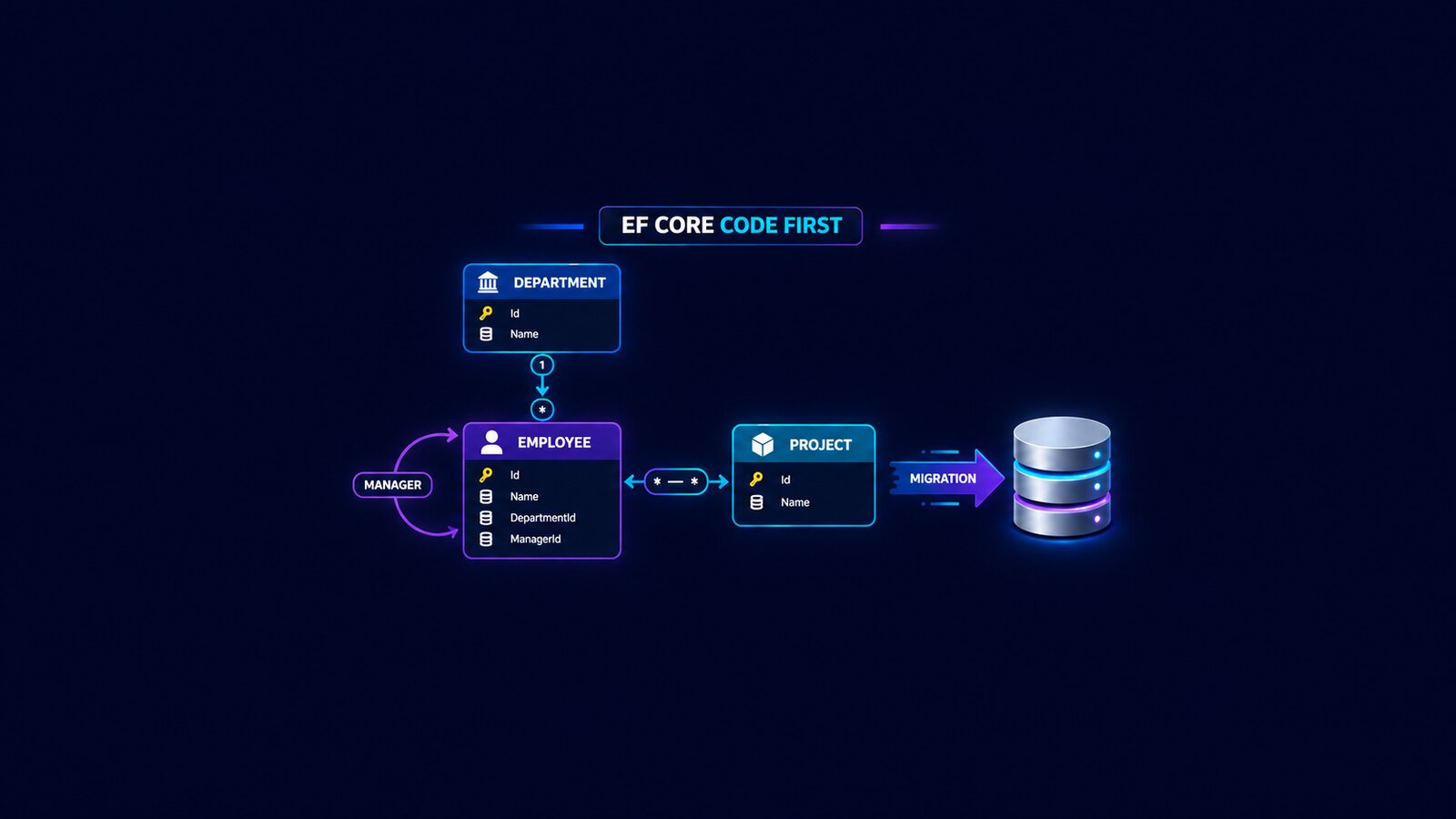
Entity Framework Code First lets a .NET application describe its database model in C# and evolve the schema through migrations. This guide rebuilds the original .NET 8 Staff sample step by step: three entities, a DbContext, one-to-many and many-to-many relationships, a self-referencing manager relationship, and the migration that creates the SQL Server database.
The sample code and screenshots were verified when the original article was published in September 2024. This refresh preserves that implementation and its GitHub repository, while adding clearer explanations, verification steps, and production migration guidance. It does not claim that the historical project was rebuilt against a newer framework.
Table of Contents
What Entity Framework Code First Owns
EF Core is Microsoft’s cross-platform object-relational mapper for .NET. In a Code First workflow, C# entity classes and mapping configuration are the source model. EF Core compares that model with its last model snapshot and generates migration operations that create or change the database schema.
That does not mean the database is safely updated whenever the application starts. Code First gives the team a repeatable schema definition; migrations remain deployment artifacts that should be reviewed and controlled. This distinction is easy to miss in a local demo and important in production.

Create the .NET 8 Data Project
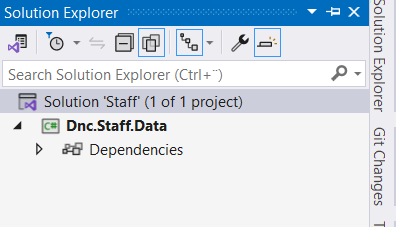
The original solution uses Visual Studio 2022, a .NET 8 class library named Dnc.Staff.Data, and SQL Server LocalDB. LocalDB is appropriate for this development walkthrough; replace the connection strategy for a deployed environment.
Install the EF Core command-line tool and the SQL Server and design packages from a terminal in the project:
dotnet tool install --global dotnet-ef
dotnet add package Microsoft.EntityFrameworkCore.SqlServer
dotnet add package Microsoft.EntityFrameworkCore.Design
For a historical sample, keep package versions compatible with its target framework. In a maintained application, pin package versions centrally and review upgrades deliberately.
Define the Staff Domain Model
The sample starts with Department, Employee, and Project. At this stage they contain scalar properties; relationship navigations are added in the following sections.
namespace Dnc.Staff.Data.Models.Entities
{
    public class Department
    {
        public int Id { get; set; }
        public string Name { get; set; }
        public string Location { get; set; }
    }
}
namespace Dnc.Staff.Data.Models.Entities
{
public class Employee
{
public int Id { get; set; }
public string Name { get; set; }
public string Job { get; set; }
public DateTime HireDate { get; set; }
public decimal Salary { get; set; }
}
}namespace Dnc.Staff.Data.Models.Entities
{
public class Project
{
public int Id { get; set; }
public DateOnly StartDate { get; set; }
public DateOnly EndDate { get; set; }
}
}Create the DbContext and Design-Time Factory
StaffDbContext exposes each aggregate through a DbSet. EF tooling also needs a reliable way to create the context when it generates migrations. Because this is a class library rather than a complete host, the original project uses IDesignTimeDbContextFactory<StaffDbContext>.
public class StaffDbContext : DbContext
{
    public DbSet<Employee> Employees => Set<Employee>();
    public DbSet<Department> Departments => Set<Department>();
    public DbSet<Project> Projects => Set<Project>();

    public StaffDbContext(DbContextOptions<StaffDbContext> options)
        : base(options)
    {
    }

    protected override void OnModelCreating(ModelBuilder modelBuilder)
    {
        // Shape your entities using the Fluent API.
    }
}
public class StaffDbContextFactory : IDesignTimeDbContextFactory<StaffDbContext>
{
public StaffDbContext CreateDbContext(string[] args)
{
var optionsBuilder = new DbContextOptionsBuilder<StaffDbContext>();
var connectionString = @"Server=(localdb)\MSSQLLocalDB;Database=Dnc-Staff-Database;Trusted_Connection=True;MultipleActiveResultSets=true";
optionsBuilder.UseSqlServer(connectionString);
Console.WriteLine(connectionString);
return new StaffDbContext(optionsBuilder.Options);
}
}The literal LocalDB connection string is part of the original development sample. Do not commit production credentials. A deployed application should obtain its runtime connection string from protected configuration, and its migration process should use a separately controlled deployment identity.
Configure the One-to-Many Relationship
One department can contain many employees, while each employee belongs to one department. Add an employee collection to Department, then add the reference navigation and foreign key to Employee:
// Department
public IEnumerable<Employee> Employees { get; set; }

// Employee
public Department Department { get; set; }
public int DepartmentId { get; set; }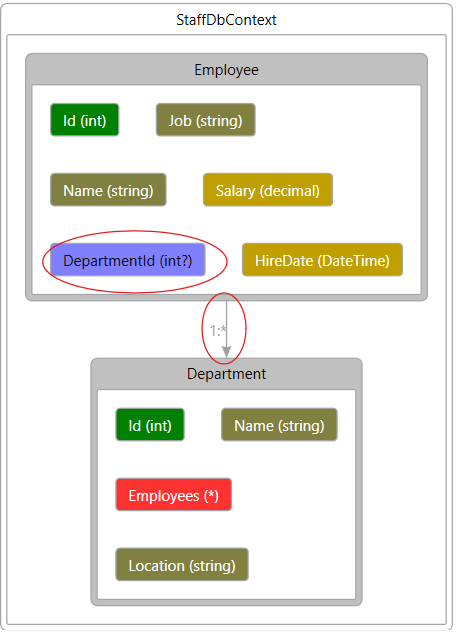
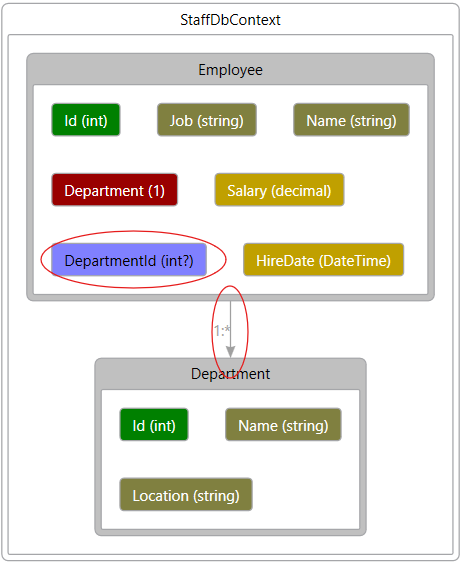
EF Core conventions can discover this shape, but explicit configuration documents the intended cardinality and required foreign key:
modelBuilder.Entity<Department>(e =>
{
    e.ToTable("Departments");
    e.HasKey(i => i.Id);
    e.HasMany(i => i.Employees)
        .WithOne(i => i.Department)
        .HasForeignKey(i => i.DepartmentId)
        .IsRequired(true);
});
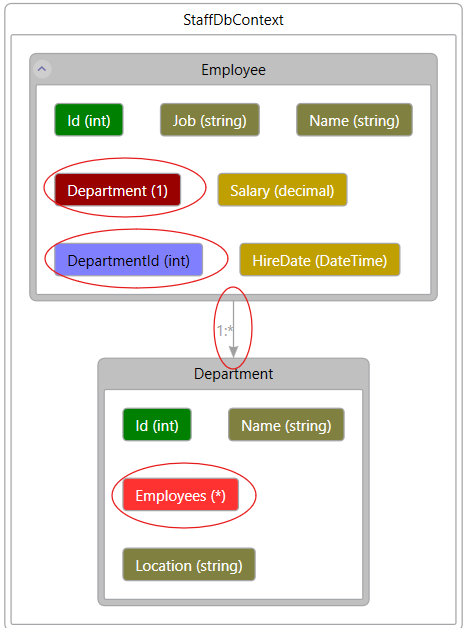
Move Mapping Rules into Configuration Classes
A large OnModelCreating method quickly becomes hard to review. The sample separates each entity’s mapping into an IEntityTypeConfiguration<TEntity> implementation.
public class DepartmentConfiguration : IEntityTypeConfiguration<Department>
{
    public void Configure(EntityTypeBuilder<Department> builder)
    {
        builder.ToTable("Departments", "dbo");
        builder.HasKey(e => e.Id);
        builder.HasMany(e => e.Employees)
            .WithOne(e => e.Department)
            .HasForeignKey(e => e.DepartmentId)
            .OnDelete(DeleteBehavior.ClientSetNull);
    }
}
public class EmployeeConfiguration : IEntityTypeConfiguration<Employee>
{
public void Configure(EntityTypeBuilder<Employee> builder)
{
builder.ToTable("Employees", "dbo");
builder.HasKey(e => e.Id);
builder.Property(e => e.Salary)
.HasColumnType("decimal")
.HasPrecision(18, 2);
}
}The original project invokes these configurations from OnModelCreating and associates them with the entity types. Keep one clear registration strategy so future developers can find every mapping rule. Also review delete behavior carefully: a required foreign key and ClientSetNull can conflict with the business expectation if a department is deleted while employees still reference it.
Configure the Many-to-Many Relationship
An employee can work on many projects and a project can contain many employees. EF Core can create a join table from two collection navigations. This sample makes the join type explicit so the two foreign keys are visible in the model:
public class EmployeeProject
{
    public int EmployeeId { get; set; }
    public int ProjectId { get; set; }
}
builder.HasMany(e => e.Employees)
.WithMany(e => e.Projects)
.UsingEntity<EmployeeProject>(
left => left.HasOne<Employee>()
.WithMany()
.HasForeignKey(e => e.EmployeeId),
right => right.HasOne<Project>()
.WithMany()
.HasForeignKey(e => e.ProjectId));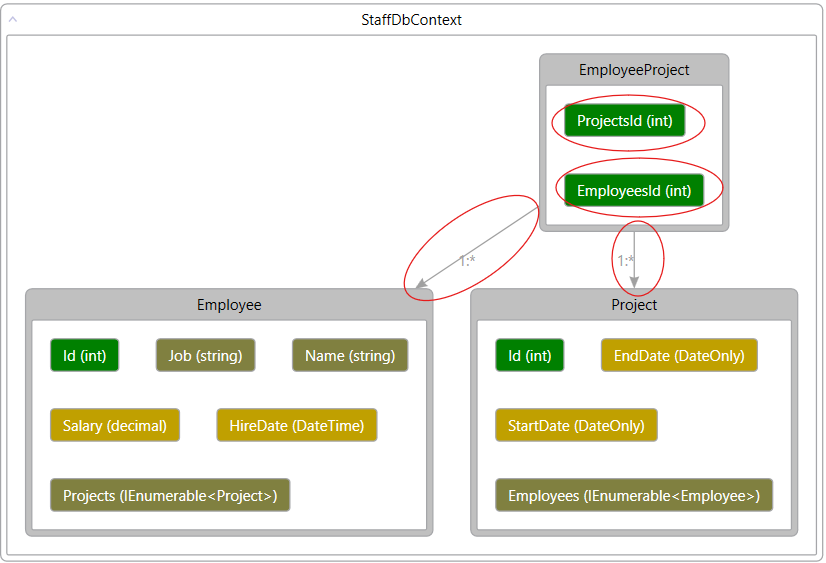
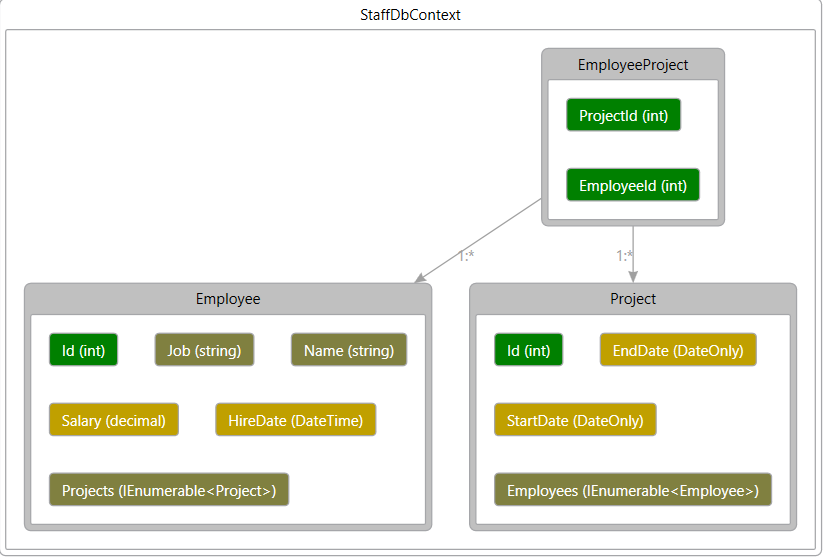
An explicit join entity becomes especially useful when the relationship later needs data such as assignment date, role, or allocation. Add those properties to EmployeeProject instead of hiding them in an implicit join table.
Model the Self-Referencing Manager Relationship
The employee hierarchy is another one-to-many relationship, but both ends use the same table. The manager reference is optional because the top employee in a hierarchy may not have a manager:
// Employee
public Employee Manager { get; set; }
public int? ManagerId { get; set; }

// EmployeeConfiguration
builder.HasOne(e => e.Manager)
    .WithMany()
    .HasForeignKey(e => e.ManagerId)
    .IsRequired(false);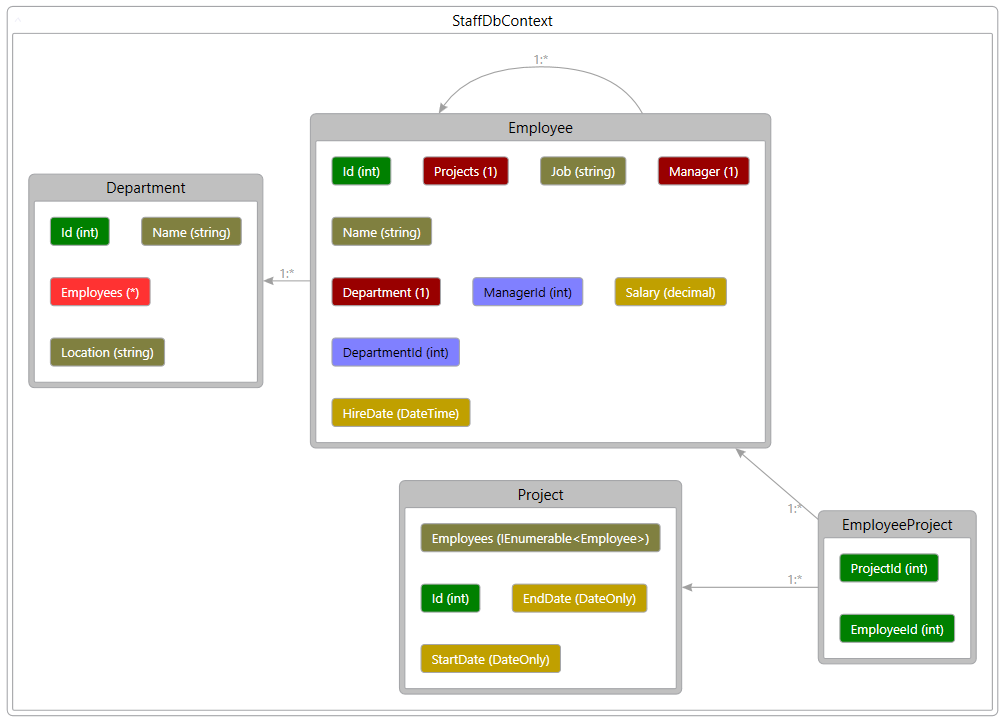
Before accepting this mapping in a real organization, decide what should happen when a manager is removed. Restricting deletion or clearing the optional manager reference is usually safer than cascading through an employee hierarchy.
Create and Verify the Migration
Create the initial migration from the project directory. The context option is valuable when a solution contains more than one DbContext:
dotnet ef migrations add Initial -o Migrations -c Dnc.Staff.Data.StaffDbContext
Review the generated Up and Down methods before applying anything. Confirm table and column names, nullability, decimal precision, foreign keys, indexes, and delete behaviors. Then apply the reviewed migration to the local development database:
dotnet ef database update -c Dnc.Staff.Data.StaffDbContext
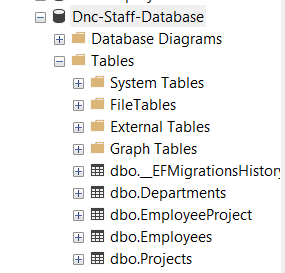
Verify the result in SQL Server Object Explorer. The expected schema includes Departments, Employees, Projects, the employee-project join table, and __EFMigrationsHistory. Check the actual foreign keys rather than treating a successful command as sufficient proof.
Apply Migrations Safely in Production
dotnet ef database update is convenient for local development and testing. Microsoft does not recommend treating it as the default production deployment mechanism. The command requires the SDK and project source, applies operations immediately, and gives an operator less opportunity to inspect or coordinate changes.
- Generate an idempotent SQL script or a migration bundle in the build pipeline.
- Review the exact SQL and estimated locking impact before deployment.
- Back up important data and test the migration against a production-like copy.
- Use a least-privilege deployment identity; the running application should not need schema-owner permissions.
- Plan expand-and-contract changes when old and new application versions may overlap.
- Monitor duration, blocking, errors, and application health, with a tested recovery plan.
Also remember that a DbContext instance is not thread-safe. Await each asynchronous EF operation before using the same context again, or use separate contexts for parallel work.
Current Compatibility Status
This implementation targets .NET 8 and SQL Server LocalDB. .NET 8 remains supported until November 10, 2026, but support status alone does not prove that a historical repository builds with today’s latest EF Core packages. Use the repository’s original target and package versions to reproduce the demo, then plan a separate, tested upgrade if the code will become a maintained application. If that upgrade includes EF Core 10, review how Contains() translation can change generated SQL and expose query regressions before production deployment.
Conclusion
The Entity Framework Code First workflow is strongest when the model, mapping configuration, migration files, and deployment process are all reviewed as code. The original Staff sample demonstrates the essential mechanics in .NET 8: define entities, make relationships explicit, create a design-time context, generate a migration, and verify the resulting schema.
Download the preserved implementation from the Entity Framework Code First sample repository. Treat the LocalDB commands as a development path, and use reviewed scripts or migration bundles for controlled production rollout.
Official References
- DbContext configuration and lifetime
- One-to-many relationships in EF Core
- Many-to-many relationships in EF Core
- Managing database schemas with migrations
- Applying migrations in production
- Official .NET support policy
Found this useful? Support more practical developer content.