Binary file responses need an OpenAPI description that agrees with the bytes your endpoint sends. In an ASP.NET Core 11 RC1 application, declare the file-result type and media type, then check the generated document alongside a real HTTP download. A successful download alone can leave incorrect metadata undetected; a correct schema alone cannot prove the file contents.
Table of Contents
Describe binary file responses explicitly
For the built-in OpenAPI generator, the executed proof uses these registrations and endpoint mappings:
builder.Services.AddControllers();
// Pin the document dialect so this proof checks string/binary consistently.
builder.Services.AddOpenApi(options => options.OpenApiVersion = OpenApiSpecVersion.OpenApi3_0);
var app = builder.Build();
app.UseDefaultFiles();
app.UseStaticFiles();
app.MapOpenApi();
app.MapControllers();
app.MapGet("/files/content", () => TypedResults.File(Payload.Bytes(), Payload.MediaType, Payload.FileName))
    .Produces<FileContentHttpResult>(StatusCodes.Status200OK, Payload.MediaType);
app.MapGet("/files/stream", () => TypedResults.File(new MemoryStream(Payload.Bytes()),
        Payload.MediaType, Payload.FileName, enableRangeProcessing: true))
    .Produces<FileStreamHttpResult>(StatusCodes.Status200OK, Payload.MediaType);
Here, builder is a WebApplication.CreateBuilder instance. AddControllers and MapControllers enable the controller examples below, while MapOpenApi serves the generated document at /openapi/v1.json. The two Minimal API routes declare their actual file-result types and the same media type they return. These are extracts from the complete local proof, whose host binds to loopback and supplies the runner.
The document version is set deliberately. This experiment generates OpenAPI 3.0.4, where the checked schema is type: string with format: binary. Do not turn that assertion into a universal rule for every OpenAPI dialect. ASP.NET Core supports newer document versions, but this run does not test them.
The fixture supplies a deterministic payload:
static class Payload
{
    public const string MediaType = "application/octet-stream";
    public const string FileName = "dnc-proof.bin";
    public static byte[] Bytes() => [0, 1, 2, 3, 127, 128, 254, 255, 68, 78, 67, 10];
    public static string Hash(byte[] bytes) => Convert.ToHexString(SHA256.HashData(bytes)).ToLowerInvariant();
}
The bytes include zero, values above 127, and a newline. That makes this a binary-content comparison rather than a text comparison that might conceal encoding changes. Hash records a compact fingerprint, while the actual assertion compares the complete byte arrays.
Microsoft’s ASP.NET Core 11 release notes document support for file-result schemas. Our reproduction checks four concrete result types on RC1 and makes the behavior observable through schema and HTTP assertions.
Cover Minimal APIs and controllers
Controller actions in the same proof declare their response types explicitly:
[ApiController]
public sealed class FilesController : ControllerBase
{
    [HttpGet("/files/mvc-content")]
    [ProducesResponseType<FileContentResult>(StatusCodes.Status200OK, Payload.MediaType)]
    public IActionResult ContentFile() => File(Payload.Bytes(), Payload.MediaType, Payload.FileName);

    [HttpGet("/files/mvc-stream")]
    [ProducesResponseType<FileStreamResult>(StatusCodes.Status200OK, Payload.MediaType)]
    public IActionResult StreamFile() => File(new MemoryStream(Payload.Bytes()), Payload.MediaType,
        Payload.FileName, enableRangeProcessing: true);
}
IActionResult alone does not identify which file result the action will return to the documentation generator. These attributes provide that declared contract. The first action returns a byte-array result; the second supplies a fresh stream for each request and enables range processing. The full project also imports the MVC and HTTP-results namespaces used by the preceding examples.
| Route | Declared response type | Actual response checked |
|---|---|---|
/files/content | FileContentHttpResult | Complete 12-byte download |
/files/stream | FileStreamHttpResult | Complete download and one byte-range request |
/files/mvc-content | FileContentResult | Complete 12-byte download |
/files/mvc-stream | FileStreamResult | Complete 12-byte download |
All four advertise application/octet-stream and return the filename dnc-proof.bin. For an actual PDF or another known file format, use the appropriate media type in both the returned result and its metadata. Do not label a JSON metadata object as the downloaded file: those are different response contracts.
The proof intentionally creates a new MemoryStream for each call. It does not share a stream across requests. When replacing it with a service-backed stream, settle ownership and lifetime explicitly; the site’s ASP.NET Core dependency injection guide provides background on service lifetimes. Also avoid disposing a stream before the framework has sent it.
Compare the generated schema with HTTP bytes
The runner fetches /openapi/v1.json from the running application and reads the 200 response for each route. It checks the declared media type and resolves the schema before evaluating its shape:
var media = root.GetProperty("paths").GetProperty(path).GetProperty("get")
                    .GetProperty("responses").GetProperty("200").GetProperty("content");
                var schema = Resolve(root, media.GetProperty(Payload.MediaType).GetProperty("schema"));
                var isBinary = schema.TryGetProperty("type", out var type) && type.GetString() == "string"
                    && schema.TryGetProperty("format", out var format) && format.GetString() == "binary";
                report.Check(path + ": response schema resolves to string/binary", isBinary,
                    JsonSerializer.Deserialize<object>(schema.GetRawText()));
This extract runs inside the four-route loop; root is the parsed document and path is the current route. Resolve is the project’s helper for following local $ref pointers, including JSON Pointer escaping, with a bounded reference count. Without that step, an assertion may reject a valid referenced schema or inspect the reference wrapper instead of the actual schema. report.Check records the result without changing the document.
After resolving a tested response, the relevant schema is:
{
  "type": "string",
  "format": "binary"
}
This is an OpenAPI representation of unencoded binary content. It does not mean the HTTP response is a JSON string or a Base64 string. The OpenAPI 3.0.4 specification distinguishes binary content from the byte format used for encoded data.
The runner then calls the endpoint rather than trusting its description:
using var response = await client.GetAsync(path);
                var bytes = await response.Content.ReadAsByteArrayAsync();
                var name = response.Content.Headers.ContentDisposition?.FileNameStar
                    ?? response.Content.Headers.ContentDisposition?.FileName?.Trim('"');
                var observation = new
                {
                    path, status = (int)response.StatusCode,
                    contentType = response.Content.Headers.ContentType?.MediaType,
                    fileName = name, length = bytes.Length, sha256 = Payload.Hash(bytes)
                };
                report.Check(path + ": HTTP status, media type, filename and exact bytes match the contract",
                    response.StatusCode == HttpStatusCode.OK
                    && response.Content.Headers.ContentType?.MediaType == Payload.MediaType
                    && name == Payload.FileName && bytes.SequenceEqual(Payload.Bytes()), observation);
The same check requires HTTP 200, the expected media type, the download filename, and byte-for-byte equality. The filename lookup handles both filename* and the plain filename parameter. Recording a length or status without comparing content would permit a wrong file of the same size to pass.
The expected full-file SHA-256 in this fixture is db6a895b5e93ef6c40767e5136f6b1e74e1d25e87c1c7e52861885176358b828. That value identifies this 12-byte test payload; it is not an expected checksum for an application’s own exports.
Prove that misleading metadata is detectable
The fifth route is deliberately wrong:
app.MapGet("/files/wrong-metadata", IResult () => Results.File(Payload.Bytes(), Payload.MediaType, Payload.FileName))
    .Produces<DownloadMetadata>(StatusCodes.Status200OK, "application/json");
Its handler sends the same binary file, but the declared DownloadMetadata response advertises a JSON object. DownloadMetadata is the fixture record sealed record DownloadMetadata(string FileName, long Length);. Returning a file does not make that false declaration true. Keep this route in the test fixture as a negative control, then remove the inaccurate declaration from your real endpoint.
The runner confirms that the generated 200 description contains an object under application/json and no application/octet-stream entry. A second check confirms that the actual body is still the expected binary payload with application/octet-stream. Both checks pass because they observe the intended disagreement; the route’s documentation itself is not correct.
That control protects against a test suite that merely downloads a file and reports success. If your application has endpoint conventions or document transformers, run the contract assertions after those transformations have been applied. Read the document your clients actually consume, rather than a separately maintained sample JSON file.
Check the range response separately
The streaming Minimal API route receives an additional request:
using var rangeRequest = new HttpRequestMessage(HttpMethod.Get, "/files/stream");
            rangeRequest.Headers.Range = new RangeHeaderValue(2, 6);
            using var range = await client.SendAsync(rangeRequest);
            var rangeBytes = await range.Content.ReadAsByteArrayAsync();
            report.Check("The streaming HTTP endpoint honors bytes 2-6 with HTTP 206",
                range.StatusCode == HttpStatusCode.PartialContent
                && rangeBytes.SequenceEqual(Payload.Bytes()[2..7])
                && range.Content.Headers.ContentRange?.From == 2
                && range.Content.Headers.ContentRange?.To == 6,
                new { status = (int)range.StatusCode, contentRange = range.Content.Headers.ContentRange?.ToString(), sha256 = Payload.Hash(rangeBytes) });
The requested interval is inclusive: bytes 2 through 6 produce five bytes. The observed response is HTTP 206 with Content-Range: bytes 2-6/12; its bytes match the corresponding slice of the fixture. This test uses a seekable in-memory stream. It establishes that one tested range succeeds, not that every storage backend or range combination behaves identically.
The generated metadata inspected earlier describes HTTP 200. This proof does not assert that a 206 response or its headers appear in the OpenAPI document. If partial downloads are part of your public API contract, describe the relevant status and headers and add document assertions for them. An observed runtime response and a documented response are separate things to verify.
Before relying on range support for a real export, add tests for unsatisfiable ranges, validators and conditional requests, the exact storage stream you use, and interruptions during a download. Those paths were not executed here. A freshly allocated MemoryStream also provides no evidence about large-file memory use or throughput.
Run the pinned proof and interpret its results
The Windows run on 3 October 2026 used SDK 11.0.100-rc.1.26425.128 and ASP.NET Core 11.0.0-rc.1.26425.128. The project targets net11.0, pins Microsoft.AspNetCore.OpenApi to 11.0.0-rc.1.26425.128, and pins Microsoft.OpenApi to 3.10.0, with a package lock file. Treat these as the reproduction’s versions, rather than silently replacing them with a newer dependency set.
In the extracted proof directory, start the browser demonstration:
Get-ChildItem -Recurse -Filter *.ps1 | Unblock-File
powershell -NoProfile -ExecutionPolicy Bypass -File .\Start-Demo.ps1
Open http://127.0.0.1:5129, select Run verification, and download the JSON receipt. The application provides links to the real generated document and the binary download. An initial page is not a completed test: the expected result is PASS · 12/12 checks. Stop the local host with Ctrl+C when finished.
For a run without the browser, use:
powershell -NoProfile -ExecutionPolicy Bypass -File .\Verify-Demo.ps1The script checks the SDK, restores locked packages, builds the application and runs verification. This proof needs NuGet access for its pinned packages on first setup; it needs no Azure account, database or Docker installation. Keep the scripts with the supplied project rather than running these commands in an unrelated application.
| Check group | Successful checks | Observed evidence |
|---|---|---|
| Document dialect | 1 | Generated version is 3.0.4 |
| Four file-result schemas | 4 | Each resolves to string/binary under the expected media type |
| Four HTTP downloads | 4 | Status, filename, media type and exact bytes match |
| Deliberately incorrect metadata | 2 | Document describes JSON; actual response carries binary bytes |
| One streaming range | 1 | HTTP 206 and the requested five-byte slice |
The browser capture records a successful run of the same source:
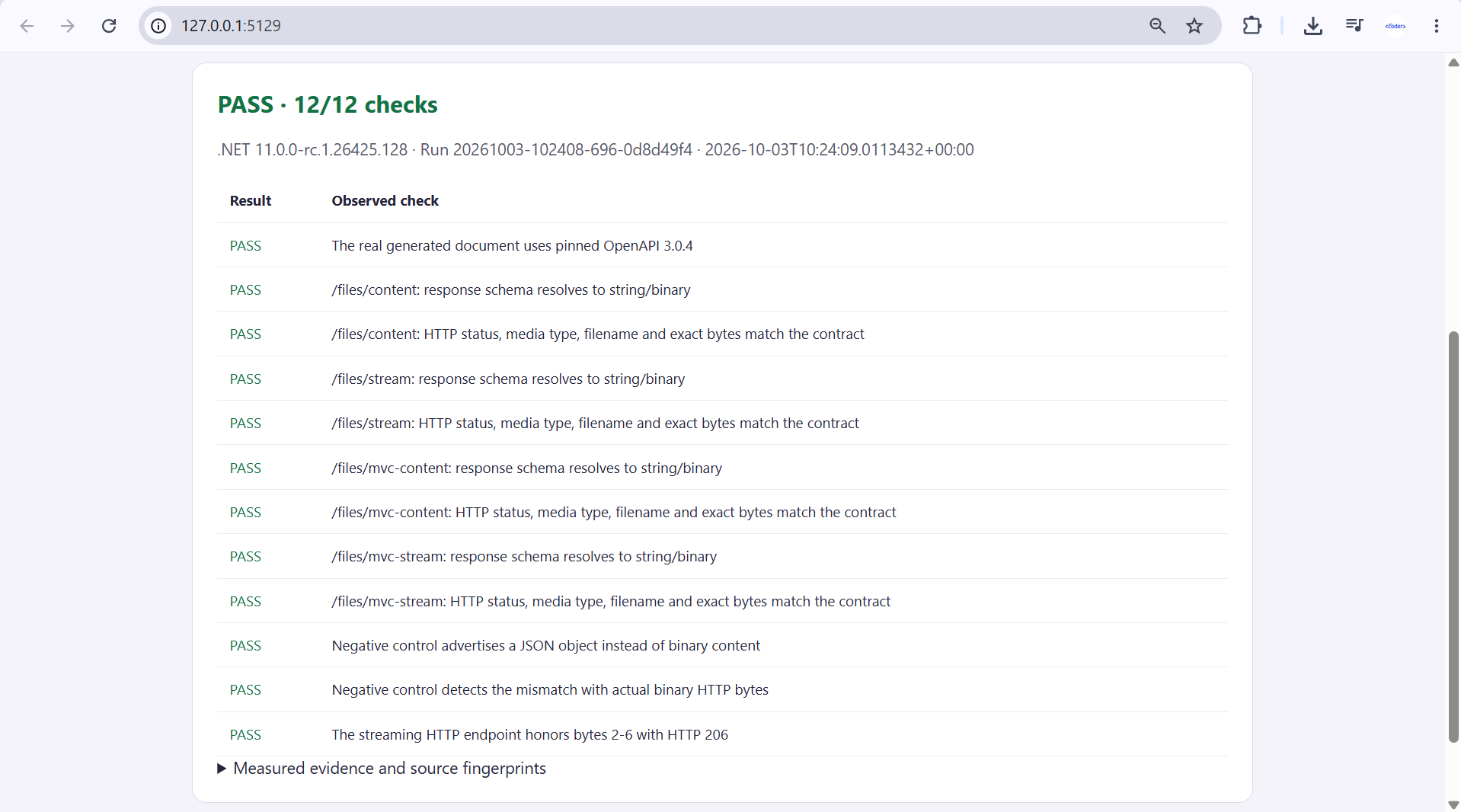
The screenshot run identifier differs from the uploaded JSON receipt. They document two successful executions, not one combined execution. The receipt’s five application-source fingerprints match the supplied project files, including the package lock and browser page. Preserve the receipt with the code so a later green result can be tied to the exact application tested.
Carry the contract checks into your application
Start with the intended client contract: status codes, media types, filenames where relevant, and a known body. Make the file-result metadata agree with that contract, then check both the generated description and the real endpoint in your application’s integration suite. A tiny deterministic payload is useful for correctness; measure performance separately with realistic files.
This proof exercises the built-in generator in Microsoft.AspNetCore.OpenApi. It does not compare .NET 10 with .NET 11, test Swashbuckle or NSwag document generation, or generate a third-party client SDK. If a generated client is your acceptance criterion, pin the client generator and test its download operation against the real response before claiming compatibility.
Keep the loopback proof host and its verification controls local. For a real service, protect downloads with the appropriate authorization and avoid using caller-controlled filesystem paths directly. Decide whether exposing the generated document is appropriate for the deployment. These are application integration requirements, not security properties established by the local fixture.
When upgrading beyond RC1, keep a known-good application build and generated document for comparison. Rerun the same content and schema assertions with the new packages before promoting the change. A revised schema reference name can be harmless when the resolved contract remains correct; a changed media type or lost binary description warrants investigation. The useful acceptance signal is agreement between the declared contract and the returned file, with each claim supported by an observable check.
References
Demo source code: View the complete runnable example on GitHub.
Found this useful? Support more practical developer content.