Angular route resources reload lets a page refresh its route-bound data without navigating to the same URL again. In Angular 22.2, define a resource for /user/:id, bind its resolved value to the component, and call reload() when the reader needs fresh data. The small example below uses an in-memory revision counter so the result can be checked without a server.
Table of Contents
Configure the route resource
Enable router resources and component input binding when you configure the standalone application:
import { ApplicationConfig } from '@angular/core';
import {
  provideRouter,
  withComponentInputBinding,
  withRouterResources,
} from '@angular/router';
import { routes } from './app.routes';

export const appConfig: ApplicationConfig = {
  providers: [
    provideRouter(routes, withComponentInputBinding(), withRouterResources()),
  ],
};
The route then creates a resource keyed by user. Its params function reads only the route ID, and the loader passes that ID to the service. The default resource is blocking: the router waits for its value before activating the component, then binds that value to the matching required input.
import { inject, resource } from '@angular/core';
import { Routes } from '@angular/router';
import { UserPage } from './user-page';
import { UserService } from './user.service';

export const routes: Routes = [
  { path: '', redirectTo: 'user/42', pathMatch: 'full' },
  {
    path: 'user/:id',
    component: UserPage,
    resources: (context) => {
      const users = inject(UserService);
      return {
        user: resource({
          params: () => context.params()['id'],
          loader: ({ params: id }) => users.load(id),
        }),
      };
    },
  },
];
Load a visible revision
The demo service returns a synthetic user and increments a local counter for each completed load. Its 400 ms delay makes the reload visible; it does not call an HTTP API or measure network behavior.
import { Injectable } from '@angular/core';

export interface UserSnapshot {
  id: string;
  name: string;
  revision: number;
}

@Injectable({ providedIn: 'root' })
export class UserService {
  private revision = 0;

  async load(id: string): Promise<UserSnapshot> {
    await new Promise<void>((resolve) => setTimeout(resolve, 400));
    return { id, name: 'Ada Example', revision: ++this.revision };
  }
}
Because this counter is held in memory, refreshing the browser resets the example. The counter is evidence that this local loader ran again, not evidence of server-side freshness.
Reload without another navigation
For a blocking route resource, the component input receives the resolved user value, while the resource instance is available through ActivatedRoute.resources. Call reload() on that instance rather than navigating to /user/42 again:
import { Component, inject, input } from '@angular/core';
import { ActivatedRoute } from '@angular/router';
import type { UserSnapshot } from './user.service';

@Component({
  standalone: true,
  selector: 'app-user-page',
  template: `
    <main>
      <h1>Route resource proof</h1>
      <p>Route: user/{{ user().id }}</p>
      <p>Name: {{ user().name }}</p>
      <p id="revision">Loaded revision: {{ user().revision }}</p>
      <button type="button" (click)="reload()">Reload resource</button>
      <p id="reload-result">{{ message }}</p>
    </main>
  `,
})
export class UserPage {
  readonly user = input.required<UserSnapshot>();
  private readonly route = inject(ActivatedRoute);
  message = '';

  reload(): void {
    const started = this.route.resources?.['user']?.reload() ?? false;
    this.message = started ? 'Reload requested' : 'Reload not started';
  }
}
The return value indicates whether the reload started. “Reload requested” therefore does not say that an API operation succeeded; the new visible revision is the observation that matters here. Angular also documents that a reload attempted during an active navigation or rollback can return false.
Run and verify the example
The complete runnable project pins Angular 22.2.0 in its lockfile. On a compatible Node.js installation, run these commands from its root:
npm ci
npm run build
npm start
Open http://localhost:4200/user/42 (or the local address printed by the CLI). Wait for Loaded revision: 1, then click Reload resource. Wait for Loaded revision: 2 and check that the address is still /user/42. The site owner ran the build on Windows with Node.js 22.22.3 and captured these two browser states on 26 September 2026:
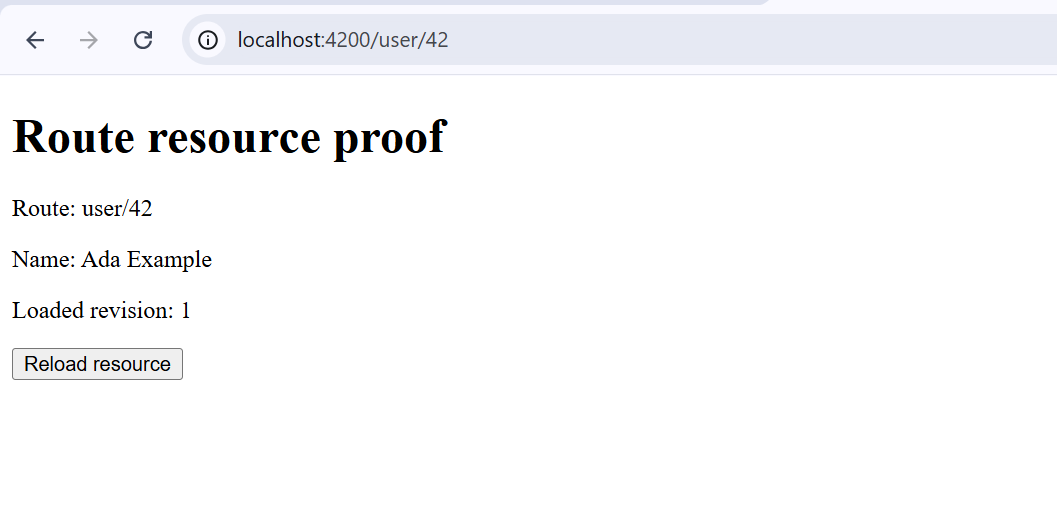
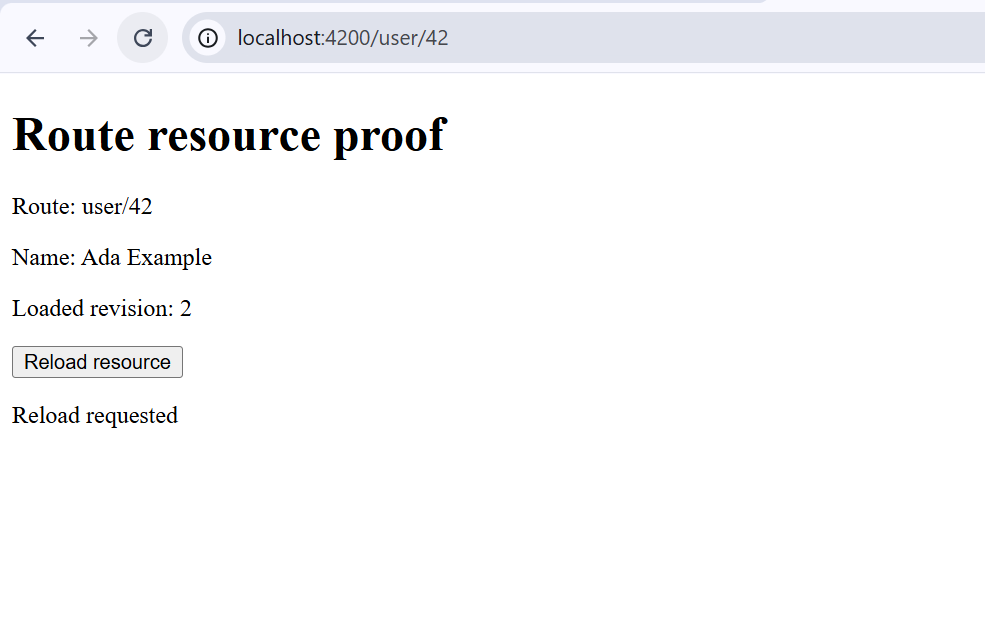
This check proves the in-place refresh of the local route resource in the tested project. It does not establish that a remote request completed, that failures are handled, or that guards behave a particular way in this application. The distinction matters when you replace the local loader with real data access.
Adapt it for a real API
Keep the same route-resource shape when the loader calls your application service, but adapt the loading, cancellation, and error paths before relying on it in production. Angular recommends forwarding the loader’s abortSignal to asynchronous requests so superseded work can be cancelled. Verify your real endpoint with an integration test or browser network trace; the revision-counter screenshot cannot stand in for that test.
With the blocking form used here, the router waits on the initial load. A failure during that load cancels navigation and emits NavigationError. If the page must render while data is pending and display loading or error states itself, Angular’s nonBlocking(resource(...)) passes the resource object to the component instead of only its resolved value. Choose the form that matches the page’s user experience, then test retries and parameter changes against your actual service.
References
- Angular: Data fetching with resources — route configuration, blocking and non-blocking behavior, reload, and cancellation.
- Angular: Version compatibility — supported Node.js and TypeScript ranges.
- Angular 22.2.0 release — release reference for the version used in the demo.
Demo source code: View the complete runnable example on GitHub.
Found this useful? Support more practical developer content.