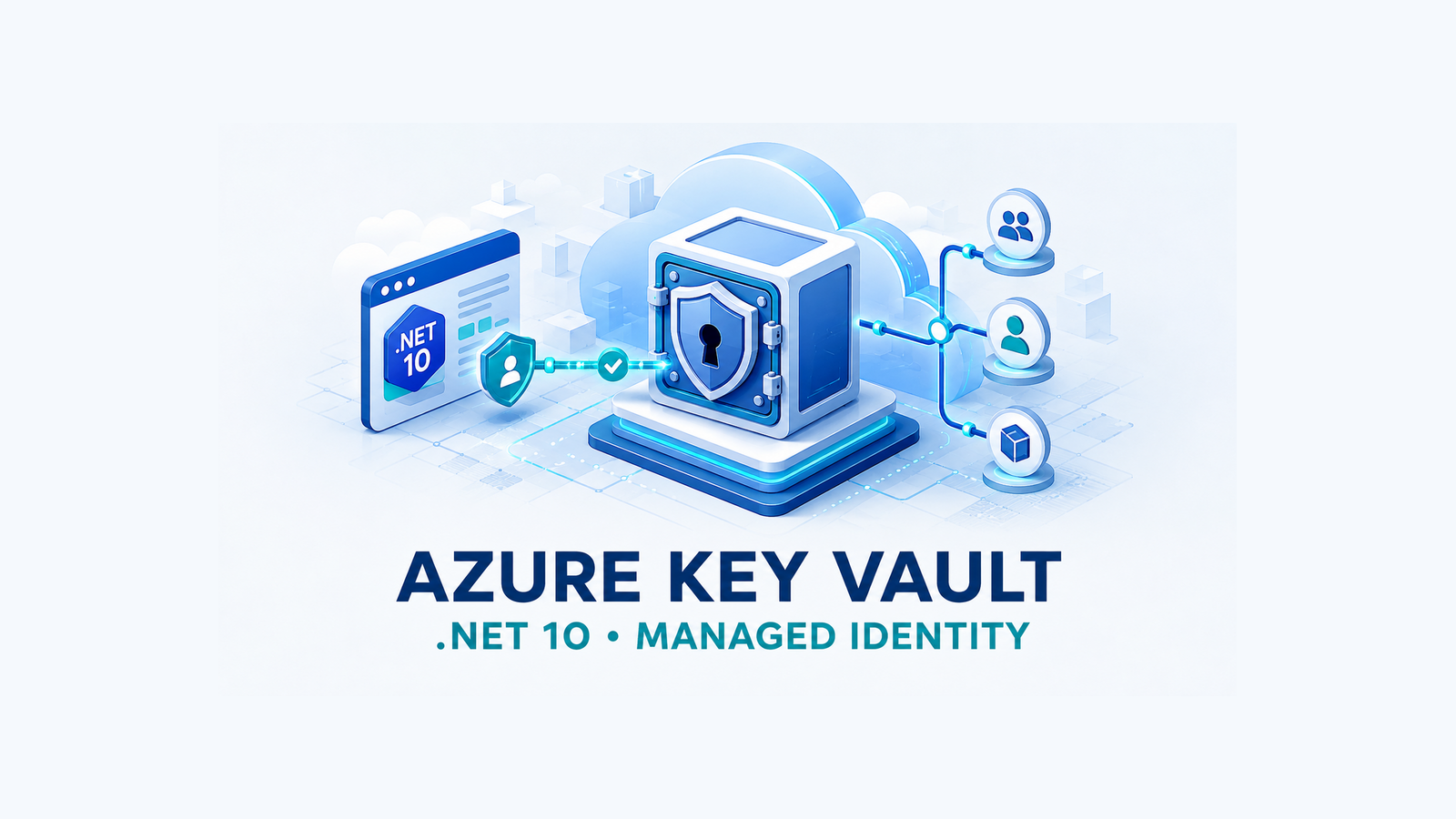
Azure Key Vault in ASP.NET Core should normally use a managed identity, Azure RBAC, and a narrowly scoped configuration provider. The application stores only the vault URI; Azure supplies the workload identity, and the vault grants that identity read access with the Key Vault Secrets User role. A client secret that unlocks the vault merely replaces one secret-management problem with another.
This .NET 10 guide implements that production boundary, explains when AddAzureKeyVault is the right abstraction, and covers rotation, startup failures, deterministic credentials, and network restrictions. The original 2023 app-registration, client-secret, access-policy, and managed-identity examples remain later as clearly labelled historical material.
Table of Contents
Choose the right Key Vault integration
Key Vault solves storage, access control, auditing, and lifecycle problems. It does not decide how often the application should retrieve a secret or whether that secret belongs in ASP.NET Core configuration. Pick the integration according to the access pattern.
| Integration | Use it when | Important trade-off |
|---|---|---|
AddAzureKeyVault | A bounded set of secrets should behave like normal application configuration. | Secrets are loaded during startup. By default, the provider doesn’t poll for changes. |
SecretClient | The app needs a specific secret on demand, its metadata, or a version-pinned value. | Don’t call Key Vault on every request. Reuse the client and define caching and failure behavior. |
| App Service Key Vault references | Operations wants the platform to resolve secrets into App Service settings without application code. | The application sees configuration values, while refresh and diagnostics follow the hosting platform’s rules. |
This article uses the configuration provider because the sample secret configures a long-lived service. For a hot request path or a very large shared vault, loading and polling every secret is the wrong design. Prefer one vault per application and environment, and keep the set of secrets intentionally small.
Provision a vault with Azure RBAC
For new deployments, use the Azure RBAC permission model. Access policies are the legacy model, and switching an existing vault to RBAC can cause an outage if equivalent role assignments are not created first. Treat that migration as a separate, reviewed deployment.
az login
az group create \
  --name dnc-keyvault-rg \
  --location swedencentral
az keyvault create \
  --name <globally-unique-vault-name> \
  --resource-group dnc-keyvault-rg \
  --location swedencentral \
  --enable-rbac-authorization true \
  --enable-purge-protection true
The identity that provisions secrets needs write permission. The running application does not. Assign Key Vault Secrets Officer to the provisioning identity, then create the sample secret. In repeatable infrastructure, use the role’s immutable ID instead of its display name.
vaultId=$(az keyvault show \
  --name <vault-name> \
  --resource-group dnc-keyvault-rg \
  --query id -o tsv)
developerObjectId=$(az ad signed-in-user show --query id -o tsv)
az role assignment create \
  --assignee-object-id "$developerObjectId" \
  --assignee-principal-type User \
  --role "Key Vault Secrets Officer" \
  --scope "$vaultId"
az keyvault secret set \
  --vault-name <vault-name> \
  --name "Payments--ApiKey" \
  --value "<development-secret-value>"
Key Vault secret names can’t contain a colon. The ASP.NET Core provider maps a double dash to the configuration delimiter, so Payments--ApiKey becomes Payments:ApiKey. Never put a real secret in shell history, a tutorial, a pipeline log, or source control; the literal value above is only a placeholder.
Configure local developer access
Separate the human who manages secrets from the human who runs the application. For normal local execution, the developer needs read access only:
az role assignment create \
  --assignee-object-id "$developerObjectId" \
  --assignee-principal-type User \
  --role "Key Vault Secrets User" \
  --scope "$vaultId"
Role assignments can take several minutes to propagate. A 403 immediately after deployment is not proof that the code is wrong; first confirm the vault, tenant, selected identity, role, and scope, then allow for propagation. Do not respond by granting Owner or a broad subscription role.
Load secrets into .NET 10 configuration
Create the .NET 10 API and add the Azure configuration and identity packages. Versionless commands intentionally resolve the current stable packages when the project is created; pin versions centrally in a real repository.
dotnet new webapi -n Dnc.KeyVault.Api -f net10.0
cd Dnc.KeyVault.Api
dotnet add package Azure.Extensions.AspNetCore.Configuration.Secrets
dotnet add package Azure.Identity
The vault URI is not a secret. Keep it in normal configuration and override it per environment.
{
  "KeyVault": {
    "VaultUri": "https://<vault-name>.vault.azure.net/"
  }
}
DefaultAzureCredential is convenient for development because it can use Azure CLI or IDE sign-in. In production, a specific credential is easier to reason about. The following boundary uses the development chain locally and the system-assigned managed identity in Azure.
using Azure.Core;
using Azure.Extensions.AspNetCore.Configuration.Secrets;
using Azure.Identity;
var builder = WebApplication.CreateBuilder(args);
var vaultUri = builder.Configuration["KeyVault:VaultUri"]
    ?? throw new InvalidOperationException(
        "Configuration key 'KeyVault:VaultUri' is required.");
TokenCredential credential = builder.Environment.IsDevelopment()
    ? new DefaultAzureCredential()
    : new ManagedIdentityCredential();
builder.Configuration.AddAzureKeyVault(
    new Uri(vaultUri),
    credential);
builder.Services.AddControllers();
var app = builder.Build();
app.MapControllers();
app.Run();
For a user-assigned managed identity, construct ManagedIdentityCredential with its client ID and configure that non-secret identifier outside the vault. Avoid a wide production credential chain whose behavior can change when someone adds environment variables to the host.
Bind secrets to validated options
Do not scatter string-based lookups such as configuration["Payments:ApiKey"] throughout controllers. Bind the section once, validate it during startup, and inject a typed contract into the service that needs it.
using System.ComponentModel.DataAnnotations;
public sealed class PaymentsOptions
{
    public const string SectionName = "Payments";
    [Required, MinLength(16)]
    public string ApiKey { get; init; } = string.Empty;
}
builder.Services
.AddOptions<PaymentsOptions>()
.BindConfiguration(PaymentsOptions.SectionName)
.ValidateDataAnnotations()
.ValidateOnStart();A validation failure should stop the deployment rather than let the first real request discover an empty key. Never expose a diagnostic endpoint that returns the secret, and never interpolate an options object into logs. The updated Azure Face API in ASP.NET Core guide shows the same secret boundary around an external Azure service.
Deploy with managed identity
Enable a system-assigned identity on the App Service, capture its object ID, and grant only secret-read access at the vault scope.
principalId=$(az webapp identity assign \
  --name <app-service-name> \
  --resource-group <app-resource-group> \
  --query principalId -o tsv)
vaultId=$(az keyvault show \
  --name <vault-name> \
  --resource-group dnc-keyvault-rg \
  --query id -o tsv)
az role assignment create \
  --assignee-object-id "$principalId" \
  --assignee-principal-type ServicePrincipal \
  --role "Key Vault Secrets User" \
  --scope "$vaultId"
The role is a data-plane permission. Reader or Key Vault Contributor on the Azure resource does not automatically grant permission to read secret values. Conversely, the application does not need Key Vault Secrets Officer, because a runtime should not create, rotate, or delete its own secrets.
Handle rotation and startup failures
The configuration provider’s default ReloadInterval is null, so it does not poll Key Vault. A rotated value becomes visible after an application restart. If the workload needs automatic refresh, configure a deliberate interval and consume changing values with IOptionsMonitor<T>.
builder.Configuration.AddAzureKeyVault(
    new Uri(vaultUri),
    credential,
    new AzureKeyVaultConfigurationOptions
    {
        ReloadInterval = TimeSpan.FromMinutes(15)
    });
Polling adds Key Vault operations and does not make every downstream client rotation-aware. A client that copies the key into a private field at construction still holds the old value. Decide whether to rebuild that client, read IOptionsMonitor.CurrentValue per operation, or restart after rotation.
- 403 Forbidden: authentication probably succeeded, but the principal lacks a data-plane role at the correct scope, the vault uses a different permission model, or propagation is incomplete.
- Credential unavailable: the expected local sign-in or managed identity is missing. Log the credential type and vault URI, never token or secret content.
- Timeout or DNS failure: inspect Key Vault firewall, private endpoint, VNet integration, DNS resolution, and outbound connectivity.
- Startup failure: do not silently replace a missing production secret with an empty value. Fail the deployment and keep the previous healthy instance serving traffic.
Disabled secrets are not loaded. Expired secrets, however, can still be included by the provider unless you add explicit filtering, so expiry metadata is not a substitute for rotation and validation.
Harden the production boundary
- Use a separate vault for each application and environment instead of prefixes inside a shared vault.
- Prefer Azure RBAC and grant the runtime
Key Vault Secrets Useronly at the narrowest practical vault scope. - Use a deterministic
ManagedIdentityCredentialin production. - Enable purge protection, define rotation ownership, and test recovery from deletion.
- Restrict network access with a firewall or private endpoint when the workload requires it, and verify private DNS before cutover.
- Enable audit logs and alert on repeated authorization failures, deletion, purge, and unusual access patterns.
- Keep secret values out of logs, traces, exception payloads, health responses, and client-side configuration.
- Pin and update Azure SDK packages through the repository’s normal dependency process.
If this application is moving from an older runtime at the same time, separate the credential migration from the framework migration. The .NET 8/9 to .NET 10 production migration checklist provides a safer sequencing model.
Historical 2023 implementation
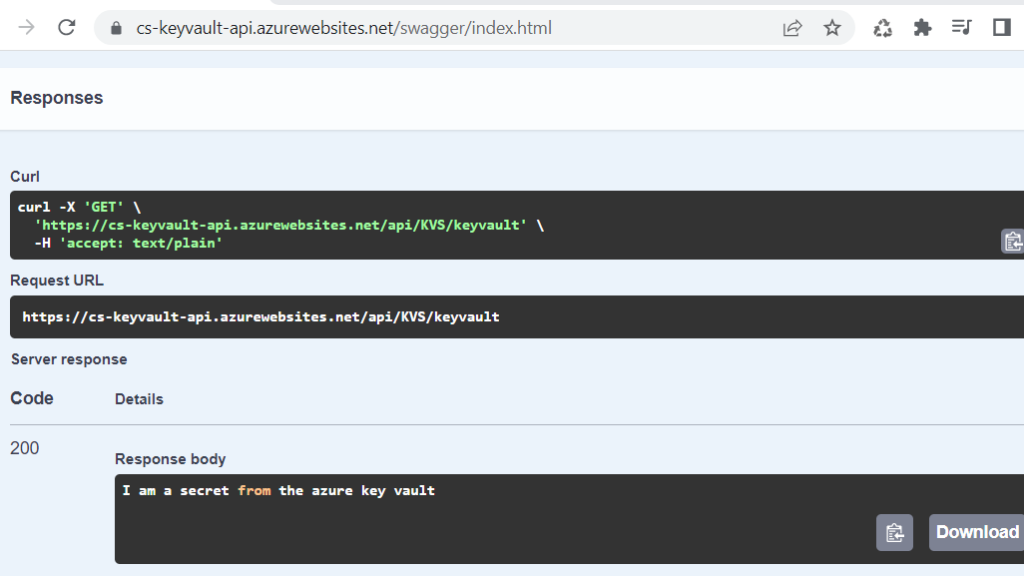
The original article was published in October 2023 and used a .NET 6 Web API. It demonstrated both an app registration with a client secret and an App Service managed identity, using the Key Vault access-policy model. That implementation and its screenshots worked for the original demo. They are retained below—and in the original GitHub repository—as historical evidence, not as the recommended baseline for a new 2026 deployment.
Original provisioning commands
az group create --name "{RESOURCE GROUP NAME}" --location {LOCATION}az group create --name "CS-KeyVault-RG" --location "Sweden Central"az keyvault create --name {KEY VAULT NAME} --resource-group "{RESOURCE GROUP NAME}" --location {LOCATION}az keyvault create --name "CS-KeyVault-KV" --resource-group "CS-KeyVault-RG" --location "Sweden Central"az keyvault secret set --vault-name {KEY VAULT NAME} --name "SecretName" --value "secretValue"az keyvault secret set --vault-name "CS-KeyVault-KV" --name "SecretName" --value "I am a secret from the azure key vault"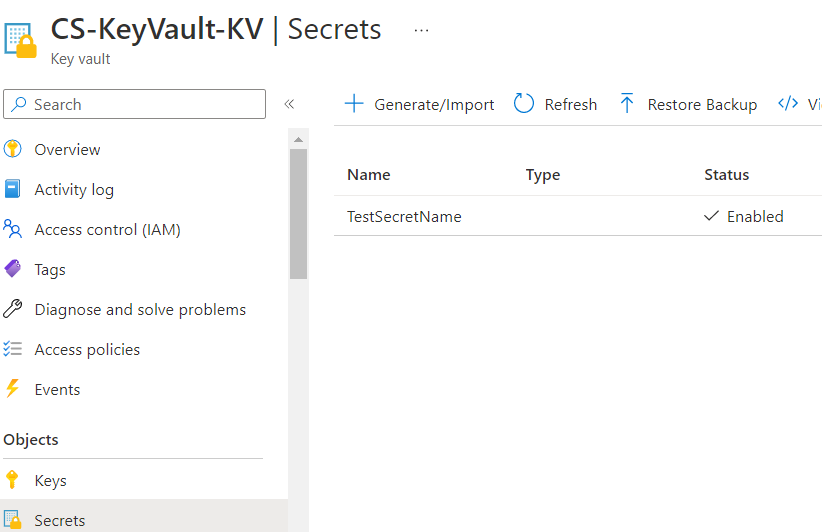
Original app-registration and client-secret flow
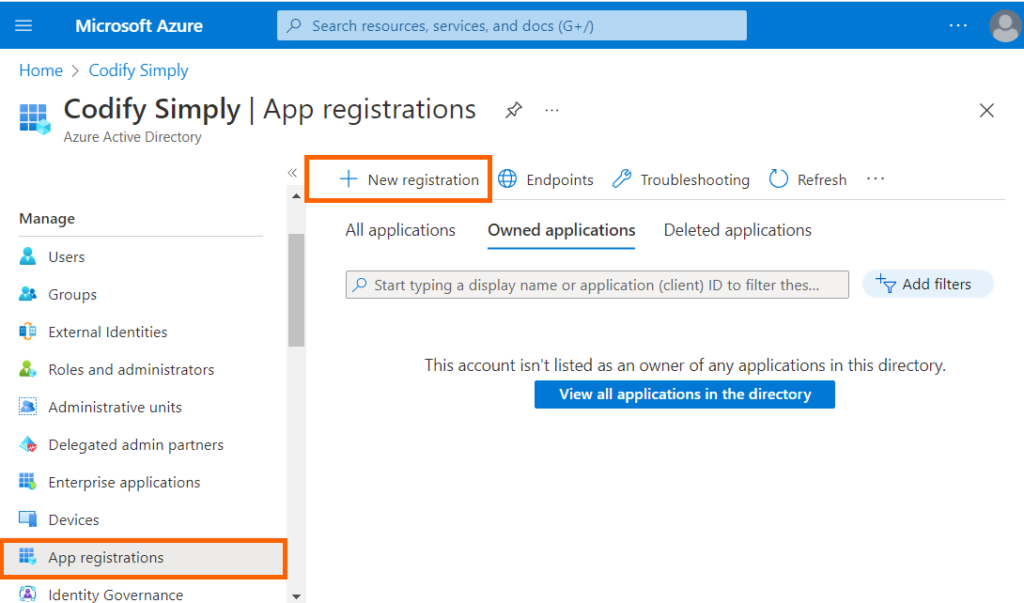
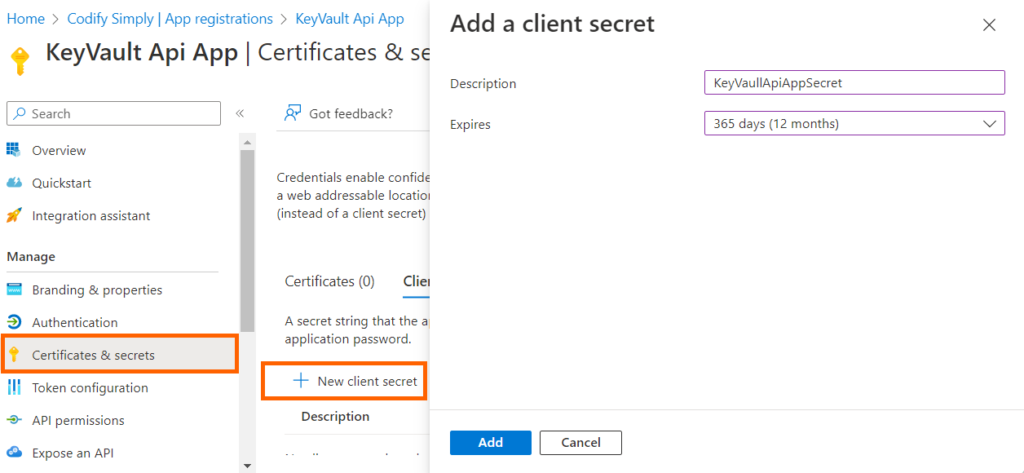
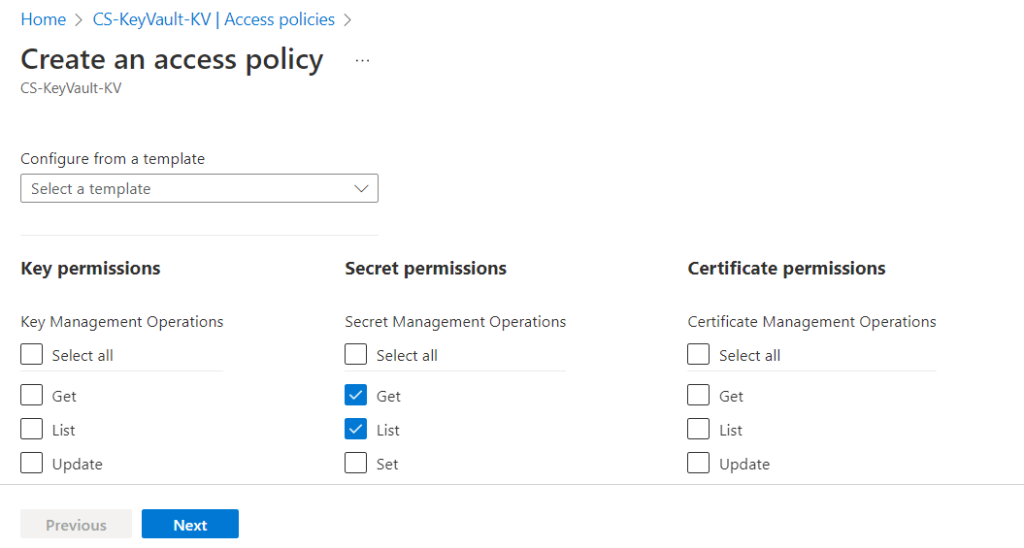
The original flow registered an application in Microsoft Entra ID (then labelled Azure Active Directory), created a client secret, and granted access through a vault access policy. The security weakness is operational: the application must already possess and rotate one credential before it can retrieve the others.
dotnet new webapi --output CS.KeyVault.ApiApp --framework "net6.0" --use-program-mainvar builder = WebApplication.CreateBuilder(args);
//I Removed code for brevity
var keyVaultUrl = new Uri($"https://{builder.Configuration["KeyVault:Name"]}.vault.azure.net/");
var Credentials = new ClientSecretCredential(builder.Configuration["KeyVault:TenantId"],
builder.Configuration["KeyVault:ClientId"],
builder.Configuration["KeyVault:ClientSecret"]);
var secretClient = new SecretClient(keyVaultUrl, Credentials);
builder.Configuration.AddAzureKeyVault(secretClient, new AzureKeyVaultConfigurationOptions());
var app = builder.Build();namespace CS.KeyVault.ApiApp.Controllers
{
[Route("api/[controller]")]
[ApiController]
public class KVSController : ControllerBase
{
private readonly IConfiguration configuration;
public KVSController(IConfiguration configuration)
{
this.configuration = configuration;
}
[HttpGet("keyvault")]
public string GetSecret()
{
return configuration["SecretName"];
}
}
}var Credentials = new ClientSecretCredential(builder.Configuration["KeyVault:TenantId"],
builder.Configuration["KeyVault:ClientId"],
builder.Configuration["KeyVault:ClientSecret"]);
var secretClient = new SecretClient(keyVaultUrl, Credentials);
KeyVaultSecret kvs = secretClient.GetSecret("SecretName");
var secretValue = kvs.Value;
Original managed-identity flow
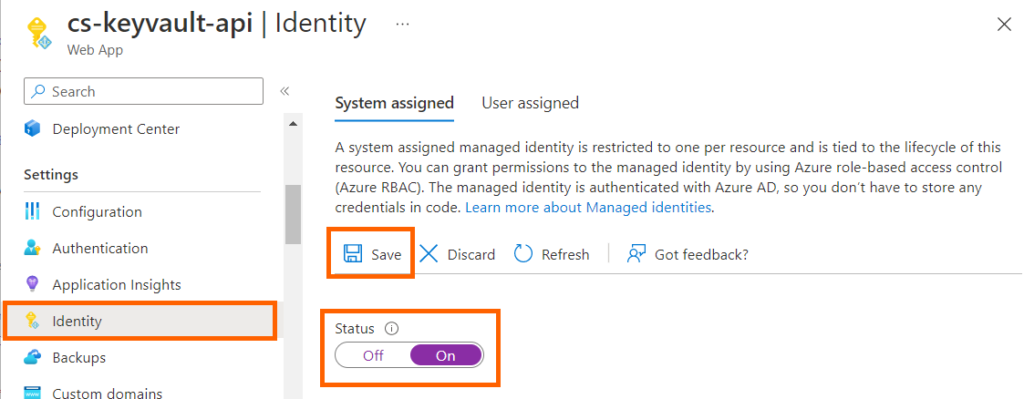
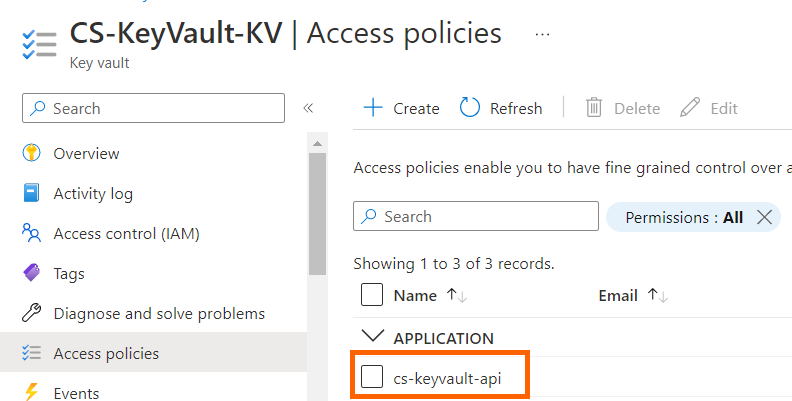
The original article then improved the design by enabling an App Service managed identity. That identity choice remains sound. The historical screenshots still use vault access policies, whereas the modern implementation earlier in this article uses Azure RBAC.
public class Program
{
    public static void Main(string[] args)
    {
        var builder = WebApplication.CreateBuilder(args);
        // Removed code for brevity
        // Access key vault using Managed Identity
        var keyVaultUrl = new Uri($"https://{builder.Configuration["KeyVault:Name"]}.vault.azure.net/");
        builder.Configuration.AddAzureKeyVault(keyVaultUrl, new DefaultAzureCredential(),
            new AzureKeyVaultConfigurationOptions
            {
                ReloadInterval = TimeSpan.FromMinutes(5)
            });
        var app = builder.Build();
Production checklist
- The vault uses Azure RBAC, or an existing access-policy deployment has a separately tested migration plan.
- The application uses a managed identity and holds only
Key Vault Secrets Userat the intended vault scope. - The vault URI is external configuration; no client secret unlocks the vault.
- Secret names map deliberately to configuration sections with
--. - Options are strongly typed and validated during startup.
- Rotation behavior is explicit: restart, polling plus
IOptionsMonitor, or an on-demand client. - Purge protection, audit logs, alerts, and recovery procedures are enabled and tested.
- Firewall, private endpoint, VNet integration, and DNS behavior are verified in the deployed environment.
- No secret value reaches logs, traces, health checks, exception responses, screenshots, or source control.
The strongest design is not the one with the most Key Vault code. It is the one where the workload has a verifiable identity, the identity has the smallest useful permission, secret loading has defined failure and rotation behavior, and operators can diagnose access without exposing the value being protected.
References
- Microsoft Learn: Azure Key Vault configuration provider in ASP.NET Core 10
- Microsoft Learn: Azure RBAC versus Key Vault access policies
- Microsoft Learn: Use managed identity with Key Vault in a .NET web app
- Microsoft Learn: Credential chains in Azure Identity for .NET
- Microsoft Learn: Secure your Azure Key Vault
Found this useful? Support more practical developer content.