EF Core 11 JsonPathExists lets a SQL Server query distinguish an absent JSON property from a property explicitly set to null. Use EF.Functions.JsonPathExists when presence is the question; comparing an extracted value with SQL NULL loses that distinction. The example below proves the difference on SQL Server 2025 LocalDB, including zero, a string value, nested paths, and a SQL-null document.
Table of Contents
Use EF Core 11 JsonPathExists for property presence
For a nullable string column containing JSON text, keep the existence test inside the database query. The non-null guard states which documents belong in this result; the path test then includes every document containing OptionalInt, regardless of the value stored there.
var existing = context.Rows.Where(row =>
    row.JsonData != null &&
    EF.Functions.JsonPathExists(row.JsonData, "$.OptionalInt"));

var ids = await existing.OrderBy(row => row.Id)
    .Select(row => row.Id)
    .ToArrayAsync();
The name OptionalInt describes the fixture key, not a type constraint imposed by the function. Our string-valued row is included too. If your application requires an integer, add separate validation or value-query logic; existence alone cannot establish that requirement.
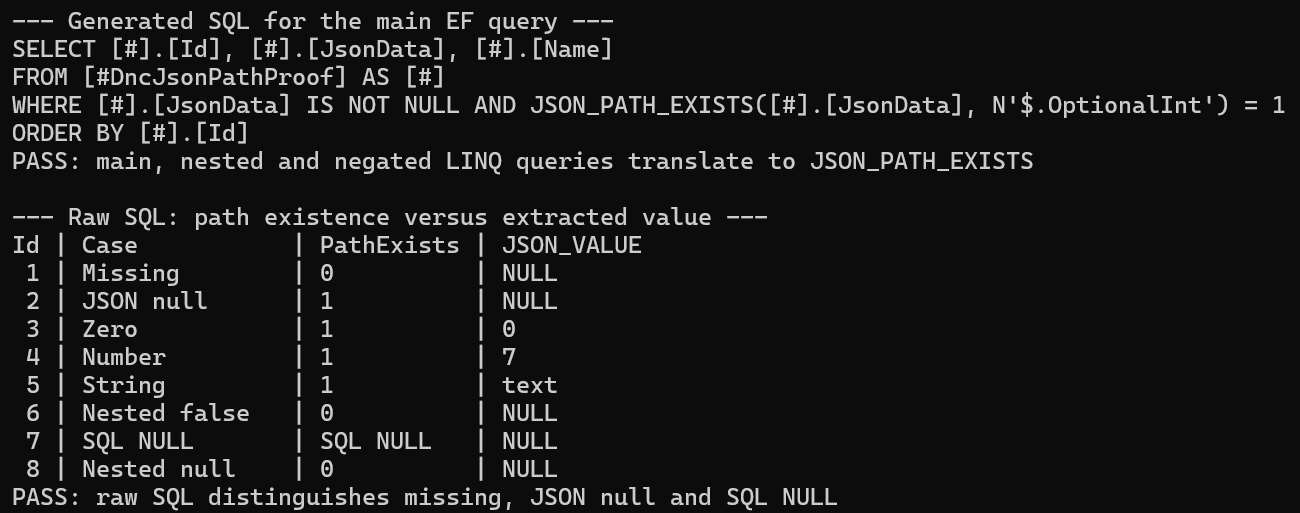
The recorded EF query generated this SQL. Printing ToQueryString() verifies translation without executing the query, while ToArrayAsync() above obtains the database result. The demo checks both stages because correct-looking SQL alone is incomplete evidence.
SELECT [#].[Id], [#].[JsonData], [#].[Name]
FROM [#DncJsonPathProof] AS [#]
WHERE [#].[JsonData] IS NOT NULL
  AND JSON_PATH_EXISTS([#].[JsonData], N'$.OptionalInt') = 1
ORDER BY [#].[Id]
Microsoft documents this translation in the EF Core 11 feature notes. This reproduction deliberately uses an nvarchar(max) property; it does not exercise native SQL Server json storage or an owned/complex JSON model.
Why JSON_VALUE cannot answer the same question
The two smallest documents expose the problem: {} has no OptionalInt key, whereas {"OptionalInt":null} contains it. In the executed comparison, JSON_VALUE produced SQL NULL for both, but JSON_PATH_EXISTS returned different existence values.
The following statement compares the functions over the temporary fixture table. It runs on the same open connection and transaction that created and populated that table; running it in a separate session would not see this local temporary table.
SELECT Id, Name,
       JSON_PATH_EXISTS(JsonData, '$.OptionalInt') AS PathExists,
       JSON_VALUE(JsonData, '$.OptionalInt') AS ExtractedValue
FROM #DncJsonPathProof
ORDER BY Id;| Id | Case | JsonData | PathExists | JSON_VALUE |
|---|---|---|---|---|
| 1 | Missing | {} | 0 | SQL NULL |
| 2 | JSON null | {"OptionalInt":null} | 1 | SQL NULL |
| 3 | Zero | {"OptionalInt":0} | 1 | 0 |
| 4 | Number | {"OptionalInt":7} | 1 | 7 |
| 5 | String | {"OptionalInt":"text"} | 1 | text |
| 6 | Nested false | {"Nested":{"Flag":false}} | 0 | SQL NULL |
| 7 | SQL NULL document | SQL NULL | SQL NULL | SQL NULL |
| 8 | Nested null | {"Nested":null} | 0 | SQL NULL |
A predicate such as JSON_VALUE(JsonData, '$.OptionalInt') IS NOT NULL would omit row 2 even though its key exists. Conversely, IS NULL groups the missing key and explicit JSON null together. Microsoft’s JSON_VALUE reference also describes other reasons scalar extraction can return null in lax mode, including paths pointing to objects or arrays.
Reproduce the query with pinned versions
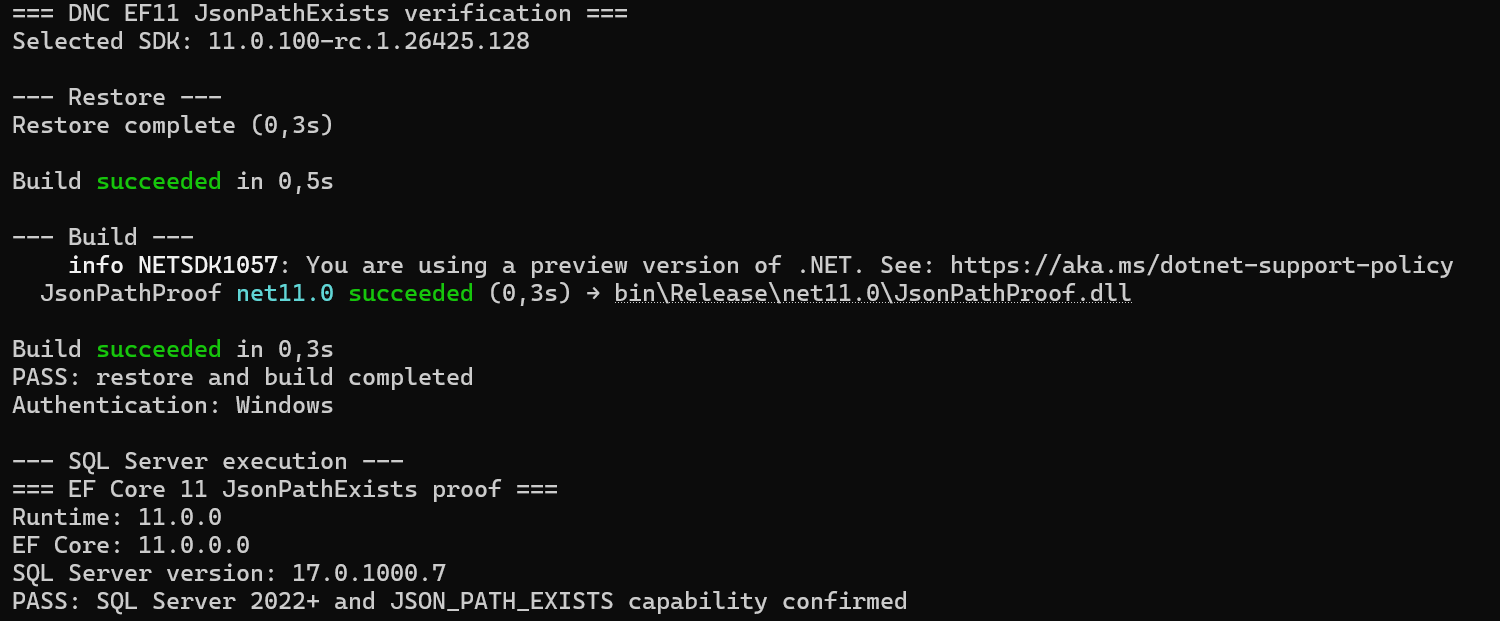
The successful Windows run used SDK 11.0.100-rc.1.26425.128, runtime 11.0.0, EF Core SQL Server package 11.0.0-rc.1.26425.128, and SQL Server 17.0.1000.7. These are the recorded reproduction versions, including a prerelease framework/package combination; keep them separate from your production version policy.
<Project Sdk="Microsoft.NET.Sdk">
  <PropertyGroup>
    <OutputType>Exe</OutputType>
    <TargetFramework>net11.0</TargetFramework>
    <ImplicitUsings>enable</ImplicitUsings>
    <Nullable>enable</Nullable>
  </PropertyGroup>
  <ItemGroup>
    <PackageReference Include="Microsoft.EntityFrameworkCore.SqlServer" Version="11.0.0-rc.1.26425.128" />
  </ItemGroup>
</Project>
The repository includes global.json selecting that SDK. Install the matching SDK to reproduce the recorded setup, then run the verification script from the directory containing Verify-JsonPathExists.ps1. Restore requires access to NuGet.
Unblock-File .\Verify-JsonPathExists.ps1
powershell -NoProfile -ExecutionPolicy Bypass -File .\Verify-JsonPathExists.ps1 -Server '(localdb)\DNC2025'
Use your own local instance name if it differs. The script uses Windows authentication by default, restores and builds the project, then runs the SQL proof and saves artifacts\verification.txt. Keep credentials out of screenshots and shared logs; this run needed no SQL-login password.
SQL Server 2022 or newer is required for the function, according to Microsoft’s JSON_PATH_EXISTS reference. The initial SQL Server 2019 LocalDB attempt reported version 15.0.4382.1 and stopped at the version preflight. A successful build did not make that engine support the generated SQL.
On this laptop, SQL Server 2019 and SQL Server 2025 LocalDB were installed side by side. After sqllocaldb versions confirmed version 17 was available, these commands created and started the dedicated test instance:
sqllocaldb versions
sqllocaldb create DNC2025 17.0 -s
Run the create command only if that named instance does not already exist. We tested the SQL results on SQL Server 2025 LocalDB, not SQL Server 2022; the 2022 minimum is documentation-backed rather than a second executed environment.
Keep the fixture isolated and inspect the result
The demo maps a small entity to a local temporary table. Explicit IDs make the expected query results stable, while the nullable JSON column preserves the difference between a SQL-null document and an explicit JSON-null property.
sealed class ProofContext(DbContextOptions<ProofContext> options) : DbContext(options)
{
    public DbSet<ProofRow> Rows => Set<ProofRow>();

    protected override void OnModelCreating(ModelBuilder modelBuilder)
    {
        modelBuilder.Entity<ProofRow>(row =>
        {
            row.ToTable("#DncJsonPathProof");
            row.HasKey(x => x.Id);
            row.Property(x => x.Id).ValueGeneratedNever();
            row.Property(x => x.Name).HasMaxLength(40);
            row.Property(x => x.JsonData).HasColumnType("nvarchar(max)");
        });
    }
}

sealed class ProofRow(int id, string name, string? jsonData)
{
    public int Id { get; set; } = id;
    public string Name { get; set; } = name;
    public string? JsonData { get; set; } = jsonData;
}
The runner opens a connection to tempdb, passes that same connection to EF, and enlists EF in the transaction before creating the table. The following essential setup is extracted from that runner; settings is its parsed connection-string builder and Proof.Fixtures() is the eight-row array shown immediately below. The complete runner also checks server capability, assertions, exit codes, and failure cleanup.
await using var connection = new SqlConnection(settings.ConnectionString);
await connection.OpenAsync();
await using var context = new ProofContext(
    new DbContextOptionsBuilder<ProofContext>()
        .UseSqlServer(connection, sql => sql.UseCompatibilityLevel(160))
        .Options);
await using var transaction = await connection.BeginTransactionAsync();
await context.Database.UseTransactionAsync(transaction);
try
{
    await context.Database.ExecuteSqlRawAsync("""
        CREATE TABLE #DncJsonPathProof (
            Id int NOT NULL PRIMARY KEY,
            Name nvarchar(40) NOT NULL,
            JsonData nvarchar(max) NULL
        );
        """);
    foreach (var row in Proof.Fixtures())
        await context.Database.ExecuteSqlAsync(
            $"INSERT INTO #DncJsonPathProof (Id, Name, JsonData) VALUES ({row.Id}, {row.Name}, {row.JsonData})");

    // Execute the existence query here, before rolling back.
}
finally
{
    await transaction.RollbackAsync();
}
The INSERT uses the interpolated ExecuteSqlAsync overload so fixture values become SQL parameters. The table-creation statement is fixed SQL. In the actual runner, the parsed connection settings force tempdb and disable pooling; the finally block rolls back the test rows, and disposing the connection ends the temporary-table session without creating or deleting an application database.
static ProofRow[] Fixtures() =>
    [
        new(1, "Missing", "{}"),
        new(2, "JSON null", """{"OptionalInt":null}"""),
        new(3, "Zero", """{"OptionalInt":0}"""),
        new(4, "Number", """{"OptionalInt":7}"""),
        new(5, "String", """{"OptionalInt":"text"}"""),
        new(6, "Nested false", """{"Nested":{"Flag":false}}"""),
        new(7, "SQL NULL", null),
        new(8, "Nested null", """{"Nested":null}""")
    ];
This helper belongs inside the runner’s Proof class and is called there; it is private in the complete source. The setup excerpt above is intended for that same class, not as a separate top-level program. Its eight inputs explain the result IDs rather than leaving the fixture hidden behind the repository link.
UseCompatibilityLevel(160) configures EF’s SQL translation target in this proof. It does not upgrade SQL Server 2019 or alter a database’s compatibility setting. For a separate native-JSON translation failure, see the EF Core 11 Azure SQL OPENJSON error 13618 guide; that storage/provider scenario is outside this string-column test.
Verify nested paths and the SQL-null policy
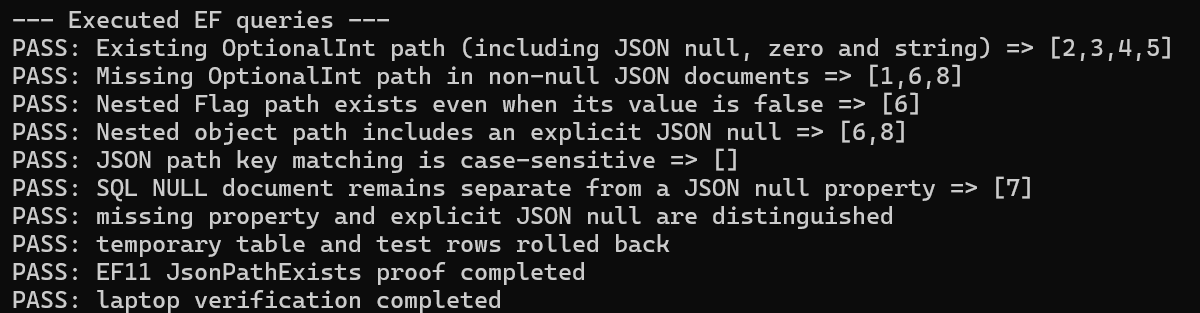
The main query returns [2,3,4,5]. Negating the existence test while retaining the non-null guard returns [1,6,8], so the SQL-null row is handled separately rather than being silently classified as a missing property.
var missing = context.Rows.Where(row => row.JsonData != null &&
    !EF.Functions.JsonPathExists(row.JsonData, "$.OptionalInt"));

var nullDocuments = context.Rows.Where(row => row.JsonData == null);

var nestedFlag = context.Rows.Where(row => row.JsonData != null &&
    EF.Functions.JsonPathExists(row.JsonData, "$.Nested.Flag"));
SQL-null documents return SQL NULL from the SQL existence function; the explicit guard and separate query make the application policy visible. If your business definition groups null documents with missing properties, implement that policy explicitly and assert the additional row rather than relying on an unexamined negated expression.
In the executed fixtures, $.Nested.Flag selects row 6 even though the flag is false. Testing $.Nested selects rows 6 and 8, including the explicit null at the parent path. Testing $.optionalint selects nothing: the changed key case does not match OptionalInt in this proof.
For an offline translation check, run the command below after restoring and building. It prints the main SQL and checks main, nested, and negated translations, but opens no SQL Server connection and verifies no result rows. Keep its PASS distinct from the engine-backed verification above.
dotnet run --configuration Release -- --offlineBefore applying the predicate to a real workload, test representative documents and confirm that presence is the intended contract. Keep JSON validation and allowed path selection at your application boundary, measure the real query plan for performance decisions, and retain result assertions when upgrading the provider. Our EF Core SQL query regression workflow explains why SQL inspection should accompany database execution.
The screenshots record one successful Windows run on September 30, 2026; the full transcript file was not uploaded. This proof does not establish index use, performance, invalid-path behavior, Azure SQL execution, native-json behavior, or portability to other providers. Re-run the complete script on the versions and engine you plan to use.
References
- Microsoft: EF Core 11 JsonPathExists translation
- Microsoft: JSON_PATH_EXISTS requirements and return values
- Microsoft: JSON_VALUE scalar extraction and lax-mode behavior
Demo source code: View the complete runnable example on GitHub.
Found this useful? Support more practical developer content.