Service Bus sessions can deliver messages to an Azure Functions trigger while the processor span is missing from the exported trace. Successful handling therefore needs a separate telemetry check. Azure Functions Host v4.1055.100 includes the registration fix for the session processor ActivitySource. Verify the Host version and the producer context in exported telemetry, rather than trying to repair the trace by changing SessionId.
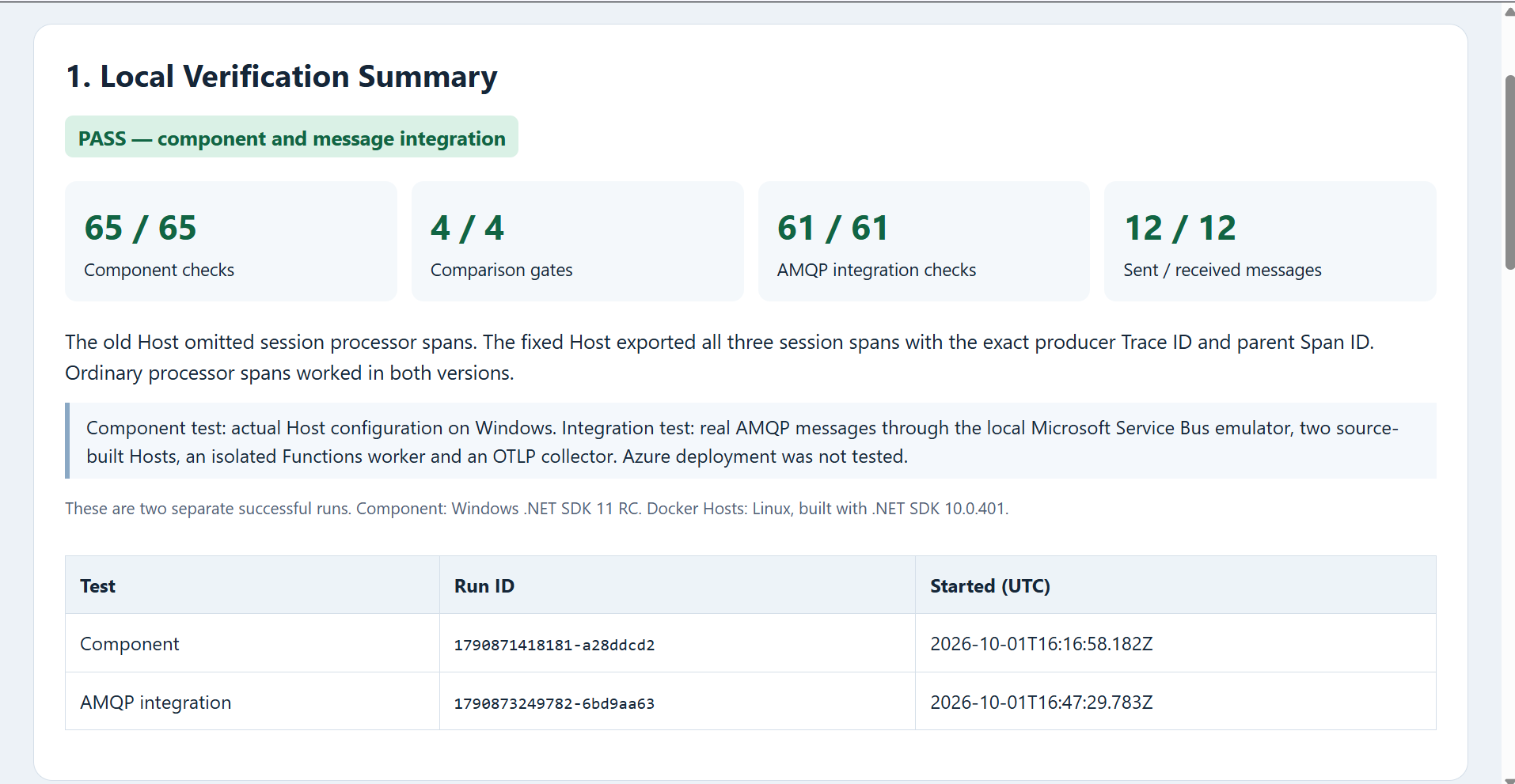
Our local comparison reproduced the missing span with v4.1054.200 and exported all three session processor spans with v4.1055.100. It passed 65 component checks, four comparison gates and 61 AMQP integration checks. The integration run sent and received 12 messages.
Table of Contents
Start the Service Bus sessions tracing fix at the Host
Host PR #11946 adds Azure.Messaging.ServiceBus.ServiceBusSessionProcessor to the Host’s OpenTelemetry source registration. The ordinary ServiceBusProcessor source was already registered. The v4.1055.100 release notes include this fix.
This is a change to the Functions Host. Updating only Microsoft.Azure.Functions.Worker.Extensions.ServiceBus does not demonstrate that the running Host contains it. Our demo builds both pinned Host revisions from source and keeps the function application constant.
Keep Host and worker telemetry separate
The demo uses the .NET isolated worker. Its Host enables OpenTelemetry through the root configuration:
{
  "version": "2.0",
  "telemetryMode": "OpenTelemetry"
}
The worker exports its own telemetry and registers only the demo’s application source. This is the tested Program.cs:
using Microsoft.Azure.Functions.Worker;
using Microsoft.Azure.Functions.Worker.OpenTelemetry;
using Microsoft.Extensions.DependencyInjection;
using Microsoft.Extensions.Hosting;
using OpenTelemetry;
using OpenTelemetry.Trace;
AppContext.SetSwitch("Azure.Experimental.EnableActivitySource", true);
new HostBuilder().ConfigureFunctionsWorkerDefaults()
    .ConfigureServices(s => s.AddOpenTelemetry().UseFunctionsWorkerDefaults()
        .WithTracing(b => b.AddSource("DNC.Consumer"))
        .UseOtlpExporter())
    .Build().Run();
Configure OTEL_EXPORTER_OTLP_ENDPOINT for both the Host and worker to reach your collector; the demo supplies this setting in Docker Compose. DNC.Consumer is our custom application source. It is not a substitute for the missing Host session processor source. Adding the Service Bus source to a worker-side provider would not reproduce the unmodified Host comparison.
The session trigger itself uses the normal session-enabled binding. This excerpt from the tested function forwards the received message to the receipt recorder:
[Function("SessionProof")]
public void Session(
    [ServiceBusTrigger("%SessionQueue%",
        Connection = "ServiceBusConnection", IsSessionsEnabled = true)]
    ServiceBusReceivedMessage message)
    => Record(message, "session");
The sender records a W3C context per message. The recorder preserves the received message ID, session ID and Diagnostic-Id; the verifier then matches exported processor spans to the sent context. The session identifier groups messages and is kept separate from the trace identifiers.
What the two proof runs established
The Windows component run loads each actual Host assembly and exercises its OpenTelemetry configuration with three ordinary, three session and three unknown-source activities. The old Host exports the ordinary activities but omits the session activities. The fixed Host exports both known sources with the expected Trace ID and parent Span ID. Neither version exports the unknown-source control.
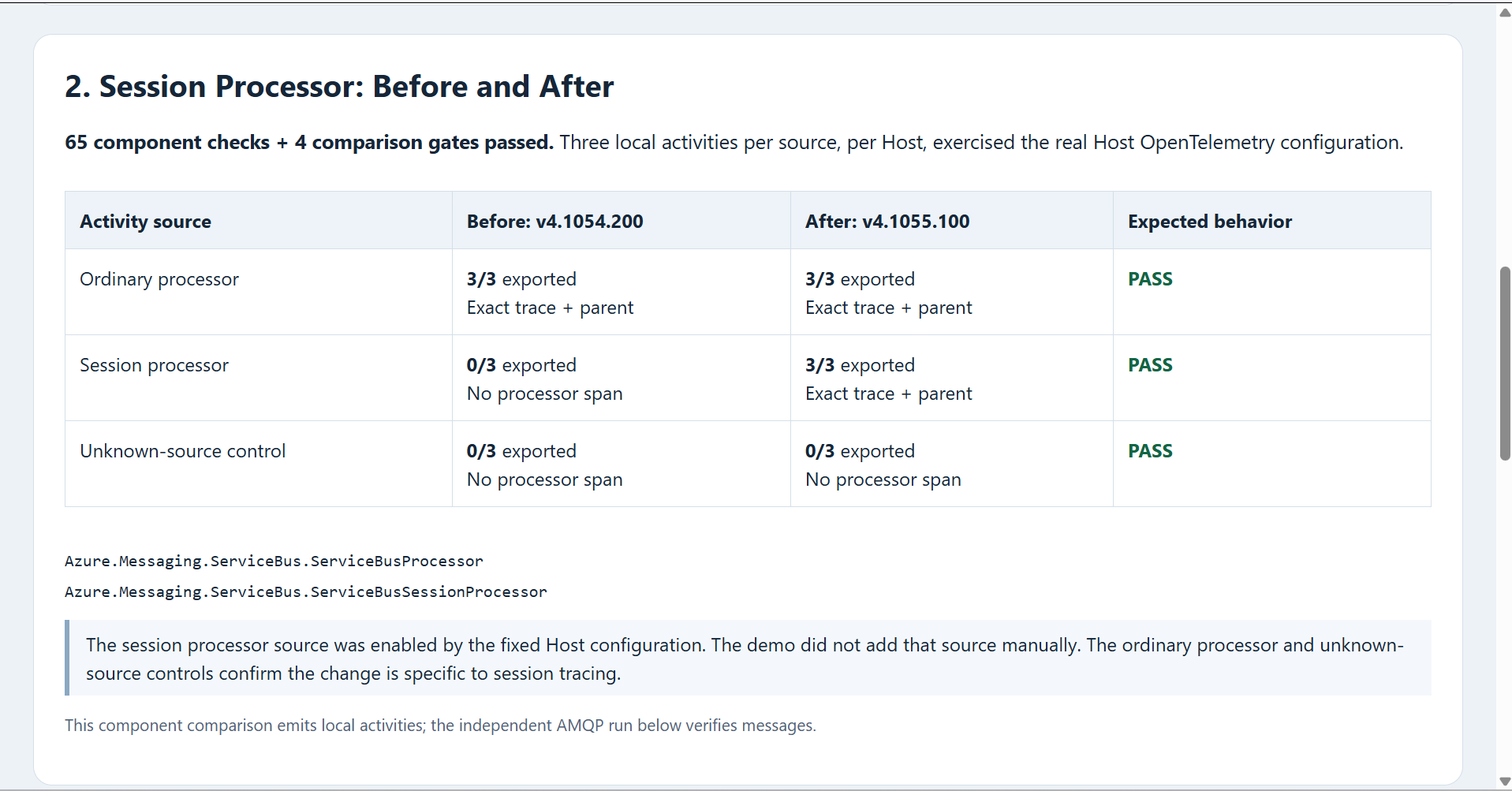
Those local activities establish the source-registration difference. They do not send broker messages. The independent Docker run provides the message evidence, using the Microsoft Service Bus emulator, SQL Server, Azurite, an OTLP collector and the two source-built Hosts.
Verify actual session messages
| Host | Messages received | Ordinary processor spans | Session processor spans |
|---|---|---|---|
| v4.1054.200 | 6 of 6 | 3 of 3 | 0 of 3 |
| v4.1055.100 | 6 of 6 | 3 of 3 | 3 of 3 |
All 12 messages were present in the captured receipts, with unchanged Diagnostic-Id values and preserved session identifiers. Each appeared once in this run’s receipts; that observation does not establish exactly-once delivery semantics.
For all three fixed-Host session messages, the exported processor Trace ID matched the sender’s Trace ID and the processor parent Span ID matched the producer Span ID. This run observed a direct parent relationship. The verifier also accepts an exact producer link when present, but a link was not needed for these three messages.
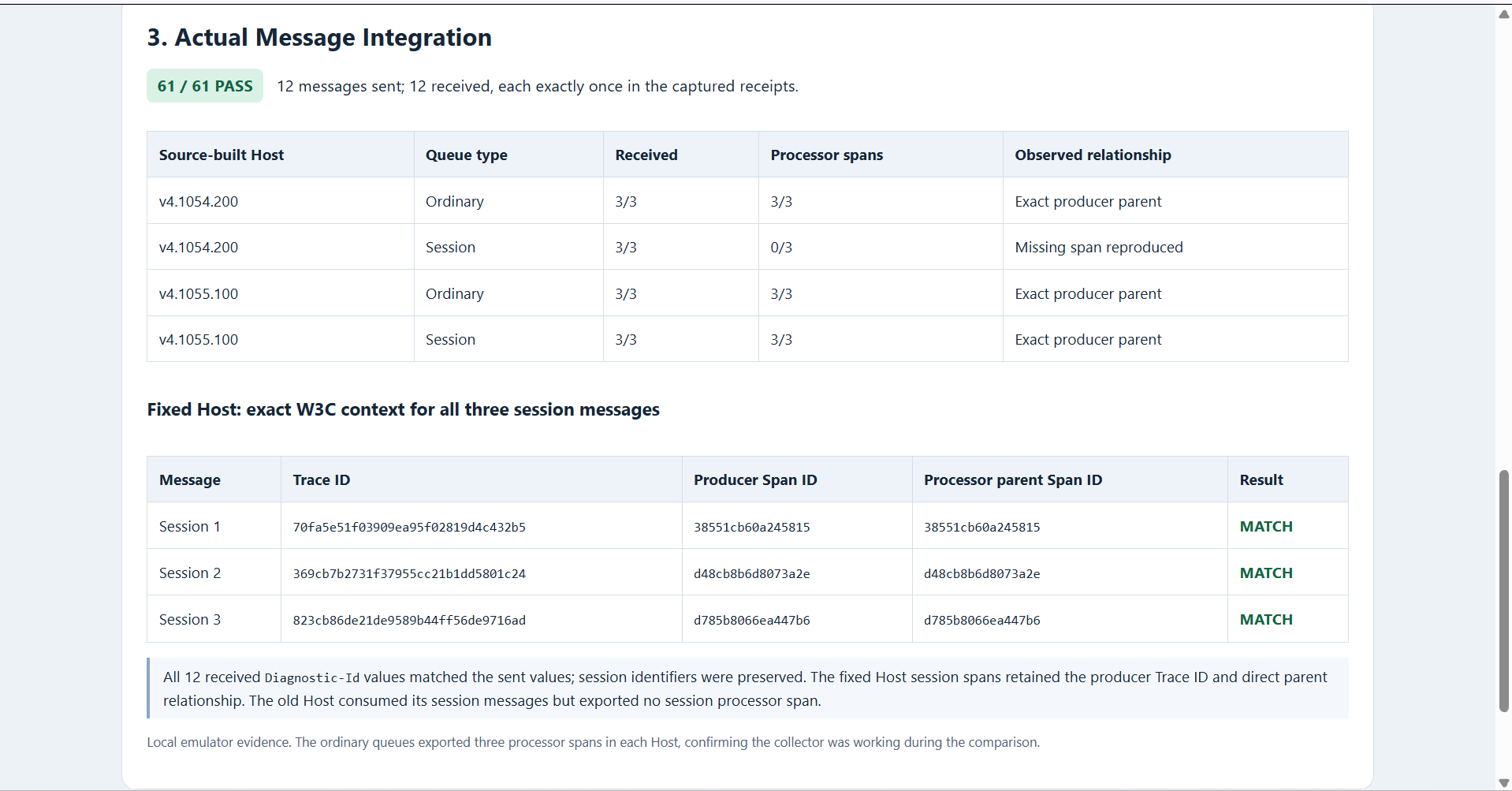
The ordinary queues are an essential control: all three ordinary processor spans were exported by each Host. An empty collector file could not pass as a reproduction of the session-specific regression.
Run the local demo
The packaged demo needs Node.js 22 or later, the .NET 10 SDK and runtime (a newer compatible SDK can build the net10.0 projects) and Docker Desktop running Linux containers. It pins the Host sources, package lock files and infrastructure image inputs. No Azure account or cloud resource is required. After extracting the package, run:
Unblock-File .\Verify-ServiceBus.ps1
powershell -NoProfile -ExecutionPolicy Bypass -File .\Verify-ServiceBus.ps1 -Mode All
The script asks you to read and accept the Microsoft emulator and SQL Server licenses before starting the integration services. Enter uppercase Y only if you accept. It records message manifests, receipt files, OTLP traces, image information and logs, then removes the demo’s containers and network. Open artifacts/latest/report.html to inspect the result.
Component mode runs without Docker. A component-only PASS still leaves broker integration pending. If you run the two modes separately, retain both evidence folders; a later run replaces the latest convenience folder.
Check your deployed environment
Our Docker images are source-built proof images, not Microsoft’s released Functions Host images. This test demonstrates the behavior of two specific source revisions against a local emulator. It does not establish that the fix has reached your Azure app, nor does it exercise production scaling, sampling or Service Bus failure recovery.
Record the actual Host version in your environment, check the exporter configuration in both Host and worker, and send a controlled session message with a known producer context. Confirm the processor span and its parent or link in the exported trace. Keep an ordinary queue as a control. Treat missing spans separately from successful business processing.
For the handler and failure-processing baseline, see our Azure Service Bus queue trigger guide. Keep message processing checks separate from trace export checks.
References
- Functions Host session tracing fix — PR #11946
- Functions Host v4.1055.100 release
- Use OpenTelemetry with Azure Functions
- Test locally with the Service Bus emulator
Demo source code: View the complete runnable example on GitHub.
Found this useful? Support more practical developer content.