Parallel .NET publish jobs that build the same referenced project should use independent intermediate artifact roots, as well as separate final publish directories. Give each service a unique --artifacts-path and verify the assemblies it actually ships. The local demo here starts two publish processes concurrently and confirms that each service receives its own build of a shared library; it does not provision or deploy anything to Azure.
Table of Contents
Give each parallel .NET publish its own artifact root
A separate --output directory distinguishes the final service packages. It does not by itself establish that the shared ProjectReference was built in independent intermediate directories. The test makes that distinction observable by compiling the shared library with an A marker for Service A and a B marker for Service B.
dotnet publish .\src\ServiceA\ServiceA.csproj --configuration Release --output .\evidence\manual\publish-a --self-contained false -p:DncFlavor=A --artifacts-path .\evidence\manual\artifacts-a

dotnet publish .\src\ServiceB\ServiceB.csproj --configuration Release --output .\evidence\manual\publish-b --self-contained false -p:DncFlavor=B --artifacts-path .\evidence\manual\artifacts-b
Those commands illustrate the two distinct roots; typing them one after the other tests only sequential execution. Use the verifier below to start both processes concurrently and check their actual results. Choose fresh roots per service and invocation in a real pipeline, so another job cannot reuse the same writable location.
The SDK artifacts layout separates output categories, projects, and build pivots such as configuration, target framework, and runtime identifier. This feature is available from .NET 8 onward. Different per-service build properties are not automatically a unique pivot in this example, so both builds of Shared need their own invocation root even though the project names are the same.
Run the two-service proof
The demo contains ServiceA, ServiceB, a common Shared project, and a console runner. Each service references Shared; no external NuGet package, web server, Docker image, Azure resource, or deployment command is involved in the default test. The applications target net10.0, so the relevant .NET 10 reference packs and a compatible runtime must be installed.
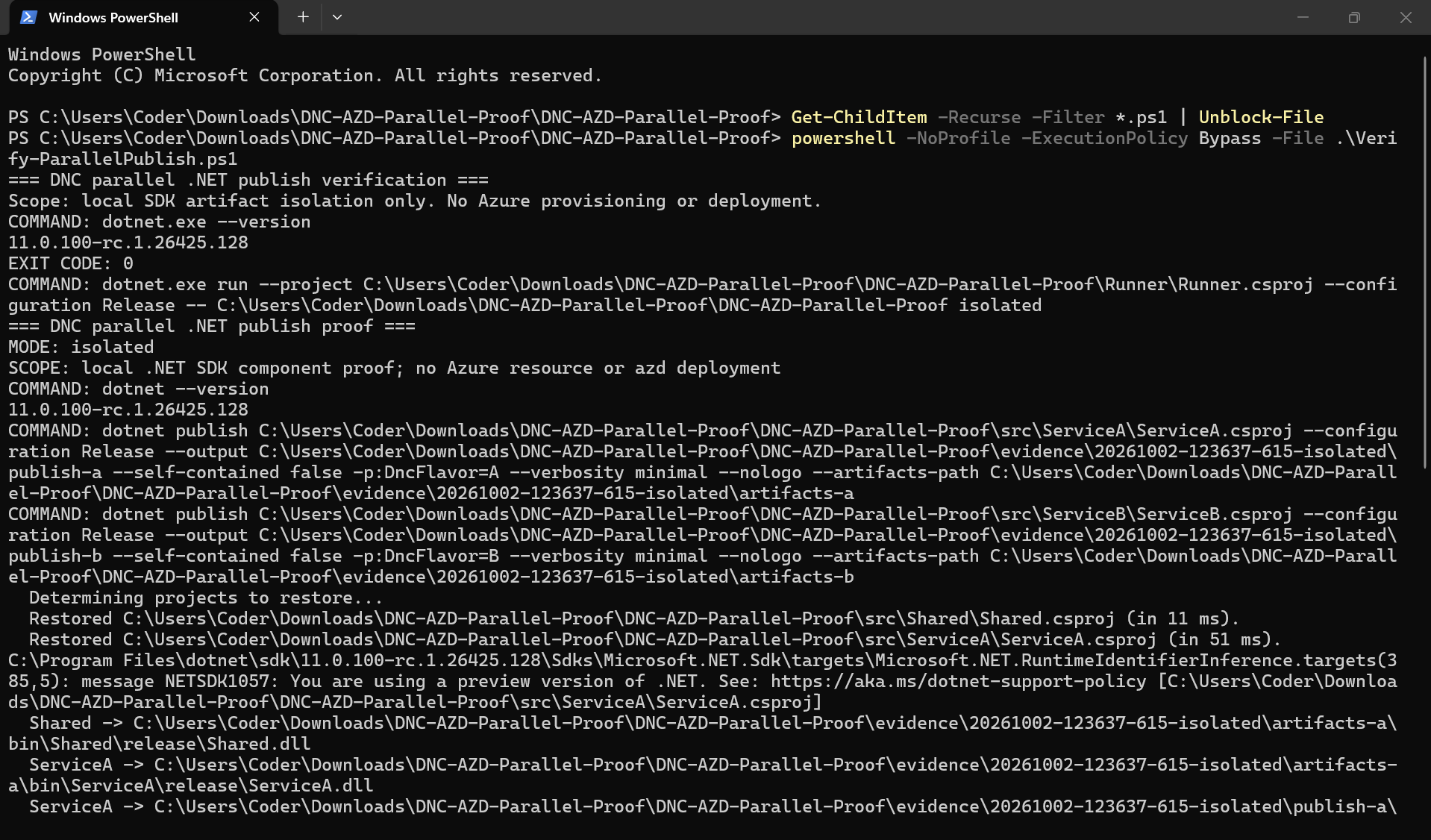
Get-ChildItem -Recurse -Filter *.ps1 | Unblock-File
powershell -NoProfile -ExecutionPolicy Bypass -File .\Verify-ParallelPublish.ps1
Run the script from the extracted folder containing it. The runner starts both publish processes before awaiting either, checks their exit codes, runs the published DLLs, and validates the shared-library markers, hashes, and intermediate roots. ArgumentList supplies each process argument separately, rather than relying on shell parsing.
var builds = await Task.WhenAll(
    Execute("publish-a", commands[0]),
    Execute("publish-b", commands[1]));
This excerpt is from the demo runner: Execute starts a real dotnet child process and captures its output asynchronously. Both calls reach their process wait before Task.WhenAll awaits their combined completion. The helper also applies a timeout and kills a failed or timed-out process tree rather than leaving a publisher running unnoticed.
Make a shared-build mix-up observable
The Shared project stores DncFlavor as assembly metadata. A build for Service A passes -p:DncFlavor=A; the Service B build passes B. The shared code reads the value embedded in its own assembly, and each service checks that it received the expected value.
<ItemGroup>
  <AssemblyAttribute Include="System.Reflection.AssemblyMetadataAttribute">
    <_Parameter1>DncFlavor</_Parameter1>
    <_Parameter2>$(DncFlavor)</_Parameter2>
  </AssemblyAttribute>
</ItemGroup>
This metadata belongs inside Shared.csproj, whose default DncFlavor is UNSET when no caller supplies a value. The markers are diagnostic instrumentation: they make two builds of the same project intentionally differ, so using the wrong output becomes visible. They are not a recommendation to vary normal shared-library behavior by service.
public static string Flavor => typeof(BuildMarker).Assembly
    .GetCustomAttributes<AssemblyMetadataAttribute>()
    .Single(x => x.Key == "DncFlavor").Value ?? "MISSING";
The complete sample puts BuildMarker in the Dnc.Shared namespace and imports System.Reflection. Each published service executes this check from its own output directory, so a successful build alone is insufficient. The test also compares Shared.dll bytes and verifies that both invocation roots contain obj/Shared.
Interpret the recorded result accurately
On October 2, 2026, the Windows verifier selected SDK 11.0.100-rc.1.26425.128; its runner used runtime 10.0.12. Both concurrent publish commands and both published service executions returned exit code 0. Service A printed shared-library flavor A, Service B printed B, and the two Shared.dll hashes differed as expected.
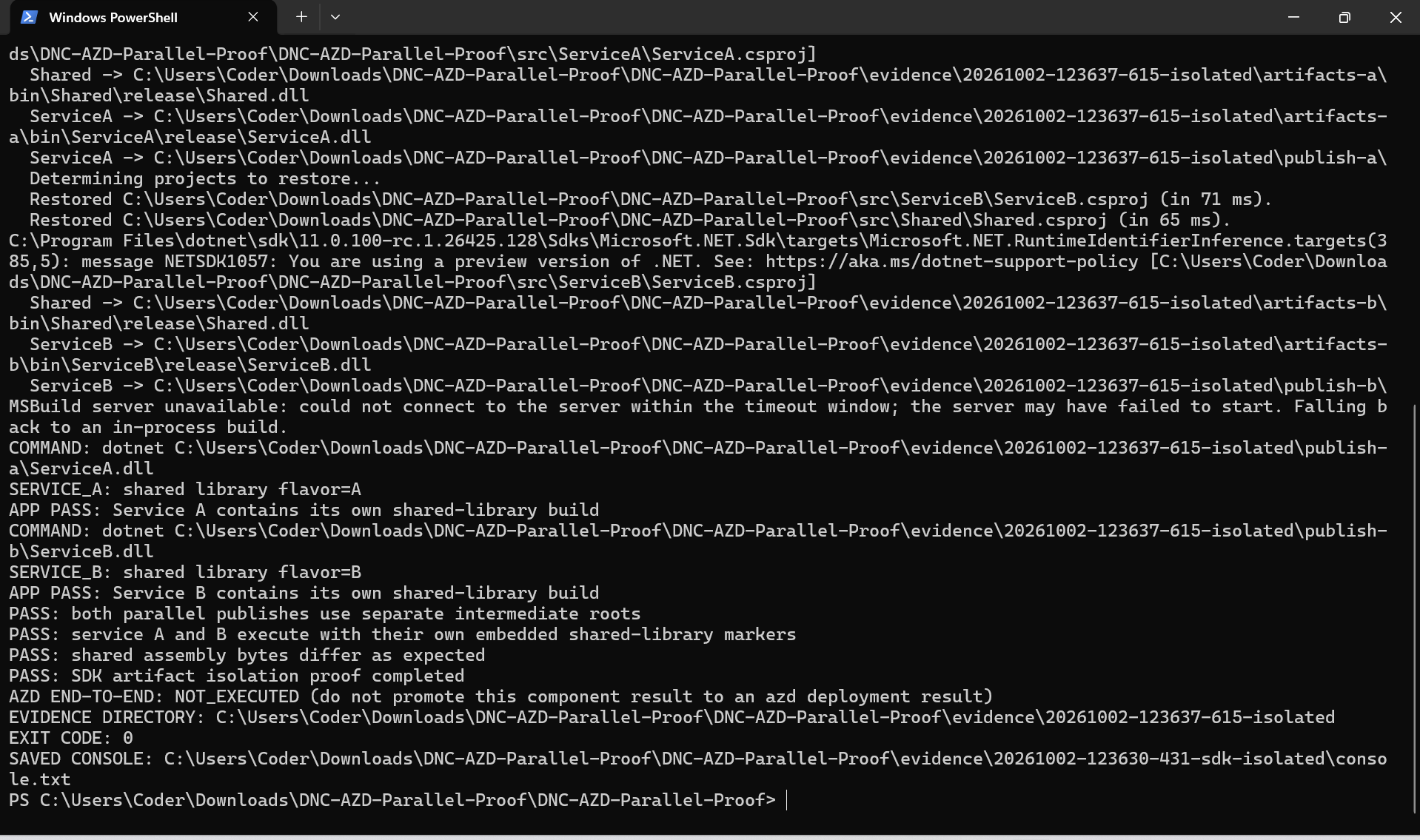
The receipt records five successful process exit checks and two PASS records for the assembly hashes and intermediate roots. The console also reported an unavailable MSBuild server and a successful fallback to an in-process build. That fallback did not prevent either service from producing and executing the expected package.
The sample proves that this pair of concurrent publications kept its artifacts independent. It does not measure deployment speed or establish that every project graph is safe under arbitrary parallelism. Keep the output directories, process logs, receipt, and SDK version together when comparing another machine or toolchain.
Diagnose a real pipeline without depending on a race
Start by identifying which processes can write the same Shared intermediate root. Compare configuration, target framework, runtime identifier, and custom build properties, then assign unique writable roots to concurrently built graphs. Inspect custom build targets too: a generated file written to a hard-coded path outside the SDK artifacts tree can still be shared.
The optional shared-output mode removes the per-service artifacts paths while keeping the final publish directories distinct. It may report NO_RACE_OBSERVED, and that is an honest result: process scheduling can hide a collision. A failing restore or compiler invocation needs its own log review before you attribute it to shared build state.
powershell -NoProfile -ExecutionPolicy Bypass -File .\Verify-ParallelPublish.ps1 -Mode SharedNo shared-mode result is reported here because that mode was not part of the supplied Windows evidence. Use it as a diagnostic, not as a requirement that an older or unisolated run must fail. The stronger acceptance condition is that the isolated run produces the right assemblies and separate intermediate directories.
If you cannot isolate a toolchain or custom generator safely, serialize the conflicting builds until you can verify the boundary. Treat this as a build-stage control; it need not force unrelated upload or deployment stages to be serial. On failure, retain evidence for diagnosis, and clean invocation-specific directories after their consumers finish rather than deleting a shared tree another job may still use.
How this relates to azd
The September 30, 2026 Azure Developer CLI roundup discusses .NET parallel-build artifact isolation. The released azure-dev-cli_1.34.2 build-gate source shows a context-dependent path: when a build gate is supplied and the SDK supports artifacts paths, it uses a service-specific temporary root; unsupported SDKs or setup failures take a serialized fallback. When that context has no build gate, this function invokes the build directly.
Those details are source-backed context, not observations from this SDK-only demo. Running azd package --all would also need its own evidence and would not automatically prove the concurrent deployment graph uses the same context. No azd packaging, Azure authentication, resource provisioning, or deployment result is claimed here, and the fresh September article is not evidence that the feature first appeared that month.
References
- Microsoft: artifacts output layout — artifact roots, project separation, and build pivots.
- Azure SDK Blog: September 2026 azd roundup — current context for parallel .NET builds.
- azd 1.34.2 build-gate source — artifact isolation and the context-dependent serialized fallback.
- azd 1.34.2 .NET CLI implementation — SDK support and artifacts-path arguments.
Demo source code: View the complete runnable example on GitHub.
Found this useful? Support more practical developer content.