


Table of Contents
Introduction
Creating angular datagrids is a common yet challenging task in web development. Whether you’re building dashboards, admin panels, or reports, a robust DataGrid is essential. In this article, I’ll show you how to implement a reusable Angular DataGrid component packed with features like sorting, filtering, and custom templates. By the end, you’ll have a powerful table component that’s easy to integrate and customize.
Watch the Reusable Angular DataGrid Component in Action!
<dnc-datagrid [Items]="employees">
  <dnc-datagrid-column [value]="'id'" header="ID" width="8%" [filterable]="true" [sortable]="true"></dnc-datagrid-column>
  <dnc-datagrid-column [value]="'name'" header="Name" align="left" [filterable]="true" [sortable]="true"></dnc-datagrid-column>
  <dnc-datagrid-column [value]="'department'" header="Department" [filterable]="true" [sortable]="true"></dnc-datagrid-column>
  <dnc-datagrid-column [value]="'designation'" header="Designation" [filterable]="true" [sortable]="true"></dnc-datagrid-column>
  <dnc-datagrid-column [value]="'age'" header="Age" width="10%" align="center" [filterable]="true" [sortable]="true"></dnc-datagrid-column>
  <dnc-datagrid-column [value]="'isManager'" header="Manager" align="center">
    <ng-template let-item>
      {{item.isManager ? 'Yes' : 'No'}}
    </ng-template>
  </dnc-datagrid-column>
  <dnc-datagrid-column [value]="'salary'" header="Salary" width="10%" format="1.0-2" align="right" [filterable]="true" [sortable]="true"></dnc-datagrid-column>
  <dnc-datagrid-column [value]="'address'" header="Address" align="right">
    <ng-template let-item>
      {{ item.address?.country }}, {{ item.address?.city }}
    </ng-template>
  </dnc-datagrid-column>
</dnc-datagrid>
If you’re interested in creating reusable DataGrid components in other frameworks, you might find my guide, Creating a Reusable Blazor DataGrid Component, helpful.
Why You Need a Reusable Angular DataGrid Component
Tables are a core part of many web applications. But let’s face it—coding one from scratch every time isn’t fun. Here’s why using a reusable Angular DataGrid component can save you time and effort:
- Consistency: Maintain uniform styling and functionality across your app.
- Efficiency: Reduce repetitive code by using a single component everywhere.
- Customizability: Easily add new features like filters, templates, or sort options.
Features of This Angular DataGrid
This reusable DataGrid component is designed to handle a variety of use cases:
- Sorting: Toggle ascending/descending sort on column headers.
- Filtering: Flexible filter types, including “Contains,” “StartsWith,” and more.
- Dynamic Columns: Add columns declaratively with
<dnc-datagrid-column>. - Custom Templates: Use Angular templates to display complex data like icons, buttons, or nested objects.
- Responsive Design: Customize column width, alignment, and formatting with simple inputs.
Building the Reusable Angular DataGrid Component
To start, create a new Angular project if you don’t have one already:
ng new datagrid
cd datagrid
Create the DataGrid Component
Run the following Angular CLI command to generate the DataGrid component:
ng generate component dnc-datagrid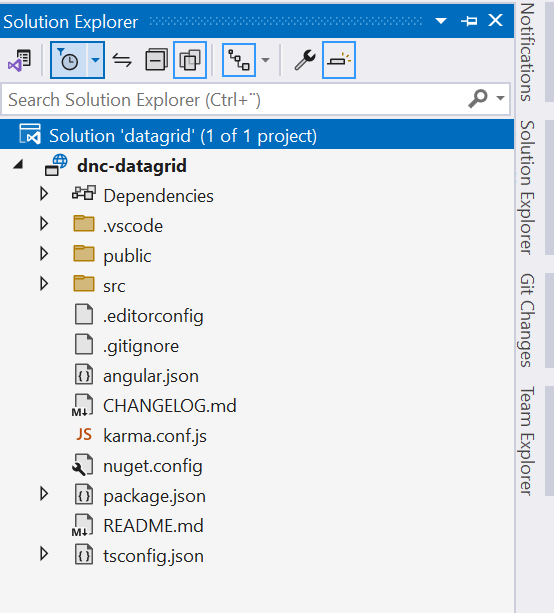
In dnc-datagrid.component.ts, define the main logic for handling items, columns, sorting, and filtering.
import {
  Component,
  ContentChildren,
  Input,
  QueryList,
  AfterContentInit,
} from '@angular/core';
import { DncDatagridColumnComponent } from '../dnc-datagrid-column/dnc-datagrid-column.component';

@Component({
  selector: 'dnc-datagrid',
  templateUrl: './dnc-datagrid.component.html',
  styleUrl: './dnc-datagrid.component.css'
})
export class DncDatagridComponent<T> implements AfterContentInit {
  @Input() Items: T[] = [];
  @ContentChildren(DncDatagridColumnComponent) columns!: QueryList<DncDatagridColumnComponent>;

  filteredItems: T[] = [];
  filters: {
    [key: string]: { value: string; type: string; dropdownVisible: boolean };
  } = {};
  sortColumn: string | null = null;
  sortDirection: 'asc' | 'desc' | null = null;

  filterTypes: string[] = [
    'Reset',
    'EqualTo',
    'NotEqualTo',
    'Contains',
    'IndexOf',
    'StartsWith',
    'EndsWith',
    'LessThan',
    'LessThanOrEqualTo',
    'GreaterThan',
    'GreaterThanOrEqualTo',
  ];

  ngAfterContentInit() {
    this.filteredItems = [...this.Items];
    this.columns.forEach((column) => {
      if (column.filterable) {
        this.filters[column.value] = {
          value: '',
          type: 'Reset',
          dropdownVisible: false,
        };
      }
    });
  }

  applyFilters() {
    this.filteredItems = this.Items.filter((item) => {
      return this.columns.toArray().every((column) => {
        if (!column.filterable) return true;
        const { value, type } = this.filters[column.value];
        const cellValue = column.getValue(item)?.toString() || '';

        switch (type) {
          case 'Reset':
            return true;
          case 'EqualTo':
            return value === '' || cellValue === value;
          case 'NotEqualTo':
            return value === '' || cellValue !== value;
          case 'Contains':
            return value === '' || cellValue.includes(value);
          case 'IndexOf':
            return value === '' || cellValue.indexOf(value) !== -1;
          case 'StartsWith':
            return value === '' || cellValue.startsWith(value);
          case 'EndsWith':
            return value === '' || cellValue.endsWith(value);
          case 'LessThan':
            return value === '' || parseFloat(cellValue) < parseFloat(value);
          case 'LessThanOrEqualTo':
            return value === '' || parseFloat(cellValue) <= parseFloat(value);
          case 'GreaterThan':
            return value === '' || parseFloat(cellValue) > parseFloat(value);
          case 'GreaterThanOrEqualTo':
            return value === '' || parseFloat(cellValue) >= parseFloat(value);
          default:
            return true;
        }
      });
    });

    if (this.sortColumn) {
      this.sort(this.sortColumn, this.sortDirection!);
    }
  }

  toggleFilterDropdown(columnValue: string) {
    this.filters[columnValue].dropdownVisible = !this.filters[columnValue]
      .dropdownVisible;
  }

  setFilterType(columnValue: string, type: string) {
    this.filters[columnValue].type = type;
    if (type === 'Reset') {
      this.filters[columnValue].value = '';
    }
    this.filters[columnValue].dropdownVisible = false;
    this.applyFilters();
  }

  toggleSort(columnValue: string) {
    if (this.sortColumn === columnValue) {
      this.sortDirection = this.sortDirection === 'asc' ? 'desc' : 'asc';
    } else {
      this.sortColumn = columnValue;
      this.sortDirection = 'asc';
    }
    this.sort(columnValue, this.sortDirection!);
  }

  getSortIconClass(columnValue: string): string {
    if (this.sortColumn === columnValue) {
      return this.sortDirection === 'asc'
        ? 'fa fa-arrow-up'
        : 'fa fa-arrow-down';
    }
    return 'fa fa-sort';
  }

  getFilterIconClass(columnValue: string): string {
    const filter = this.filters[columnValue];
    if (filter.value || filter.type !== 'Reset') {
      return 'fa fa-filter active-filter-icon';
    }
    return 'fa fa-filter';
  }

  getFilterTooltip(columnValue: string): string {
    const filter = this.filters[columnValue];
    if (filter.value || filter.type !== 'Reset') {
      return `Filter: ${filter.type} (${filter.value || 'All'})`;
    }
    return 'No filter applied';
  }

  sort(columnValue: string, direction: 'asc' | 'desc') {
    this.sortColumn = columnValue;
    this.sortDirection = direction;

    this.filteredItems.sort((a, b) => {
      const valueA = this.resolveValue(a, columnValue);
      const valueB = this.resolveValue(b, columnValue);

      if (valueA < valueB) return direction === 'asc' ? -1 : 1;
      if (valueA > valueB) return direction === 'asc' ? 1 : -1;
      return 0;
    });
  }

  private resolveValue(obj: any, path: string): any {
    return path.split('.').reduce((acc, part) => acc && acc[part], obj);
  }

  formatFilterType(type: string): string {
    return type.replace(/([A-Z])/g, ' $1').trim();
  }
}
In dnc-datagrid.component.html, define the table structure:
<table class="dnc-datagrid">
  <thead>
    <tr>
      <th *ngFor="let column of columns"
          [style.width]="column.width"
          [style.textAlign]="column.align"
          (click)="column.sortable && toggleSort(column.value)"
          class="dnc-sortable-header">
        <div class="dnc-header-container">
          {{ column.header || column.value }}
          <span *ngIf="column.sortable" class="dnc-sort-icon">
            <i [class]="getSortIconClass(column.value)"></i>
          </span>
        </div>
      </th>
    </tr>
    <tr class="dnc-filter-row">
      <th *ngFor="let column of columns">
        <div *ngIf="column.filterable" class="dnc-filter-container">
          <input [(ngModel)]="filters[column.value].value"
                 (ngModelChange)="applyFilters()"
                 placeholder="Filter..." />
          <span class="dnc-filter-icon"
                (click)="toggleFilterDropdown(column.value)">
            <i [class]="getFilterIconClass(column.value)"
               [title]="getFilterTooltip(column.value)"></i>
          </span>
          <div class="dnc-filter-dropdown"
               *ngIf="filters[column.value]?.dropdownVisible">
            <ul>
              <li *ngFor="let type of filterTypes"
                  [class.selected-filter-type]="filters[column.value].type === type"
                  (click)="setFilterType(column.value, type)">
                {{ formatFilterType(type) }}
              </li>
            </ul>
          </div>
        </div>
      </th>
    </tr>
  </thead>
  <tbody>
    <tr *ngFor="let item of filteredItems">
      <td *ngFor="let column of columns" [style.textAlign]="column.align">
        <ng-container *ngIf="!column.template">
          {{
             column.format
               ? (column.getValue(item) | number: column.format)
               : column.getValue(item)
          }}
        </ng-container>
        <ng-container *ngIf="column.template">
          <ng-container *ngTemplateOutlet="column.template; context: { $implicit: item }"></ng-container>
        </ng-container>
      </td>
    </tr>
  </tbody>
</table>
In datagrid.component.css, add basic styling:
.dnc-datagrid {
  width: 100%;
  border-collapse: collapse;
}

  .dnc-datagrid th,
  .dnc-datagrid td {
    padding: 8px;
    border: 1px solid #ddd;
  }

.dnc-header-container {
  display: flex;
  justify-content: space-between;
  align-items: center;
}

.dnc-sortable-header {
  cursor: pointer;
  user-select: none;
}

  .dnc-sortable-header .dnc-sort-icon {
    margin-left: 8px;
    pointer-events: none;
  }

.dnc-sort-icon i {
  color: #666;
}

.dnc-filter-row th {
  padding: 5px;
  position: relative;
}

.dnc-filter-container {
  display: flex;
  align-items: center;
  position: relative;
}

  .dnc-filter-container input {
    width: 100%;
    box-sizing: border-box;
    font-size: 0.8em;
    padding: 4px;
    font-style:italic;
  }

.dnc-filter-icon {
  margin-left: -25px;
  cursor: pointer;
  font-size: 0.9em;
}

.dnc-filter-dropdown {
  position: absolute;
  top: 100%;
  left: 0;
  background: #fff;
  border: 1px solid #ddd;
  z-index: 1000;
  width: max-content;
  box-shadow: 0 4px 6px rgba(0, 0, 0, 0.1);
  text-align: left;
  font-weight:normal;
}

  .dnc-filter-dropdown ul {
    list-style: none;
    padding: 0;
    margin: 0;
  }

  .dnc-filter-dropdown li {
    padding: 8px;
    cursor: pointer;
    font-size: 0.85em;
  }

    .dnc-filter-dropdown li:hover {
      background: #f0f0f0;
    }

.active-filter-icon {
  color: #007bff;
}

.selected-filter-type {
  background-color: #007bff;
  color: white;
}

  .selected-filter-type:hover {
    background-color: #0056b3;
    color: black;
    cursor: pointer;
  }
Second: Create a dnc-datagrid-column.component component to handle column-specific properties like sorting and filtering.
Generate the column component:
ng generate component dnc-datagrid-columnIn the dnc-datagrid-column.ts
import { Component, ContentChild, Input, TemplateRef } from '@angular/core';

@Component({
  selector: 'dnc-datagrid-column',
  template: '',
})
export class DncDatagridColumnComponent {
  @Input() value!: string;
  @Input() header?: string;
  @Input() width?: string;
  @Input() align?: string = 'left';
  @Input() format?: string;
  @Input() filterable: boolean = false;
  @Input() sortable: boolean = false;
  @ContentChild(TemplateRef) template: TemplateRef<any> | null = null;

  getValue(item: any): any {
    return this.resolveProperty(item, this.value);
  }

  private resolveProperty(obj: any, path: string): any {
    return path.split('.').reduce((acc, part) => acc && acc[part], obj);
  }
}
How to Use the Angular DataGrid Component
Implementing this DataGrid component in your Angular app is as simple as copy-pasting a few lines of code. Let’s break it down step-by-step.
1. Install the Component
Add the DncDatagrid and DncDatagridColumn components to your Angular project.
2. Add Data
Pass an array of data to the Items property of the <dnc-datagrid> component.
3. Define Columns
Use the <dnc-datagrid-column> component to define column headers, properties, and custom templates.
<dnc-datagrid [Items]="employees">
  <dnc-datagrid-column [value]="'id'" header="ID" width="8%" [filterable]="true" [sortable]="true"></dnc-datagrid-column>
  <dnc-datagrid-column [value]="'name'" header="Name" align="left" [filterable]="true" [sortable]="true"></dnc-datagrid-column>
  <dnc-datagrid-column [value]="'department'" header="Department" [filterable]="true" [sortable]="true"></dnc-datagrid-column>
  <dnc-datagrid-column [value]="'designation'" header="Designation" [filterable]="true" [sortable]="true"></dnc-datagrid-column>
  <dnc-datagrid-column [value]="'age'" header="Age" width="10%" align="center" [filterable]="true" [sortable]="true"></dnc-datagrid-column>
  <dnc-datagrid-column [value]="'isManager'" header="Manager" align="center">
    <ng-template let-item>
      {{item.isManager ? 'Yes' : 'No'}}
    </ng-template>
  </dnc-datagrid-column>
  <dnc-datagrid-column [value]="'salary'" header="Salary" width="10%" format="1.0-2" align="right" [filterable]="true" [sortable]="true"></dnc-datagrid-column>
  <dnc-datagrid-column [value]="'address'" header="Address" align="right">
    <ng-template let-item>
      {{ item.address?.country }}, {{ item.address?.city }}
    </ng-template>
  </dnc-datagrid-column>
</dnc-datagrid>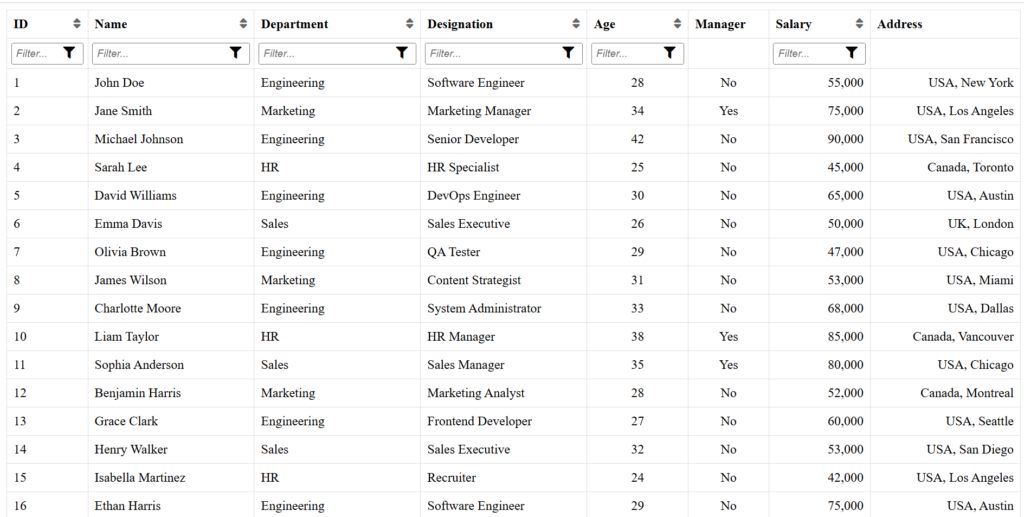
The Code Behind the Magic
Here’s a quick look at how this component is built:
The DncDatagridColumnComponent
This component defines each column’s properties, such as value, header, align, and more. It also supports custom templates for advanced formatting.
@Component({
  selector: 'dnc-datagrid-column',
  template: '',
})
export class DncDatagridColumnComponent {
  @Input() value!: string;
  @Input() header?: string;
  @Input() align?: string = 'left';
  @Input() filterable: boolean = false;
  @Input() sortable: boolean = false;
}
The DncDatagridComponent
This is the main DataGrid component, responsible for rendering the table, managing filters, and handling sorting logic.
@Component({
  selector: 'dnc-datagrid',
  templateUrl: './dnc-datagrid.component.html',
})
export class DncDatagridComponent<T> implements AfterContentInit {
  @Input() Items: T[] = [];
  @ContentChildren(DncDatagridColumnComponent) columns!: QueryList<DncDatagridColumnComponent>;

  filteredItems: T[] = [];
  sortColumn: string | null = null;
  sortDirection: 'asc' | 'desc' | null = null;

  applyFilters() {
    // Filtering logic
  }

  toggleSort(columnValue: string) {
    // Sorting logic
  }
}
Conclusion
This reusable Angular DataGrid component is more than just a table—it’s a tool that empowers developers to build elegant, feature-rich UIs quickly and efficiently. Whether you’re creating a complex dashboard or a simple admin panel, this component will save you time and effort.
If you found this guide helpful, share it with your developer friends, or drop your questions in the comments below. Happy coding
Sample code
You can explore the complete example code for the Reusable Angular DataGrid Component project on my GitHub repository!
Enjoy This Blog?


Discover more from Dot Net Coder
Subscribe to get the latest posts sent to your email.