


Table of Contents
In this post, we will create a reusable table / datagrid component in Blazor with filtering and sorting capabilities that can be used in various Blazor projects.
In the previous post, we created a JSON-based localization service for the Blazor apps that can be used with DataGrid Blazor.
Take a look at the final Table / Datagrid in blazor project:
<CSTable Items="employees" TItem="Employee" ShowFiletr="true">
    <CSTableColumn Value="(Employee v) => v.Id" Width="10%"></CSTableColumn>
    <CSTableColumn Value="(Employee v) => v.Name" Align="left"></CSTableColumn>
    <CSTableColumn Value="(Employee v) => v.Department"></CSTableColumn>
    <CSTableColumn Value="(Employee v) => v.Designation"></CSTableColumn>
    <CSTableColumn Value="(Employee v) => v.Age" Width="10%" Align="center"></CSTableColumn>
    <CSTableColumn Value="(Employee v) => v.IsManager" Header="Manager" Align="center"></CSTableColumn>
    <CSTableColumn Value="(Employee v) => v.Salary" Format="C2" Align="right"></CSTableColumn>
    <CSTableColumn Value="(Employee v) => v.Address" Align="right">
            @context.Address?.Country, @context.Address?.City
        </CSTableColumn>
</CSTable>
Creating the Datagrid blazor Razor class library project
1. Open Visual Studio 2022 and click the Create a new project button.
2. Select the Class library project and click the Next button.
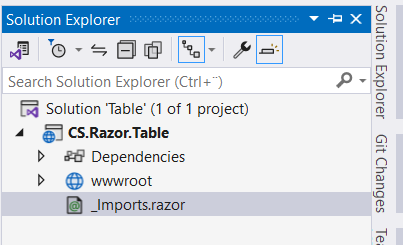
3. Enter CS.Table.Razor in the Project name textbox and Table in the Solution name and click the Next button.
4. Select .NET 7.0 as the version of the Framework to use and click the Create button.
Also read https://dotnetcoder.com/httpclient-service-in-asp-net-core-with-entra-id/
Creating CSTable component
1. Create a new project folder named Interfaces, and add the following interface files named ICSTable and ICSTableColumn.
namespace CS.Razor.Table.Interfaces
{
    public interface ICSTable<TItem>
    {
        void AddColumn(ICSTableColumn column);
        void AddHeader(string header);
        void SetSorterExpression(Expression<Func<IEnumerable<TItem>, IOrderedEnumerable<TItem>>> expression);
        void RemoveAddFilterExpression(KeyValuePair<string, Expression<Func<TItem, bool>>> kvp);
        void RemoveFilterExpression(string key);
    }
}
The generic ICSTable<TItem> is responsible for adding an ICSTableColumn and a header row to the table / datagrid blazor, and for setting the sorter and filter expressions that will be created later in this post.
namespace CS.Razor.Table.Interfaces
{
    public interface ICSTableColumn
    {
    }
}
2. Add a new project class file with the name ICSTableRow as shown below
namespace CS.Razor.Table
{
    public class CSTableRow<TItem>
    {
        public ICSTable<TItem> Table { get; set; }
        public bool IsHeader { get; set; }
        public bool IsFilter { get; set; }
        public int RowIndex { get; set; }
        public TItem RowData { get; set; }
        public List<string> Headers { get; set; }
    }
}
The generic CSTableRow<TItem> class contains the data for each row in the table / datagrid blazor, as well as other information about the row indicating whether it is a header row or a filter.
3. Right-click the CS.Razor.Table project and add a class derived from the ComponentBase base class and the ICSTable<TItem> interface, named CSTableComponent
namespace CS.Razor.Table
{
    public partial class CSTableComponent<TItem> : ComponentBase, ICSTable<TItem>
    {
        [Parameter]
        public RenderFragment ChildContent { get; set; }
        [Parameter]
        public IEnumerable<TItem> Items { get; set; }
        [Parameter]
        public string Width { get; set; } = "100%";
        [Parameter]
        public bool ShowFiletr { get; set; }
        protected readonly List<ICSTableColumn> columns = new List<ICSTableColumn>();
        private Expression<Func<IEnumerable<TItem>, IOrderedEnumerable<TItem>>> sortExpression;
        private Dictionary<string, Expression<Func<TItem, bool>>> filters = new Dictionary<string, Expression<Func<TItem, bool>>>();
        protected IEnumerable<TItem> filteredItems = new List<TItem>();
        protected List<string> headers;
        protected override void OnInitialized()
        {
            filteredItems = Items.ToList();
        }
        protected override void OnAfterRender(bool firstRender)
        {
            if (firstRender)
            {
                StateHasChanged();
            }
        }
        public void AddColumn(ICSTableColumn column)
        {
            columns.Add(column);
        }
        public void AddHeader(string header)
        {
            headers ??= new List<string>();
            headers.Add(header);
        }
        public void SetSorterExpression(Expression<Func<IEnumerable<TItem>, IOrderedEnumerable<TItem>>> expression)
        {
            sortExpression = expression;
            StateHasChanged();
        }
        public void RemoveAddFilterExpression(KeyValuePair<string, Expression<Func<TItem, bool>>> kvp)
        {
            filters.Remove(kvp.Key);
            filters.Add(kvp.Key, kvp.Value);
            StateHasChanged();
        }
        public void RemoveFilterExpression(string key)
        {
            var removed = filters.Remove(key);
            if (removed)
            {
                StateHasChanged();
            }
        }
        public IEnumerable<TItem> FilteredItems
        {
            get
            {
                if (filters.Count > 0)
                {
                    var list = filters.Select(kvp => kvp.Value.Compile());
                    filteredItems = Items.Where(v => list.All(filter => filter(v)));
                }
                else
                {
                    filteredItems = Items;
                }
                if (sortExpression != null)
                {
                    var compiledExpression = sortExpression.Compile();
                    filteredItems = compiledExpression(filteredItems);
                }
                return filteredItems;
            }
        }
    }
}
The CSTbleComponent receives the Items to be displayed as parameter and the ChildContent parameter renders all columns of the table / datagrid blazor.
The methods SetSorterExpression , RemoveAddFilterExpression and RemoveFilterExpression are responsible for setting, adding and removing the expressions for filtering and sorting the table / datagrid blazor Items .
TheAddColumn and AddHeader methods are responsible for adding columns and headers to the table / datagrid blazor.
The FilteredItems property is available for returning the sorted and filtered items.
4. Right-click the CS.Razor.Table project and add a Razor component derived from the CSTableComponent partial class named CSTable.razor as shown below.
@inherits CSTableComponent<TItem>
@typeparam TItem
    @{
            <CascadingValue Value="@(new CSTableRow<TItem> { Table = this, IsHeader = true, Headers = headers})">
                @ChildContent
            </CascadingValue>
    }
        @{
            if (ShowFiletr)
            {
                    <CascadingValue Value="@(new CSTableRow<TItem> { Table = this, IsFilter= true})">
                        @ChildContent
                    </CascadingValue>
            }
            if (FilteredItems != null && FilteredItems.Count() > 0)
            {
                var index = 0;
                foreach (var item in FilteredItems)
                {
                        <CascadingValue Value="@(new CSTableRow<TItem> { Table = this, IsHeader = false, RowIndex = index, RowData = item })">
                            @ChildContent
                        </CascadingValue>
                }
            }
            else
            {
                        No result found
            }
        }
5. Create a new project folder named Expressions and add an enum named FilterOperator, and a class file named Filter (see below).
namespace CS.Razor.Table.Expressions
{
    public enum FilterOperator
    {
        EqualTo,
        NotEqualTo,
        Contains,
        IndexOf,
        StartsWith,
        EndsWith,
        LessThan,
        LessThanOrEqualTo,
        GreaterThan,
        GreaterThanOrEqualTo,
        Default
    }
}
namespace CS.Razor.Table.Expressions
{
public class Filter
{
public FilterOperator FilterOperator { get; set; }
public string PropertyName { get; set; }
public string SearchTerm { get; set; }
}
}6. Right-click the Expressions folder and add a class file called ExpressionBuilder
namespace CS.Razor.Table.Expressions
{
    public class ExpressionBuilder
    {
        public static Expression<Func<TItem, bool>> GetFilterExpression<TItem>(Filter filter)
        {
            Type type = typeof(TItem).GetProperty(filter.PropertyName).PropertyType;
            if (type.IsGenericType && type.GetGenericTypeDefinition() == typeof(Nullable<>))
            {
                type = Nullable.GetUnderlyingType(type);
            };
            switch (Type.GetTypeCode(type))
            {
                case TypeCode.String:
                    return GetExpressionString<TItem>(filter);
                case TypeCode.Byte:
                case TypeCode.SByte:
                case TypeCode.UInt16:
                case TypeCode.UInt32:
                case TypeCode.UInt64:
                case TypeCode.Int16:
                case TypeCode.Int32:
                case TypeCode.Int64:
                case TypeCode.Decimal:
                case TypeCode.Double:
                case TypeCode.Single:
                    return GetExpressionNumeric<TItem>(filter);
                case TypeCode.DateTime:
                    return GetExpressionDateTime<TItem>(filter);
                case TypeCode.Boolean:
                    return GetExpressionBool<TItem>(filter);
                default:
                    return null;
            }
        }
        private static Expression<Func<TItem, bool>> GetExpressionString<TItem>(Filter filter)
        {
            if (string.IsNullOrEmpty(filter.SearchTerm))
            {
                return null;
            }
            ParameterExpression parameter = Expression.Parameter(typeof(TItem), "item");
            Expression property = GetPropertyExpression(parameter, filter.PropertyName);
            MethodInfo Operator;
            switch (filter.FilterOperator)
            {
                case FilterOperator.EqualTo:
                    Operator = typeof(string).GetMethod("Equals", new Type[] { typeof(string) });
                    break;
                case FilterOperator.Contains:
                    Operator = typeof(string).GetMethod("Contains", new Type[] { typeof(string) });
                    break;
                case FilterOperator.StartsWith:
                    Operator = typeof(string).GetMethod("StartsWith", new Type[] { typeof(string) });
                    break;
                case FilterOperator.EndsWith:
                    Operator = typeof(string).GetMethod("EndsWith", new Type[] { typeof(string) });
                    break;
                case FilterOperator.IndexOf:
                    ConstantExpression constant = Expression.Constant(filter.SearchTerm, typeof(string));
                    MethodCallExpression indexOfmethod = Expression.Call(property,
                        "IndexOf",
                        null,
                        constant,
                        Expression.Constant(StringComparison.InvariantCultureIgnoreCase));
                    BinaryExpression indexOfBody = Expression.GreaterThanOrEqual(indexOfmethod, Expression.Constant(0));
                    // Type check // We don't need type check
                    // typeof(searchTerm) == typeof(string)
                    TypeBinaryExpression checkForType = Expression.TypeEqual(Expression.Constant(filter.SearchTerm), typeof(string));
                    ConditionalExpression checkForTypeCondition = Expression.Condition(checkForType, indexOfBody, Expression.Constant(false));
                    BinaryExpression checkForNull = Expression.Equal(property, Expression.Constant(null));
                    ConditionalExpression checkForNullCondition = Expression.Condition(checkForNull, Expression.Constant(false), indexOfBody);
                    BinaryExpression conditions = Expression.AndAlso(checkForNullCondition, checkForTypeCondition);
                    return Expression.Lambda<Func<TItem, bool>>(conditions, parameter);
                case FilterOperator.NotEqualTo:
                    Expression notEqualMethod = Expression.NotEqual(property, Expression.Constant(filter.SearchTerm));
                    return Expression.Lambda<Func<TItem, bool>>(notEqualMethod, parameter);
                default:
                    Operator = typeof(string).GetMethod("Contains", new Type[] { typeof(string) });
                    break;
            }
            MethodInfo trim = typeof(string).GetMethod("Trim", Type.EmptyTypes);
            MethodCallExpression trimMethod = Expression.Call(property, trim);
            MethodInfo toLower = typeof(string).GetMethod("ToLower", Type.EmptyTypes);
            MethodCallExpression toLowerMethod = Expression.Call(trimMethod, toLower);
            ConstantExpression trimConstant = Expression.Constant(filter.SearchTerm.ToLower(), typeof(string));
            MethodCallExpression body = Expression.Call(toLowerMethod, Operator, trimConstant);
            BinaryExpression nullCkeck = Expression.Equal(property, Expression.Constant(null));
            ConditionalExpression condition = Expression.Condition(nullCkeck, Expression.Constant(false), body);
            return Expression.Lambda<Func<TItem, bool>>(condition, parameter);
        }
        private static Expression<Func<TItem, bool>> GetExpressionNumeric<TItem>(Filter filter)
        {
            ParameterExpression parameter = Expression.Parameter(typeof(TItem), "item");
            Expression property = GetPropertyExpression(parameter, filter.PropertyName);
            bool nullableProperty = IsNullableProperty(property);
            object parsedSearchTerm = ParseNumeric(property.Type, filter.SearchTerm, nullableProperty, out Type nonNullableType);
            Expression comparison;
            switch (filter.FilterOperator)
            {
                case FilterOperator.EqualTo:
                    property = nullableProperty ? Expression.Convert(property, nonNullableType) : property;
                    comparison = Expression.Equal(property, Expression.Constant(parsedSearchTerm));
                    break;
                case FilterOperator.NotEqualTo:
                    property = nullableProperty ? Expression.Convert(property, nonNullableType) : property;
                    comparison = Expression.NotEqual(property, Expression.Constant(parsedSearchTerm));
                    break;
                case FilterOperator.GreaterThan:
                    property = nullableProperty ? Expression.Convert(property, nonNullableType) : property;
                    comparison = Expression.GreaterThan(property, Expression.Constant(parsedSearchTerm));
                    break;
                case FilterOperator.LessThan:
                    property = nullableProperty ? Expression.Convert(property, nonNullableType) : property;
                    comparison = Expression.LessThan(property, Expression.Constant(parsedSearchTerm));
                    break;
                case FilterOperator.GreaterThanOrEqualTo:
                    property = nullableProperty ? Expression.Convert(property, nonNullableType) : property;
                    comparison = Expression.GreaterThanOrEqual(property, Expression.Constant(parsedSearchTerm));
                    break;
                case FilterOperator.LessThanOrEqualTo:
                    property = nullableProperty ? Expression.Convert(property, nonNullableType) : property;
                    comparison = Expression.LessThanOrEqual(property, Expression.Constant(parsedSearchTerm));
                    break;
                case FilterOperator.Contains:
                case FilterOperator.StartsWith:
                    MethodInfo comparisonMethod = typeof(string).GetMethod(filter.FilterOperator == FilterOperator.Contains ? "Contains" : "StartsWith", new Type[] { typeof(string) });
                    MethodCallExpression convertMethod = Expression.Call(Expression.Convert(property, typeof(object)), typeof(object).GetMethod("ToString"));
                    ConstantExpression constant = Expression.Constant(filter.SearchTerm);
                    comparison = Expression.Call(convertMethod, comparisonMethod, constant);
                    break;
                default:
                    property = nullableProperty ? Expression.Convert(property, nonNullableType) : property;
                    comparison = Expression.Equal(property, Expression.Constant(parsedSearchTerm));
                    break;
            }
            Expression method = nullableProperty ?
                Expression.AndAlso(Expression.Equal(Expression.Property(property, "HasValue"), Expression.Constant(true)), comparison) :
                comparison;
            BinaryExpression nullCkeck = Expression.Equal(parameter, Expression.Constant(null));
            Expression condition = Expression.Condition(nullCkeck, Expression.Constant(false), method);
            return Expression.Lambda<Func<TItem, bool>>(condition, parameter);
        }
        private static Expression<Func<TItem, bool>> GetExpressionBool<TItem>(Filter filter)
        {
            ParameterExpression parameter = Expression.Parameter(typeof(TItem), "item");
            Expression property = GetPropertyExpression(parameter, filter.PropertyName);
            bool nullableProperty = IsNullableProperty(property);
            var nonNullableType = typeof(bool);
            Expression hasValue = null;
            if (nullableProperty)
            {
                hasValue = Expression.Property(property, "HasValue");
                property = Expression.Convert(property, nonNullableType);
            }
            var parsedSearchTerm = Convert.ToBoolean(filter.SearchTerm);
            var constant = Expression.Constant(parsedSearchTerm);
            Expression comparison = filter.FilterOperator switch
            {
                FilterOperator.EqualTo => Expression.Equal(property, constant),
                FilterOperator.NotEqualTo => Expression.NotEqual(property, constant),
                _ => Expression.Equal(property, constant),
            };
            Expression method = nullableProperty ?
                Expression.AndAlso(Expression.Equal(hasValue, Expression.Constant(true)), comparison) :
                comparison;
            BinaryExpression nullCkeck = Expression.Equal(parameter, Expression.Constant(null));
            Expression condition = Expression.Condition(nullCkeck, Expression.Constant(false), method);
            return Expression.Lambda<Func<TItem, bool>>(condition, parameter);
        }
        private static Expression<Func<TItem, bool>> GetExpressionDateTime<TItem>(Filter filter)
        {
            ParameterExpression parameter = Expression.Parameter(typeof(TItem), "item");
            Expression property = GetPropertyExpression(parameter, filter.PropertyName);
            bool nullableProperty = IsNullableProperty(property);
            var nonNullableType = typeof(DateTime);
            Expression hasValue = null;
            if (nullableProperty)
            {
                hasValue = Expression.Property(property, "HasValue");
                property = Expression.Convert(property, nonNullableType);
            }
            var parsedSearchTerm = Convert.ToDateTime(filter.SearchTerm, CultureInfo.InvariantCulture);
            var constant = Expression.Constant(parsedSearchTerm);
            Expression comparison = filter.FilterOperator switch
            {
                FilterOperator.EqualTo => Expression.Equal(property, constant),
                // Filter by date only without time
                //FilterOperator.EqualTo => Expression.Equal(Expression.Property(property, "Date"), Expression.Constant(parsedSearchTerm.Date)),
                FilterOperator.NotEqualTo => Expression.NotEqual(property, constant),
                FilterOperator.GreaterThan => Expression.GreaterThan(property, constant),
                FilterOperator.GreaterThanOrEqualTo => Expression.GreaterThanOrEqual(property, constant),
                FilterOperator.LessThan => Expression.LessThan(property, constant),
                FilterOperator.LessThanOrEqualTo => Expression.LessThanOrEqual(property, constant),
                _ => Expression.Equal(property, constant),
            };
            Expression method = nullableProperty ?
                Expression.AndAlso(Expression.Equal(hasValue, Expression.Constant(true)), comparison) :
                comparison;
            BinaryExpression nullCkeck = Expression.Equal(parameter, Expression.Constant(null));
            Expression condition = Expression.Condition(nullCkeck, Expression.Constant(false), method);
            return Expression.Lambda<Func<TItem, bool>>(condition, parameter);
        }
        private static Expression GetPropertyExpression(ParameterExpression parameter, string propertyName)
        {
            // Check for nested properties
            if (propertyName.IndexOf(".") > -1)
            {
                var properties = propertyName.Split('.');
                return properties.Aggregate(parameter, (Expression result, string next) => Expression.Property(result, next));
            }
            else
            {
                return Expression.Property(parameter, propertyName);
            }
        }
        private static object ParseNumeric(Type propertyType, string searchTerm, bool isNullableProperty, out Type nonNullableType)
        {
            nonNullableType = null;
            object parsedSearchTerm;
            if (isNullableProperty) // Nullable<>
            {
                if (propertyType == typeof(int?) || IsEnumOrNullableEnum(propertyType))
                {
                    nonNullableType = typeof(int);
                    parsedSearchTerm = int.Parse(searchTerm, CultureInfo.InvariantCulture);
                }
                else if (propertyType == typeof(short?))
                {
                    nonNullableType = typeof(short);
                    parsedSearchTerm = short.Parse(searchTerm, CultureInfo.InvariantCulture);
                }
                else if (propertyType == typeof(long?))
                {
                    nonNullableType = typeof(long);
                    parsedSearchTerm = long.Parse(searchTerm, CultureInfo.InvariantCulture);
                }
                else if (propertyType == typeof(decimal?))
                {
                    nonNullableType = typeof(decimal);
                    parsedSearchTerm = decimal.Parse(searchTerm, CultureInfo.InvariantCulture);
                }
                else
                {
                    nonNullableType = typeof(int);
                    parsedSearchTerm = int.Parse(searchTerm, CultureInfo.InvariantCulture);
                }
            }
            else
            {
                if (propertyType.IsEnum)
                {
                    try
                    {
                        parsedSearchTerm = Enum.ToObject(propertyType, int.Parse(searchTerm));
                    }
                    catch
                    {
                        parsedSearchTerm = Enum.ToObject(propertyType, 0);
                    }
                }
                else
                {
                    try
                    {
                        parsedSearchTerm = Convert.ChangeType(searchTerm, propertyType);
                    }
                    catch
                    {
                        parsedSearchTerm = (propertyType == typeof(long) || nonNullableType == typeof(long)) ? long.MaxValue : int.MaxValue;
                    }
                }
            }
            return parsedSearchTerm;
        }
        public static bool IsEnumOrNullableEnum(Type type) => type.IsEnum || (Nullable.GetUnderlyingType(type)?.IsEnum ?? false);
        private static bool IsNullableProperty(Expression property)
        {
            return property.Type.IsGenericType && property.Type.GetGenericTypeDefinition() == typeof(Nullable<>);
        }
    }
}
The ExpressionBuilder class has four methods that build dynamic queries with expression trees and return an expression based on the property type to filter data the reusable Datagrid component.
7. Right-click the CS.Razor.Table project and add a class derived from the ComponentBase base class and the ICSTableColumn interface, named CSTableColumnComponent
namespace CS.Razor.Table
{
    public partial class CSTableColumnComponent<TItem, TValue> : ComponentBase, ICSTableColumn
    {
        [Inject]
        IJSRuntime JSRuntime { get; set; }
        [CascadingParameter]
        public CSTableRow<TItem> TableRow { get; set; }
        [Parameter]
        public RenderFragment<TItem> ChildContent { get; set; }
        [Parameter]
        public Expression<Func<TItem, TValue>> Value { get; set; }
        [Parameter]
        public string Header { get; set; }
        [Parameter]
        public string Format { get; set; }
        [Parameter]
        public string Align { get; set; }
        [Parameter]
        public string Width { get; set; }
        [Parameter]
        public bool IsFilterable { get; set; } = true;
        protected bool AscendingOrder { get; set; }
        public bool HasChild => ChildContent != null;
        public bool IsHeader => TableRow.IsHeader;
        public bool IsFilter => TableRow.IsFilter;
        public string align => string.IsNullOrEmpty(Align) ? "" : $"text-align: {Align};";
        public string width => string.IsNullOrEmpty(Width) ? "" : $"width: {Width};";
        public object ColumnValue => GetColumnValue(Value);
        public string ColumnHeader => Header ?? (string)GetColumnHeader(Value.Body);
        public string HeaderProperty => (string)GetColumnHeader(Value.Body);
        protected string Operator { get; set; }
        protected Filter filter = new Filter() { FilterOperator = FilterOperator.Default };
        protected Dictionary<FilterOperator, string> dropdownOperators = new Dictionary<FilterOperator, string>();
        protected bool IsFilterDisabled => dropdownOperators.Count == 0 || !IsFilterable;
        protected bool IsSortingDisabled { get; set; }
        protected override void OnInitialized()
        {
            TableRow.Table.AddColumn(this);
            if (IsHeader)
            {
                TableRow.Table.AddHeader(ColumnHeader);
            }
            SetDropdownOperators();
            SetOperatorIcon(FilterOperator.Default);
        }
        public async Task SortAsync()
        {
            if(IsSortingDisabled) return;
            if (AscendingOrder)
            {
                TableRow.Table.SetSorterExpression(v => v.OrderBy(Value.Compile()));
            }
            else
            {
                TableRow.Table.SetSorterExpression(v => v.OrderByDescending(Value.Compile()));
            }
            await AddClasses();
            AscendingOrder = !AscendingOrder;
        }
        protected void SetFilterOperator(FilterOperator filterOperator)
        {
            filter.FilterOperator = filterOperator;
            SetOperatorIcon(filterOperator);
            FilterColum();
        }
        protected void FilterColum()
        {
            var propertyName = (string)GetColumnHeader(Value.Body);
            if (!string.IsNullOrEmpty(filter.SearchTerm))
            {
                filter.PropertyName = propertyName;
                Expression<Func<TItem, bool>> expression = ExpressionBuilder.GetFilterExpression<TItem>(filter);
                if (expression != null)
                {
                    var kvp = new KeyValuePair<string, Expression<Func<TItem, bool>>>(propertyName, expression);
                    TableRow.Table.RemoveAddFilterExpression(kvp);
                }
            }
            else
            {
                TableRow.Table.RemoveFilterExpression(propertyName);
            }
        }
        private void SetDropdownOperators()
        {
            var propertyName = (string)GetColumnHeader(Value.Body);
            Type type = typeof(TItem).GetProperty(propertyName).PropertyType;
            if (type.IsGenericType && type.GetGenericTypeDefinition() == typeof(Nullable<>))
            {
                type = Nullable.GetUnderlyingType(type);
            };
            switch (Type.GetTypeCode(type))
            {
                case TypeCode.String:
                    dropdownOperators.Add(FilterOperator.EqualTo, "= Equals");
                    dropdownOperators.Add(FilterOperator.NotEqualTo, "≠ Does not equal (Sensetive)");
                    dropdownOperators.Add(FilterOperator.Contains, "Contains");
                    dropdownOperators.Add(FilterOperator.IndexOf, "Contains (Index of)");
                    dropdownOperators.Add(FilterOperator.StartsWith, "Starts with");
                    dropdownOperators.Add(FilterOperator.EndsWith, "Ends with");
                    break;
                case TypeCode.Byte:
                case TypeCode.SByte:
                case TypeCode.UInt16:
                case TypeCode.UInt32:
                case TypeCode.UInt64:
                case TypeCode.Int16:
                case TypeCode.Int32:
                case TypeCode.Int64:
                case TypeCode.Decimal:
                case TypeCode.Double:
                case TypeCode.Single:
                    dropdownOperators.Add(FilterOperator.EqualTo, "= Equals");
                    dropdownOperators.Add(FilterOperator.NotEqualTo, "≠ Does not equal");
                    dropdownOperators.Add(FilterOperator.GreaterThan, "> Greater than");
                    dropdownOperators.Add(FilterOperator.GreaterThanOrEqualTo, "≥ Greater than or equal");
                    dropdownOperators.Add(FilterOperator.LessThan, "< Less than");
                    dropdownOperators.Add(FilterOperator.LessThanOrEqualTo, "≤ Less than or equal");
                    dropdownOperators.Add(FilterOperator.StartsWith, "Starts with");
                    dropdownOperators.Add(FilterOperator.Contains, "Contains");
                    break;
                case TypeCode.DateTime:
                    dropdownOperators.Add(FilterOperator.EqualTo, "= Equals");
                    dropdownOperators.Add(FilterOperator.NotEqualTo, "≠ Does not equal");
                    dropdownOperators.Add(FilterOperator.GreaterThan, "> Greater than");
                    dropdownOperators.Add(FilterOperator.GreaterThanOrEqualTo, "≥ Greater than or equal");
                    dropdownOperators.Add(FilterOperator.LessThan, "< Less than");
                    dropdownOperators.Add(FilterOperator.LessThanOrEqualTo, "≤ Less than or equal");
                    break;
                case TypeCode.Boolean:
                    dropdownOperators.Add(FilterOperator.EqualTo, "= Equals");
                    dropdownOperators.Add(FilterOperator.NotEqualTo, "≠ Does not equal");
                    break;
                default:
                    dropdownOperators = new Dictionary<FilterOperator, string>();
                    IsSortingDisabled = true;
                    break;
            }
        }
        private void SetOperatorIcon(FilterOperator filterOperator)
        {
            switch (filterOperator)
            {
                case FilterOperator.EqualTo:
                    Operator = "=";
                    break;
                case FilterOperator.NotEqualTo:
                    Operator = "≠";
                    break;
                case FilterOperator.GreaterThan:
                    Operator = ">";
                    break;
                case FilterOperator.GreaterThanOrEqualTo:
                    Operator = "≥";
                    break;
                case FilterOperator.LessThan:
                    Operator = "<";
                    break;
                case FilterOperator.LessThanOrEqualTo:
                    Operator = "≤";
                    break;
                case FilterOperator.Contains:
                    Operator = "Contains";
                    break;
                case FilterOperator.StartsWith:
                    Operator = "Starts";
                    break;
                case FilterOperator.EndsWith:
                    Operator = "Ends";
                    break;
                case FilterOperator.IndexOf:
                    Operator = "Index";
                    break;
                default:
                    Operator = "";
                    break;
            }
        }
        private object GetColumnValue(Expression<Func<TItem, TValue>> expression)
        {
            var compiledExpression = expression.Compile();
            try
            {
                var value = compiledExpression(TableRow.RowData);
                return string.IsNullOrEmpty(Format) ? value : string.Format("{0:" + Format + "}", value);
            }
            catch
            {
                return null;
            }
        }
        private object GetColumnHeader(Expression expression)
        {
            try
            {
                switch (expression.NodeType)
                {
                    case ExpressionType.MemberAccess:
                        return ((MemberExpression)expression).Member.Name;
                    case ExpressionType.Convert:
                        return GetColumnHeader(((UnaryExpression)expression).Operand);
                    default:
                        throw new NotSupportedException(expression.NodeType.ToString());
                }
            }
            catch
            {
                return null;
            }
        }
        private async Task AddClasses()
        {
            string classes;
            if (AscendingOrder)
            {
                classes = "bi-arrow-up";
            }
            else
            {
                classes = "bi-arrow-down";
            }
            await JSRuntime.InvokeVoidAsync("applyHeaderStyle", ColumnHeader, classes);
            foreach (var header in TableRow.Headers)
            {
                if (header != ColumnHeader)
                {
                    await JSRuntime.InvokeVoidAsync("removeHeaderStyle", header);
                }
            }
        }
    }
}
The CSTableColumnComponent has some parameters to control the column, e.g. Header to set the column header, Width to control the column width, and IsFilterable to decide if you can filter the column.
The cascading parameter TableRow contains information about the column, whether it is a filter or a header and it contains the current row data in the reusable table/Datagrid Blazor component.
The GetColumnValue method receives the Value expression parameter and returns the current value of the column while GetColumnHeader returns the column header.
The SetFilterOperator method sets the selected FilterOperator in the filter member and then filters the column by calling the FilterColum method, which in turn retrieves the query expression from the fExpressionBuilder and adds it to or removes it from the filter dictionary in the parent CSTableComponent.
4. Right-click the CS.Razor.Table project and add a Razor component derived from the CSTableColumnComponent partial class named CSTableColumn.razor as shown below.
@inherits CSTableColumnComponent<TItem,TValue>
@typeparam TItem
@typeparam TValue

@if (IsHeader)
{
    <div class="table-header-cell" style="@align @width" @onclick="SortAsync">
        <span class="header-name">@ColumnHeader</span>
        <span class="icon" style="display:block;">
            <i id="@ColumnHeader" class=""></i>
        </span>
    </div>
}
else if (IsFilter)
{
    <div class="table-header-cell" style="@align @width padding:0px;">
        <div class="search-container">
            <label class="table-header-dd">
                <span class="table-header-dd-btn">
                    @if (filter.FilterOperator != FilterOperator.Default)
                    {
                        <span><i class="fas fa-search"></i></span>
                        <span><i class="operator">@Operator</i></span>
                    }
                    else
                    {
                        <span><i class="fas fa-filter"></i></span>
                    }
                </span>
                <input type="checkbox" class="table-header-dd-input" id="dd" disabled="@IsFilterDisabled">
                <ul class="table-header-dd-menu">
                    @foreach (var kvp in dropdownOperators)
                    {
                        <li @onclick="@(()=>SetFilterOperator(kvp.Key))">@kvp.Value</li>
                    }
                    <li @onclick="@(()=>SetFilterOperator(FilterOperator.Default))">Reset</li>
                </ul>
            </label>

            <input class="form-control no-border"
            @bind-value="filter.SearchTerm"
            @bind-value:event="oninput" @onchange="@FilterColum"
                   disabled="@IsFilterDisabled"
                   Placeholder="@( IsFilterDisabled ? "Filter disabled" : $"Search in {ColumnHeader}")" />
        </div>
    </div>
}
else
{
    if (HasChild)
    {
        <div class="table-body-cell" style="@align @width">
            @ChildContent(TableRow.RowData)
        </div>
    }
    else
    {
        <div class="table-body-cell" style="@align @width">
            @ColumnValue
        </div>
    }
}
Using the Table / Datagrid component in the Blazor App
In this section we will learn how to use our custom Table / Datagrid Blazor
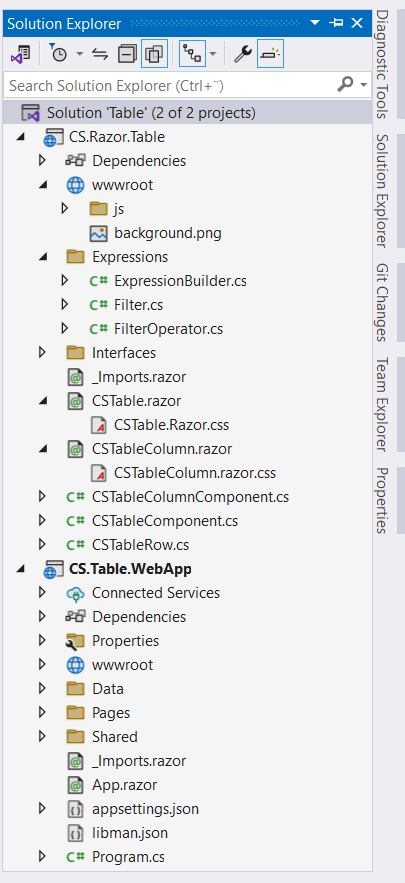
1. Right-click the Table solution and select Add, New Project from the menu and add a Blazor Server App project named CS.Table.WebApp
2. Right-click the CS.Table.WebAppproject and select Add, Project Reference from the menu and check the CS.Razor.Table checkbox and click the OK button
Your solution should look like this
@inherits CSTableColumnComponent<TItem,TValue>
@typeparam TItem
@typeparam TValue
@if (IsHeader)
{
        @ColumnHeader
}
else if (IsFilter)
{
            <label>
                    @if (filter.FilterOperator != FilterOperator.Default)
                    {
                        <i>@Operator</i>
                    }
                    else
                    {
                    }
                <input type="checkbox" id="dd" disabled="@IsFilterDisabled">
                <ul>
                    @foreach (var kvp in dropdownOperators)
                    {
                        <li @onclick="@(()=>SetFilterOperator(kvp.Key))">@kvp.Value</li>
                    }
                    <li @onclick="@(()=>SetFilterOperator(FilterOperator.Default))">Reset</li>
                </ul>
            </label>
            <input
            @bind-value="filter.SearchTerm"
            @bind-value:event="oninput" @onchange="@FilterColum"
                   disabled="@IsFilterDisabled"
                   Placeholder="@( IsFilterDisabled ? "Filter disabled" : $"Search in {ColumnHeader}")" />
}
else
{
    if (HasChild)
    {
            @ChildContent(TableRow.RowData)
    }
    else
    {
            @ColumnValue
    }
}
Add the following code to the index.razor component that shows how to use the table / Datagrid Blazor component in blazor project
    <CSTable Items="employees" TItem="Employee" ShowFiletr="true">
        <CSTableColumn Value="(Employee v) => v.Id" Width="10%"></CSTableColumn>
        <CSTableColumn Value="(Employee v) => v.Name" Align="left"></CSTableColumn>
        <CSTableColumn Value="(Employee v) => v.Department"></CSTableColumn>
        <CSTableColumn Value="(Employee v) => v.Designation"></CSTableColumn>
        <CSTableColumn Value="(Employee v) => v.Age" Width="10%" Align="center"></CSTableColumn>
        <CSTableColumn Value="(Employee v) => v.IsManager" Header="Manager" Align="center"></CSTableColumn>
        <CSTableColumn Value="(Employee v) => v.Salary" Format="C2" Align="right"></CSTableColumn>
        <CSTableColumn Value="(Employee v) => v.Address" Align="right">
            @context.Address?.Country, @context.Address?.City
        </CSTableColumn>
    </CSTable>
@code{
    List<Employee> employees = null;
    protected override void OnInitialized()
    {
        var json = File.ReadAllText(@"./Data/employees.json");
        employees = JsonSerializer.Deserialize<List<Employee>>(json, new JsonSerializerOptions { PropertyNameCaseInsensitive = true });
    }
    public class Employee
    {
        public int Id { get; set; }
        public string Name { get; set; }
        public int Age { get; set; }
        public string Gender { get; set; }
        public string Designation { get; set; }
        public string Department { get; set; }
        public decimal Salary { get; set; }
        public bool IsManager { get; set; }
        public Address Address { get; set; }
    }
    public class Address
    {
        public int Id { get; set; }
        public string Country { get; set; }
        public string City { get; set; }
    }
}
Note that you need to add validation for search input if you want to use this component in your projects .
I did not go through all the code and CSS and javascript files because the article will be very long.
In a previous post we created a custom JSON-based localization service for the Blazor server application that can be used with our table / DataGrid Blazor component.
The code for the reusable Table / Datagrid Blazor component demo can be found Here
Also read https://dotnetcoder.com/building-a-reusable-angular-modal-component/
Enjoy This Blog?


Discover more from Dot Net Coder
Subscribe to get the latest posts sent to your email.