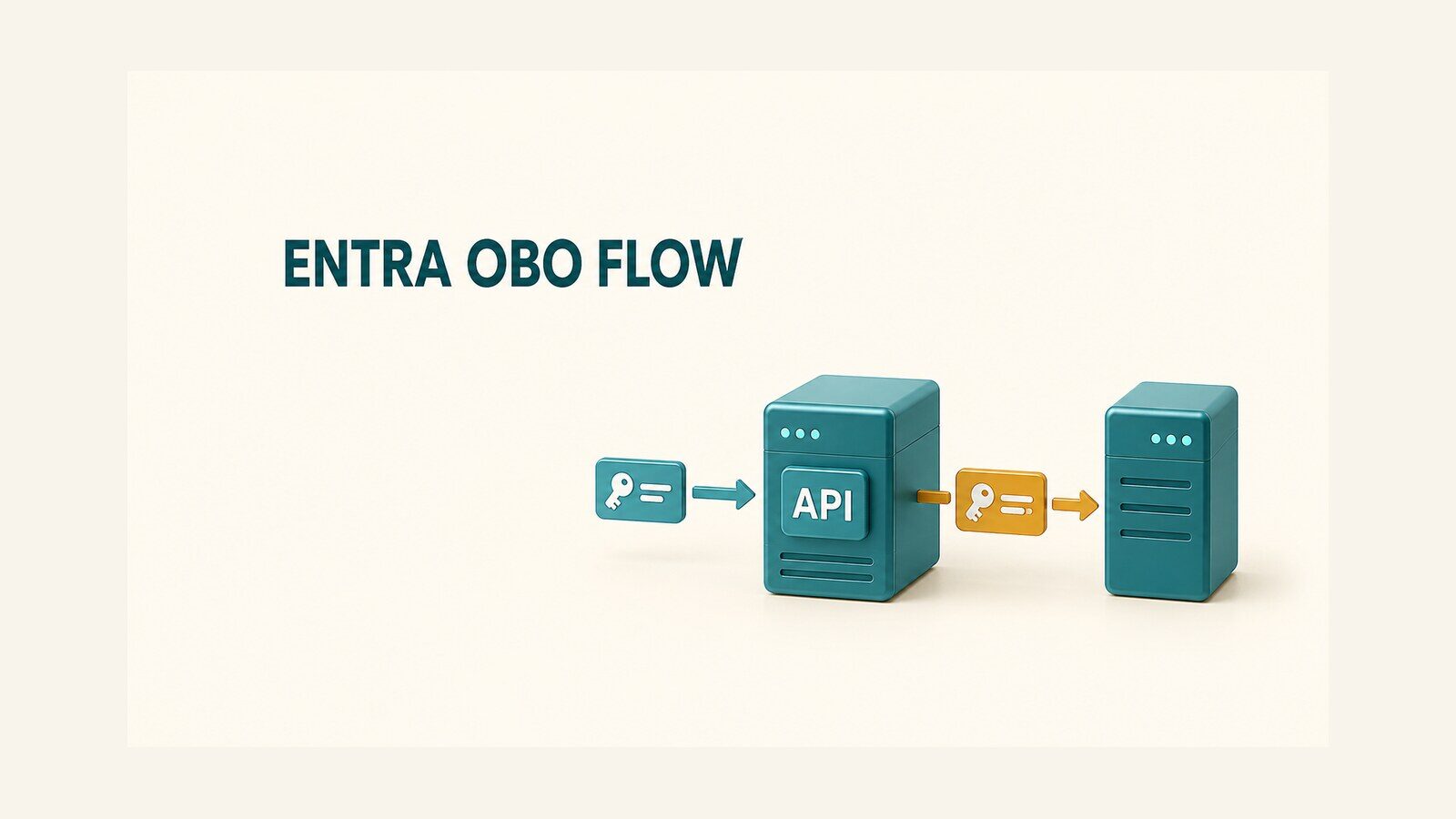
Use the Microsoft Entra on-behalf-of (OBO) flow when an authenticated client calls a middle ASP.NET Core API and that API must call another API as the same user. The middle API validates the incoming token, exchanges it for a new delegated token whose audience is the downstream API, and sends that second token only to its intended resource.
This guide refreshes the original November 2024 .NET 8 example around that end-to-end job. The historical GitHub repository, portal captures, and result video remain available. The configuration and code below are source-grounded guidance, not a claim that the 2024 repository was rebuilt or tested unchanged against later packages.
Table of Contents
Understand the OBO security boundary
An OBO chain uses two access tokens. Token A is issued for the middle API, so its aud claim must identify that API. The middle API uses Token A as the user assertion in a confidential token request. Microsoft Entra ID then issues Token B for the downstream API. Token B keeps delegated user context, but it has its own audience and permissions.
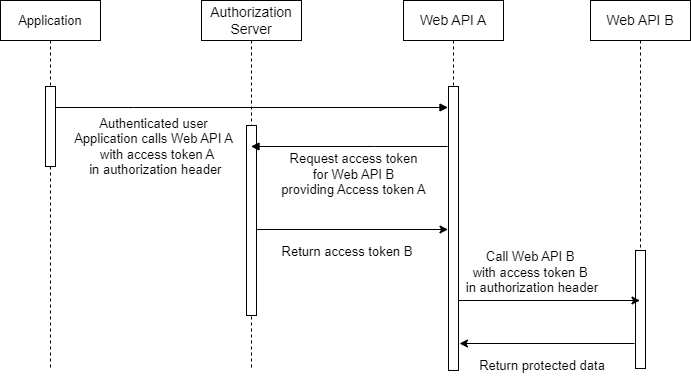
Do not relay Token A to the downstream API. Its audience is wrong, and forwarding it breaks the resource boundary that access tokens are designed to enforce. Do not use OBO for an app-only request either: when no user principal exists, the middle service needs the Microsoft Entra client credentials flow.
| Call | Token audience | Permission type |
|---|---|---|
| Client → Customer API | Customer API | Delegated scope, for example access_as_user |
| Customer API → Order API | Order API | Delegated scope, for example orders.read |
Register the three applications
The sample architecture needs separate registrations for the interactive client, the middle Customer API, and the downstream Order API. Separation makes each audience and consent relationship explicit.
- Order API: expose a delegated scope such as
orders.read. - Customer API: expose
access_as_user, add delegated permission to Order API’sorders.read, and configure a confidential credential. - Interactive client: add delegated permission to Customer API’s
access_as_user. Use the correct interactive flow for that client type.
The middle API is both a resource server and a confidential client. It validates Token A as a resource, then authenticates itself when requesting Token B. Prefer a certificate or workload identity where the hosting environment supports it. If a client secret is retained for the historical .NET 8 example, keep it outside source control and rotate it through a managed secret store.
Consent must cover both legs of the chain. A tenant administrator can grant the downstream delegated permission to the middle API in advance. Without consent, the middle API has no interactive screen of its own and token acquisition can fail with a claims or consent challenge.
Configure the middle ASP.NET Core API
The middle API needs bearer-token validation, authorization, token acquisition, a token cache, and a configured downstream API client. The following configuration uses placeholders intentionally. It does not contain a real tenant, application ID, or credential.
{
  "AzureAd": {
    "Instance": "https://login.microsoftonline.com/",
    "TenantId": "YOUR_TENANT_ID",
    "ClientId": "YOUR_CUSTOMER_API_CLIENT_ID",
    "Audience": "api://YOUR_CUSTOMER_API_CLIENT_ID",
    "ClientCredentials": [
      {
        "SourceType": "ClientSecret",
        "ClientSecret": "LOAD_FROM_A_SECRET_PROVIDER"
      }
    ]
  },
  "DownstreamApis": {
    "OrderApi": {
      "BaseUrl": "https://localhost:7202/",
      "Scopes": [
        "api://YOUR_ORDER_API_CLIENT_ID/orders.read"
      ]
    }
  }
}
AzureAd describes the middle API registration and its confidential credential. OrderApi names the downstream resource, base URL, and delegated scope. Replace the secret placeholder with configuration from your deployment platform; never commit a real secret to appsettings.json.
using Microsoft.AspNetCore.Authentication.JwtBearer;
using Microsoft.Identity.Web;

var builder = WebApplication.CreateBuilder(args);

builder.Services
    .AddAuthentication(JwtBearerDefaults.AuthenticationScheme)
    .AddMicrosoftIdentityWebApi(
        builder.Configuration.GetSection("AzureAd"))
    .EnableTokenAcquisitionToCallDownstreamApi()
    .AddInMemoryTokenCaches();

builder.Services.AddAuthorization();
builder.Services.AddControllers();
builder.Services.AddDownstreamApis(
    builder.Configuration.GetSection("DownstreamApis"));

var app = builder.Build();

app.UseHttpsRedirection();
app.UseAuthentication();
app.UseAuthorization();
app.MapControllers();

app.Run();
The middleware order matters: authentication must populate the user before authorization evaluates policies. The in-memory token cache is acceptable for a local single-instance walkthrough. A scaled deployment needs a cache design that fits its topology and protects token data; do not assume an in-memory cache will survive restarts or work coherently across instances.
Validate the incoming delegated permission
Successful JWT validation proves who issued Token A, who it targets, and whether it is still valid. It does not automatically prove that the caller has permission to execute a particular operation. Require the delegated scope at the Customer API endpoint.
using Microsoft.AspNetCore.Authorization;
using Microsoft.AspNetCore.Mvc;
using Microsoft.Identity.Web;

[Authorize]
[ApiController]
[Route("api/customers")]
public sealed class CustomersController : ControllerBase
{
    [HttpGet("me")]
    [RequiredScope("access_as_user")]
    public IActionResult GetCurrentCustomer()
    {
        return Ok(new { status = "Customer token accepted" });
    }
}
RequiredScope checks the delegated permission in the token rather than treating every authenticated principal as equally authorized. Keep the scope narrow and aligned with the operation. If an endpoint also accepts app-only callers, model that as a deliberate second authorization path and validate application roles separately.
Call the downstream API for the user
IDownstreamApi lets Microsoft.Identity.Web acquire the downstream token from the current user context and attach it to the request. The controller should not parse, log, or manually forward the inbound bearer token.
using Microsoft.AspNetCore.Authorization;
using Microsoft.AspNetCore.Mvc;
using Microsoft.Identity.Abstractions;
using Microsoft.Identity.Web;

[Authorize]
[ApiController]
[Route("api/customers")]
public sealed class CustomerOrdersController : ControllerBase
{
    private readonly IDownstreamApi _downstreamApi;

    public CustomerOrdersController(IDownstreamApi downstreamApi)
    {
        _downstreamApi = downstreamApi;
    }

    [HttpGet("me/orders")]
    [RequiredScope("access_as_user")]
    public async Task<ActionResult<IReadOnlyList<OrderDto>>> GetOrders(
        CancellationToken cancellationToken)
    {
        var orders = await _downstreamApi.GetForUserAsync<
            IReadOnlyList<OrderDto>>(
                "OrderApi",
                "api/orders/me",
                cancellationToken: cancellationToken);

        return Ok(orders ?? Array.Empty<OrderDto>());
    }
}

public sealed record OrderDto(Guid Id, decimal Total, string Status);
The name OrderApi must match the configuration section. The method requests the configured delegated scope and sends Token B to the relative path. Pass the request cancellation token so abandoned client requests do not keep consuming downstream capacity.
Protect the downstream API
Order API validates Token B against its own registration. Its audience must be the Order API, not Customer API. It must also require the downstream delegated scope.
using Microsoft.AspNetCore.Authentication.JwtBearer;
using Microsoft.Identity.Web;

var builder = WebApplication.CreateBuilder(args);

builder.Services
    .AddAuthentication(JwtBearerDefaults.AuthenticationScheme)
    .AddMicrosoftIdentityWebApi(
        builder.Configuration.GetSection("AzureAd"));

builder.Services.AddAuthorization();
builder.Services.AddControllers();

var app = builder.Build();

app.UseHttpsRedirection();
app.UseAuthentication();
app.UseAuthorization();
app.MapControllers();

app.Run();
[Authorize]
[ApiController]
[Route("api/orders")]
public sealed class OrdersController : ControllerBase
{
[HttpGet("me")]
[RequiredScope("orders.read")]
public ActionResult<IReadOnlyList<OrderDto>> GetMyOrders()
{
// Query only records the current delegated user may access.
return Ok(Array.Empty<OrderDto>());
}
}The empty result is a placeholder for application-specific data access, not a finished authorization model. The downstream service must map the user claims it trusts to tenant and record-level rules. A valid orders.read scope does not by itself prove that the user owns every order.
Verify the complete token chain
Verification should prove both successful routing and the failure boundaries. Decode development tokens only in a safe local tool and never paste production bearer tokens into logs or public websites.
- Acquire Token A for Customer API’s
access_as_userscope through the interactive client. - Call
GET /api/customers/me/orderswith Token A. Expect the middle API to obtain Token B and return the downstream result. - Inspect non-sensitive claims locally. Token A’s
audmust be Customer API; Token B’saudmust be Order API. Both should represent the same delegated user. - Remove consent for
orders.reador request an ungranted scope. Expect token acquisition to fail; do not silently fall back to an app-only identity. - Send Token A directly to Order API. Expect rejection because the audience is wrong.
- Remove
orders.readfrom Token B. Expect authorization failure at the downstream endpoint.
This test sequence distinguishes authentication, token exchange, audience validation, and operation authorization. A single HTTP 200 does not prove all four controls.
Handle production failures safely
| Symptom | Likely boundary | Check |
|---|---|---|
| 401 at Customer API | Token A validation | Issuer, audience, signature, expiry, authentication middleware |
| 403 at Customer API | Incoming authorization | access_as_user and endpoint policy |
| Consent or claims challenge | OBO acquisition | Delegated Order API permission, admin consent, Conditional Access |
| 401 at Order API | Token B validation | Order API audience and registration configuration |
| 403 at Order API | Downstream authorization | orders.read, tenant, and record-level access |
Return a controlled 401 or 403 response instead of exposing identity-provider exception details. Log a correlation ID, the failing stage, and non-secret metadata, but never log access tokens, authorization headers, client secrets, or personally sensitive claims.
Conditional Access can require the interactive client to satisfy an additional claim. The middle API cannot display a sign-in screen, so it must propagate the claims challenge to a client that can complete interaction. Treat this as part of the client/API contract, not as a generic retry condition.
- Use a certificate or managed credential rather than a long-lived client secret when practical.
- Use a distributed token cache when multiple API instances must share token state.
- Set explicit downstream timeouts and cancellation; retry only safe, transient operations.
- Preserve least privilege on both scopes and apply tenant or record authorization after token validation.
- Keep server clocks synchronized and monitor token-acquisition failures separately from downstream HTTP failures.
- Do not start ordinary background work with a request token and assume the user context will remain valid indefinitely.
Historical demo and source code
The following video records the original .NET 8 project and Microsoft Entra configuration from November 2024. It demonstrates that historical environment; it is not evidence that the repository was rerun unchanged today.
The complete historical implementation remains in the On-Behalf-Of Flow Entra ID repository. Treat old tenant IDs, screenshots, package versions, and portal labels as historical. Recreate registrations with new identifiers and credentials; never restore an expired secret from an old commit or screenshot. For the client-side leg of the chain, see Microsoft Entra authorization code flow with PKCE in .NET.
References
- Microsoft identity platform and OAuth 2.0 On-Behalf-Of flow
- Microsoft.Identity.Web: Calling downstream APIs from web APIs
- Microsoft.Identity.Web downstream API guidance
- Web API that calls web APIs: scenario overview
Found this useful? Support more practical developer content.