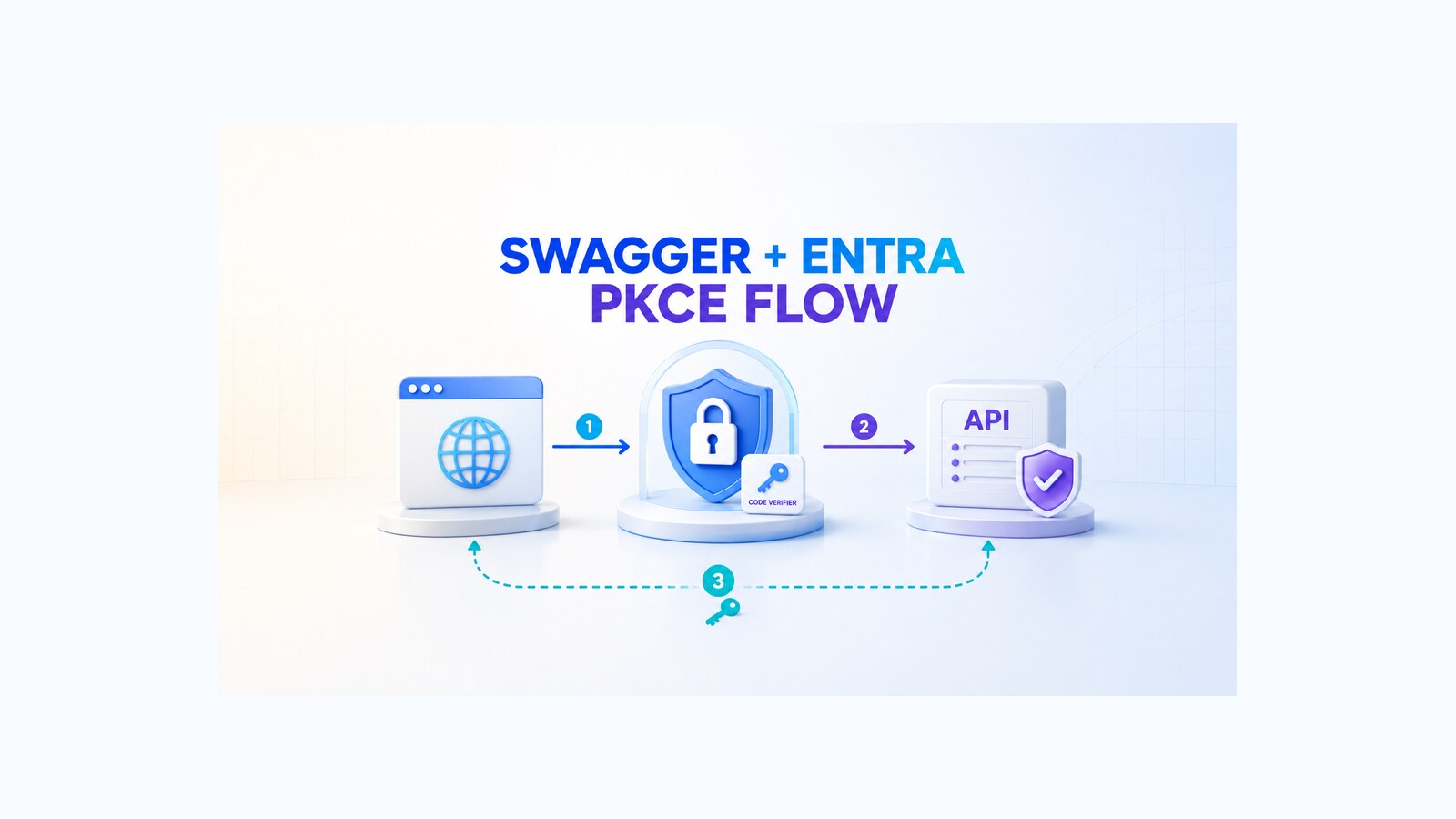
To secure Swagger UI with Microsoft Entra ID, configure the browser client and the ASP.NET Core API as separate security boundaries. The reliable pattern is an OAuth 2.0 authorization code flow with PKCE, an exact redirect URI, a narrow delegated scope, and server-side validation of both the access token and that scope.
This guide rewrites the original October 2024 .NET 8 walkthrough around that production task. The original GitHub repository, portal screenshots, and result video remain available as historical evidence. The corrected snippets below are guidance derived from the documented platform behavior and the historical source; they are not presented as a fresh build or compatibility test against later package releases.
Table of Contents
Separate the API from the Swagger client
Swagger UI runs in a browser. Anything delivered to that browser can be inspected, so Swagger must be treated as a public OAuth client. The API is a resource server: it accepts bearer tokens, validates them, and decides whether the caller has the required permission. These responsibilities should use two Microsoft Entra app registrations.
| Registration | Purpose | Important values |
|---|---|---|
| Protected API | Exposes the resource and delegated permission | API client ID, Application ID URI, access_as_user scope |
| Swagger UI client | Signs in a user and requests the delegated permission | Public client ID, exact OAuth redirect URI, API permission |
Microsoft Entra ID authenticates the user and issues the access token. PKCE binds the authorization code to the browser session that started the flow. The API still has the final responsibility: it must reject missing, invalid, misdirected, or under-scoped tokens. A successful sign-in dialog alone proves none of those API checks.
Register and expose the protected API
Create the API registration first. Under Expose an API, set its Application ID URI and add a delegated scope such as access_as_user. With the default URI, the complete scope is typically api://YOUR_API_CLIENT_ID/access_as_user. Use a permission name and consent text that describe the operation rather than granting an unnecessarily broad capability.
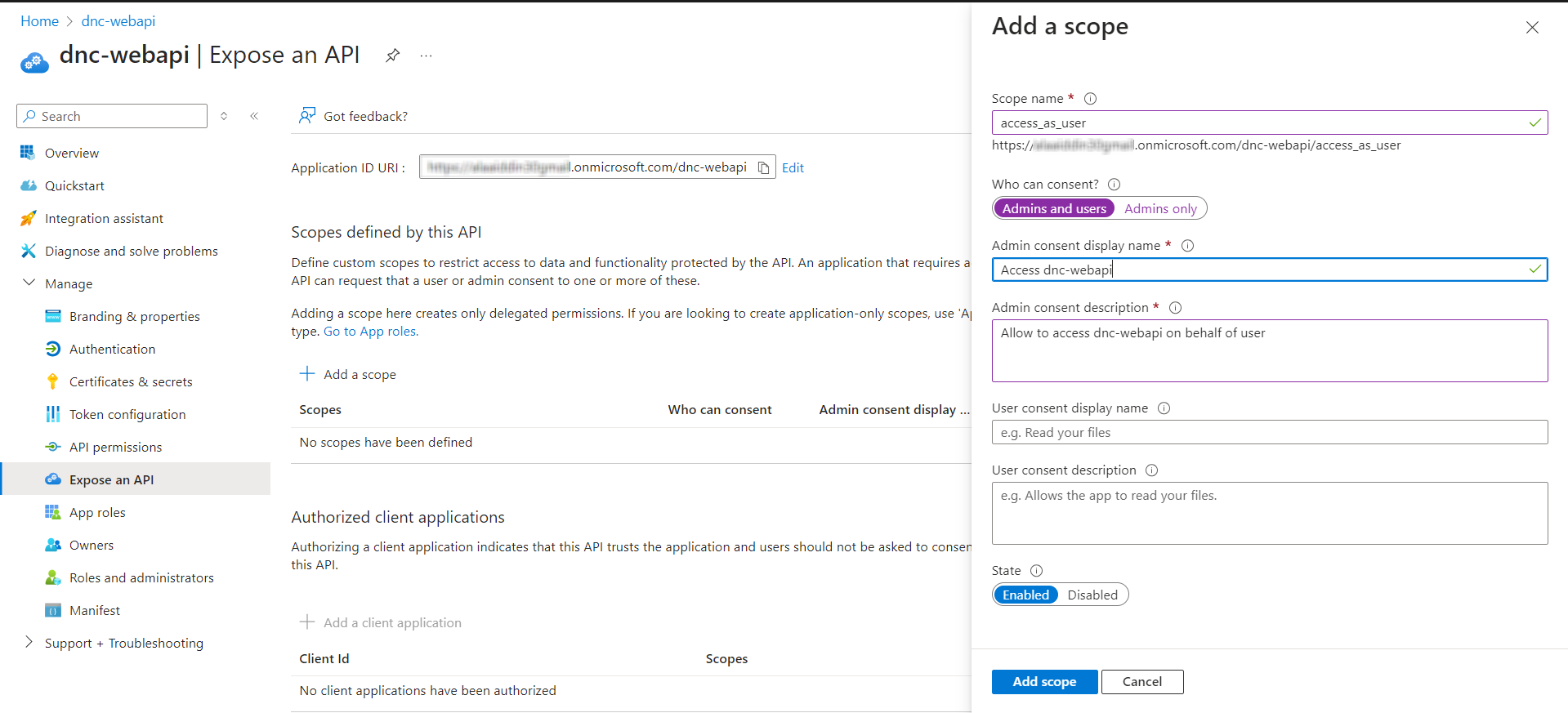
Keep token-validation settings separate from Swagger’s client settings. Use placeholders in public examples and inject environment-specific values through your normal configuration system.
{
  "AzureAd": {
    "Instance": "https://login.microsoftonline.com/",
    "TenantId": "YOUR_TENANT_ID",
    "ClientId": "YOUR_API_CLIENT_ID",
    "Audience": "api://YOUR_API_CLIENT_ID",
    "Scopes": "access_as_user"
  }
}
Register Swagger UI as a public client
Create a second registration for Swagger UI. Add the callback used by Swagger’s OAuth helper as a redirect URI. For a default local Swagger route, it is commonly https://localhost:<port>/swagger/oauth2-redirect.html. The scheme, host, port, path, and slash behavior must match the registered value exactly.
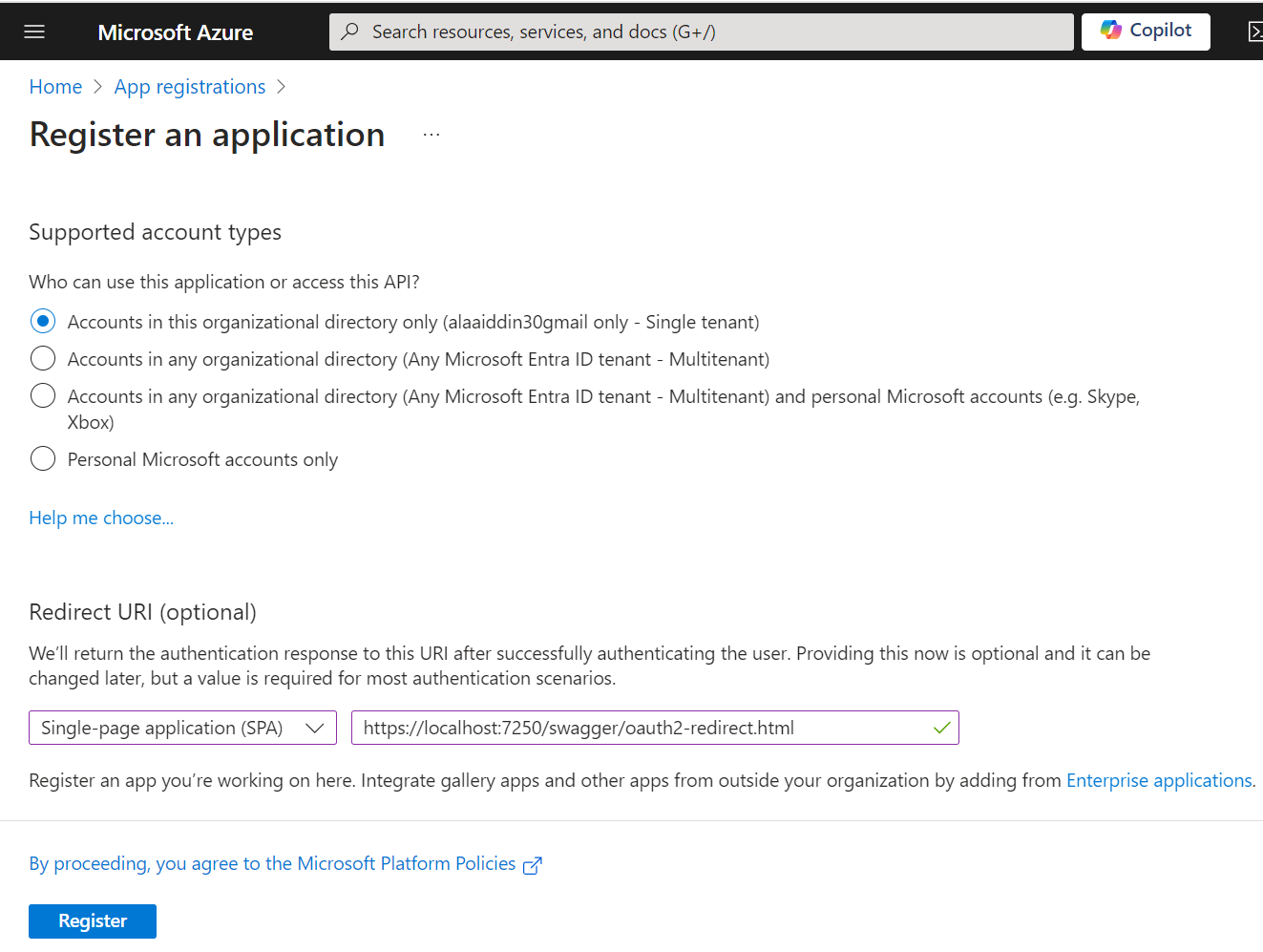
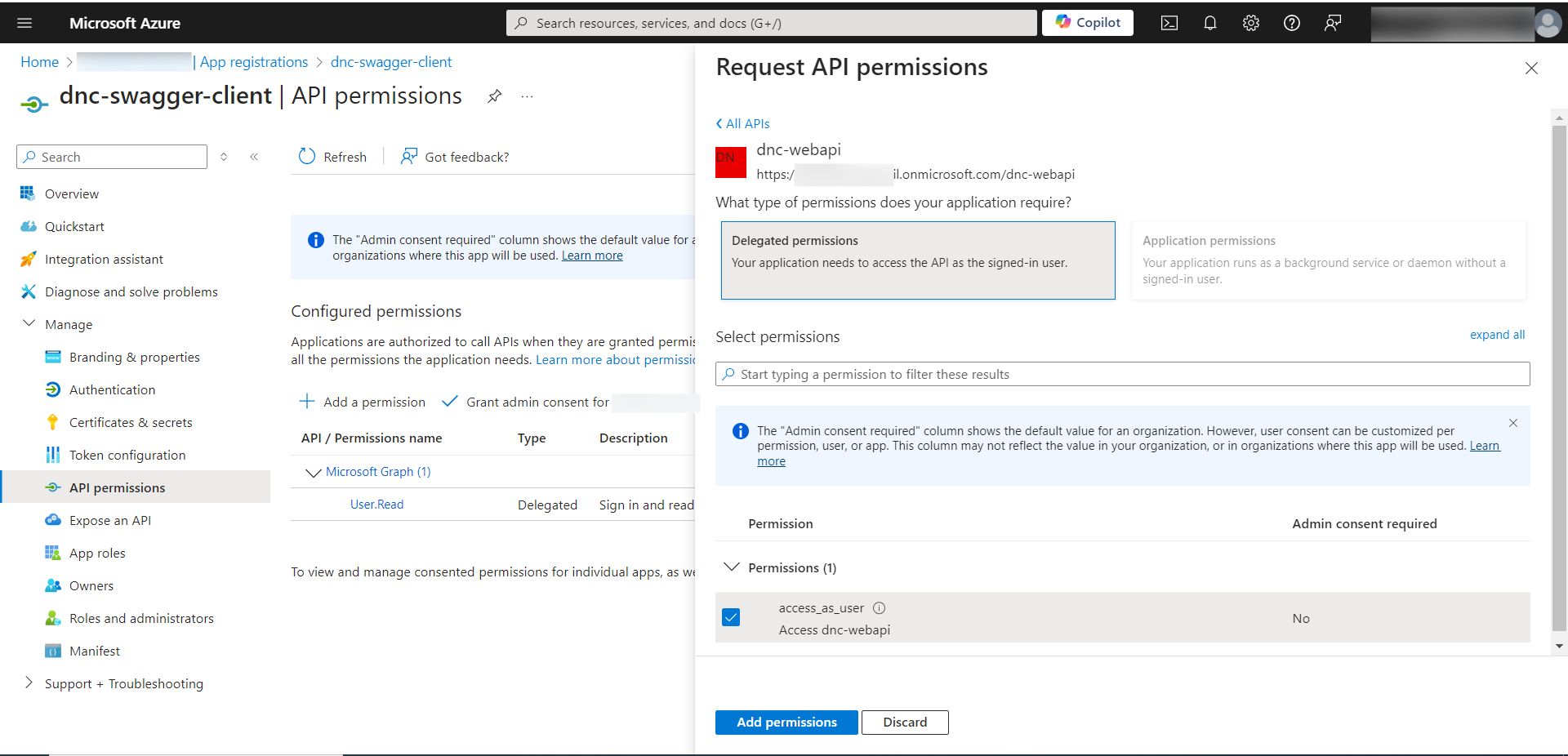
Under API permissions, add the delegated access_as_user permission from the API registration. Apply user or admin consent according to the tenant’s policy. Do not create a client secret for browser-hosted Swagger UI. A value embedded in the page, generated JavaScript, or network request cannot remain confidential.
Validate tokens and scopes in ASP.NET Core
The historical project targets .NET 8 and references Microsoft.Identity.Web. The package integrates bearer-token validation with Microsoft Entra configuration. Install it in a project that does not already reference it:
dotnet add package Microsoft.Identity.WebRegister authentication, add authorization, and place both middleware calls before mapped endpoints. The ordering makes authentication establish the principal before authorization evaluates access.
using Microsoft.AspNetCore.Authentication.JwtBearer;
using Microsoft.Identity.Web;

builder.Services
    .AddAuthentication(JwtBearerDefaults.AuthenticationScheme)
    .AddMicrosoftIdentityWebApi(
        builder.Configuration.GetSection("AzureAd"));

builder.Services.AddAuthorization();

var app = builder.Build();

app.UseAuthentication();
app.UseAuthorization();

app.MapControllers();
[Authorize] rejects anonymous or invalid callers, but delegated authorization also requires the expected scope. [RequiredScope] checks the token’s scope claim before the action runs.
using Microsoft.AspNetCore.Authorization;
using Microsoft.AspNetCore.Mvc;
using Microsoft.Identity.Web.Resource;

[ApiController]
[Route("api/weather")]
[Authorize]
[RequiredScope(RequiredScopesConfigurationKey = "AzureAd:Scopes")]
public sealed class WeatherController : ControllerBase
{
    [HttpGet]
    public IActionResult Get() =>
        Ok(new { Status = "Protected" });
}
Describe the OAuth flow in OpenAPI
Swagger UI learns how to request a token from the OpenAPI security definition. Keep the client ID outside this document; the definition needs the tenant authorization endpoint, token endpoint, and full delegated scope.
{
  "SwaggerOAuth": {
    "TenantId": "YOUR_TENANT_ID",
    "ClientId": "YOUR_SWAGGER_CLIENT_ID",
    "ApiScope": "api://YOUR_API_CLIENT_ID/access_as_user"
  }
}
using Microsoft.OpenApi.Models;
var tenantId = builder.Configuration["SwaggerOAuth:TenantId"]!;
var apiScope = builder.Configuration["SwaggerOAuth:ApiScope"]!;
builder.Services.AddSwaggerGen(options =>
{
options.SwaggerDoc("v1", new OpenApiInfo
{
Title = "Protected API",
Version = "v1"
});
options.AddSecurityDefinition("oauth2", new OpenApiSecurityScheme
{
Type = SecuritySchemeType.OAuth2,
Flows = new OpenApiOAuthFlows
{
AuthorizationCode = new OpenApiOAuthFlow
{
AuthorizationUrl = new Uri(
$"https://login.microsoftonline.com/{tenantId}/oauth2/v2.0/authorize"),
TokenUrl = new Uri(
$"https://login.microsoftonline.com/{tenantId}/oauth2/v2.0/token"),
Scopes = new Dictionary<string, string>
{
[apiScope] = "Access the API as the signed-in user"
}
}
}
});
options.AddSecurityRequirement(new OpenApiSecurityRequirement
{
[new OpenApiSecurityScheme
{
Reference = new OpenApiReference
{
Type = ReferenceType.SecurityScheme,
Id = "oauth2"
}
}] = new[] { apiScope }
});
});Configure Swagger UI with PKCE
Initialize Swagger UI with the public client ID and enable PKCE. The scope separator is a space because Microsoft Entra expects a space-separated scope list.
app.UseSwagger();
app.UseSwaggerUI(options =>
{
    options.SwaggerEndpoint(
        "/swagger/v1/swagger.json",
        "Protected API v1");

    options.OAuthClientId(
        builder.Configuration["SwaggerOAuth:ClientId"]);
    options.OAuthUsePkce();
    options.OAuthScopeSeparator(" ");
});
The browser generates a code verifier, sends its derived challenge with the authorization request, and supplies the verifier when redeeming the returned code. PKCE protects the code exchange; it does not remove the API’s obligation to validate issuer, audience, signature, lifetime, and permission claims.
Correct the historical implementation gaps
The 2024 repository is intentionally preserved, including two details that should not be copied into a new implementation.
- Remove
OAuthUseBasicAuthenticationWithAccessCodeGrant()for this public client. That option tells Swagger UI to use HTTP Basic client authentication during code redemption. It does not make a secret safe in a browser. KeepOAuthUsePkce(); omit both that Basic-auth option andOAuthClientSecret(...). - Add
app.UseAuthentication()beforeapp.UseAuthorization(). The historicalProgram.csregisters authentication services but only calls the authorization middleware. The corrected pipeline above makes the intended token-validation step explicit.
These corrections update the explanation without rewriting history. The old repository and recording still show what was built in 2024; they do not certify a current deployment or support status.
Verify the security boundary
Verification should include deliberate failures, not only a successful Authorize dialog. Use a non-production tenant or test registrations, then record the HTTP status and the expected authorization reason for each case.
| Test | Expected result | What it proves |
|---|---|---|
| Call the protected action without a token | 401 Unauthorized | The endpoint requires authentication. |
| Use a token for another audience or tenant | 401 Unauthorized | Token validation rejects a token for a different resource or issuer. |
Use a valid delegated token without access_as_user | 403 Forbidden | The API enforces the required scope. |
| Use a valid token with the required scope | The endpoint’s normal success response | The delegated path is correctly connected. |
| Change the callback to an unregistered URI | Microsoft Entra authorization error | The response is bound to a registered redirect URI. |
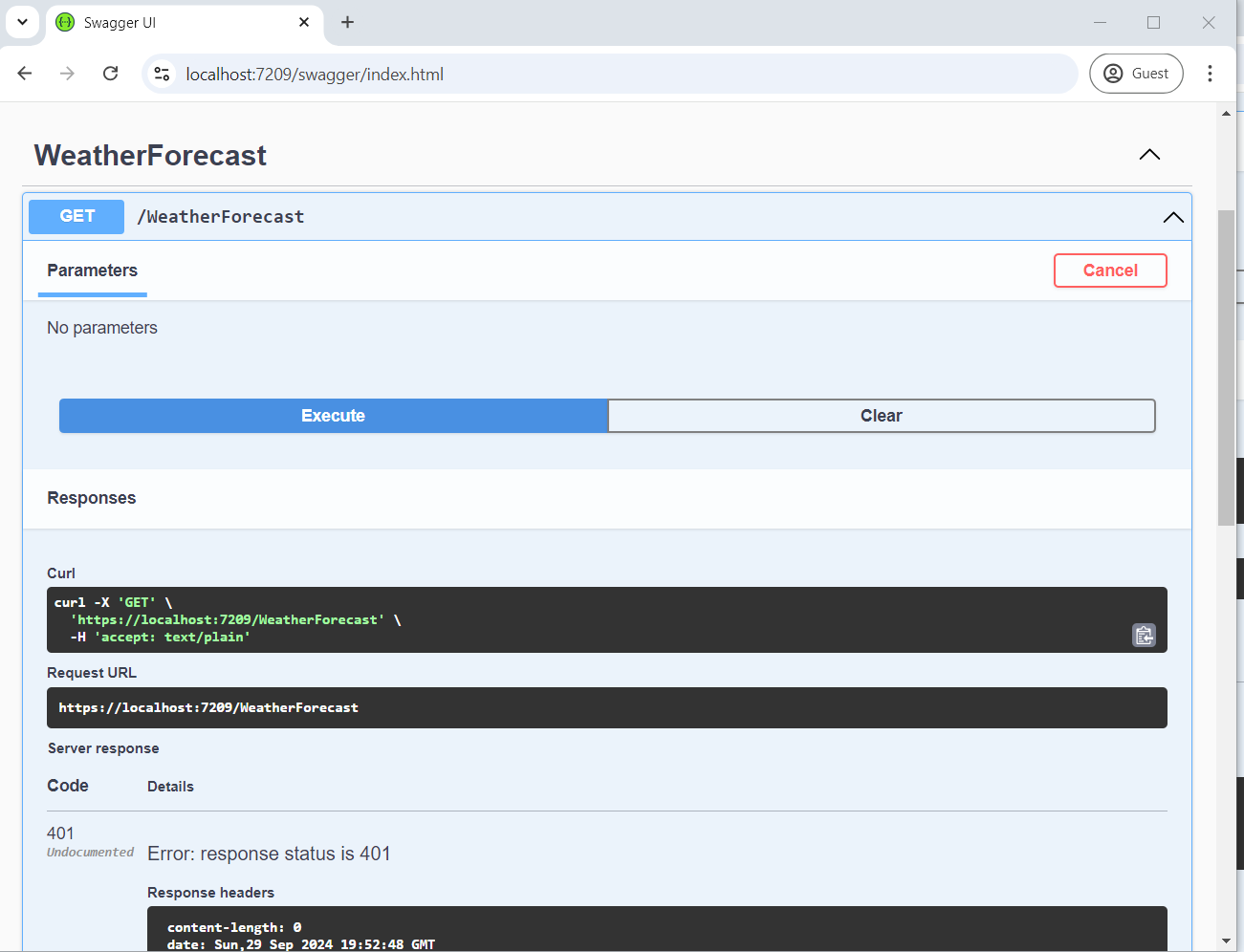
When troubleshooting, inspect only the claims needed to diagnose the boundary: tenant, issuer, audience, expiry, and scp. Do not paste complete access tokens into tickets, screenshots, analytics, or shared logs. A decoded token is still a bearer credential until it expires.
Apply production controls
- Do not expose interactive Swagger UI publicly by default. Restrict it by environment, network boundary, or an additional access policy.
- Use HTTPS and register only the callback URIs required for each intended environment.
- Request the smallest useful delegated scopes and enforce them at the API action or controller.
- Keep client secrets, access tokens, and live credentials out of source code, configuration committed to Git, screenshots, and browser-delivered settings.
- Review tenant restrictions and consent policy before external users can authorize the Swagger client.
- Remove obsolete app registrations, redirect URIs, permissions, and credentials when the demo is retired.
- Retest the complete success and failure matrix after framework, Swashbuckle, Microsoft.Identity.Web, or identity-platform changes.
This is a delegated, user-present flow. For an app-only service with no signed-in user, use the Microsoft Entra client credentials flow and validate application roles instead of delegated scopes.
Historical demo and source code
The following video records the original .NET 8 setup and result from October 2024. It demonstrates that historical environment; it is not a claim that the repository was rerun unchanged today.
Inspect the preserved implementation in the Swagger and Microsoft Entra ID repository. Treat identifiers in old screenshots or commits as historical. Do not restore or reuse old registrations or credentials. For a deeper explanation of the browser flow, read Microsoft Entra authorization code flow with PKCE in .NET.
References
- Microsoft identity platform and OAuth 2.0 authorization code flow
- Microsoft Learn: verify scopes and app roles in a protected web API
- Microsoft Learn: configure an application to expose a web API
- Swagger UI OAuth 2.0 configuration
- Swashbuckle SwaggerUIOptionsExtensions source
- RFC 9700: Best Current Practice for OAuth 2.0 Security
Found this useful? Support more practical developer content.